
Create and share VM guidelines
Upload planograms, reference images, campaign instructions, videos, PDFs, and display standards.
Share approved VM guidelines with the right stores, capture live execution proof, review displays by store or category, and track every deviation until it is corrected.


Built for visual merchandising, retail operations, regional teams, and store teams.
Trusted by multi-location teams across industries
Loved by Customers,
Trusted by Experts









Most brands already create clear VM guidelines, campaign briefs, planograms, display references, and shelf standards. The problem begins after those instructions are released.
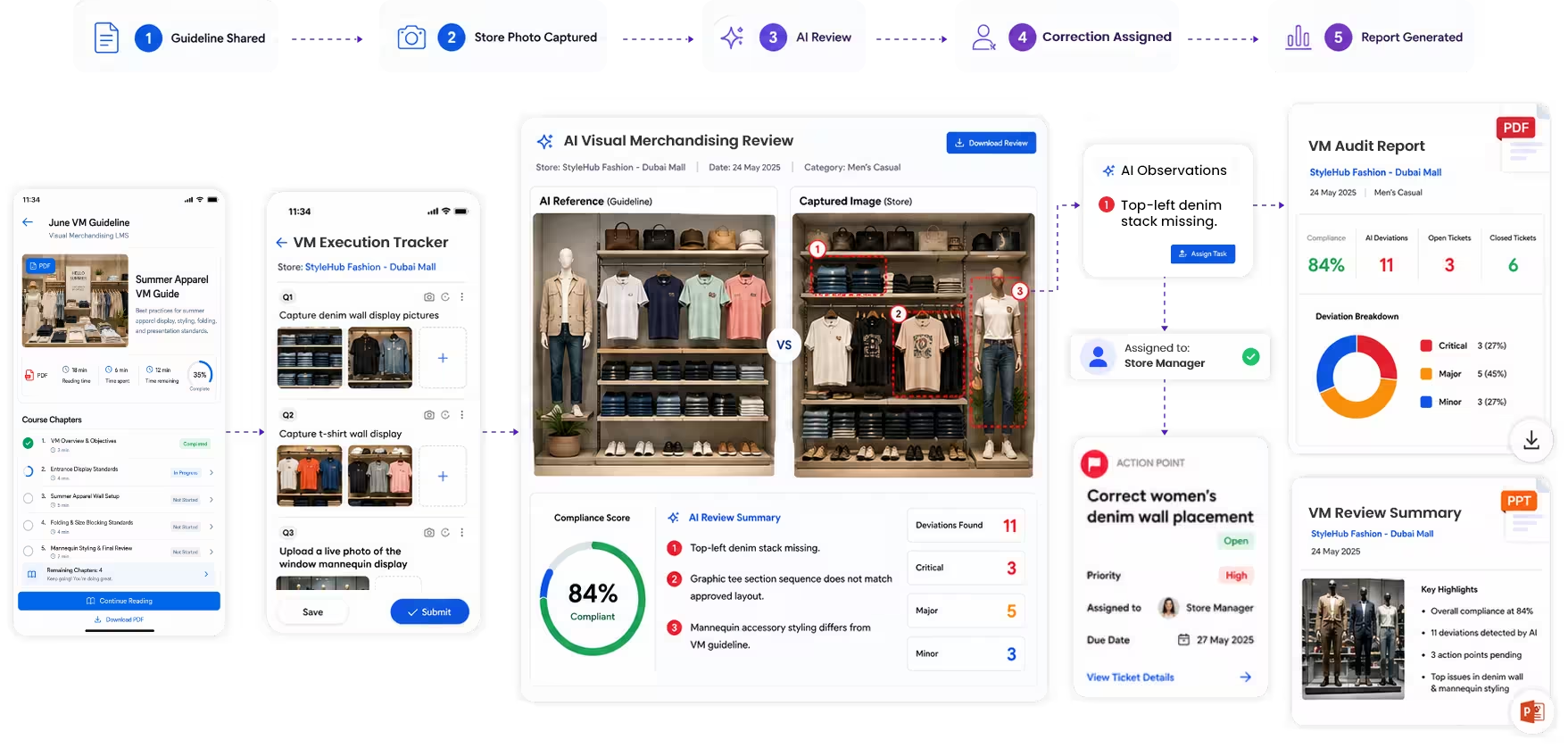
Taqtics connects guideline distribution, store execution, photo proof, review, corrective actions, and final validation in one structured workflow.
Stores receive instructions through email, WhatsApp, shared drives, presentations, and PDFs, making version control difficult.
Head office knows what was assigned, but cannot always confirm what was actually implemented at each store.
VM teams spend hours collecting photos, arranging them by store, and comparing execution without one standard review process.
Feedback is shared, but ownership, deadlines, escalation, correction proof, and final validation are often missing.
Move from guideline creation to verified store correction through one connected workflow.
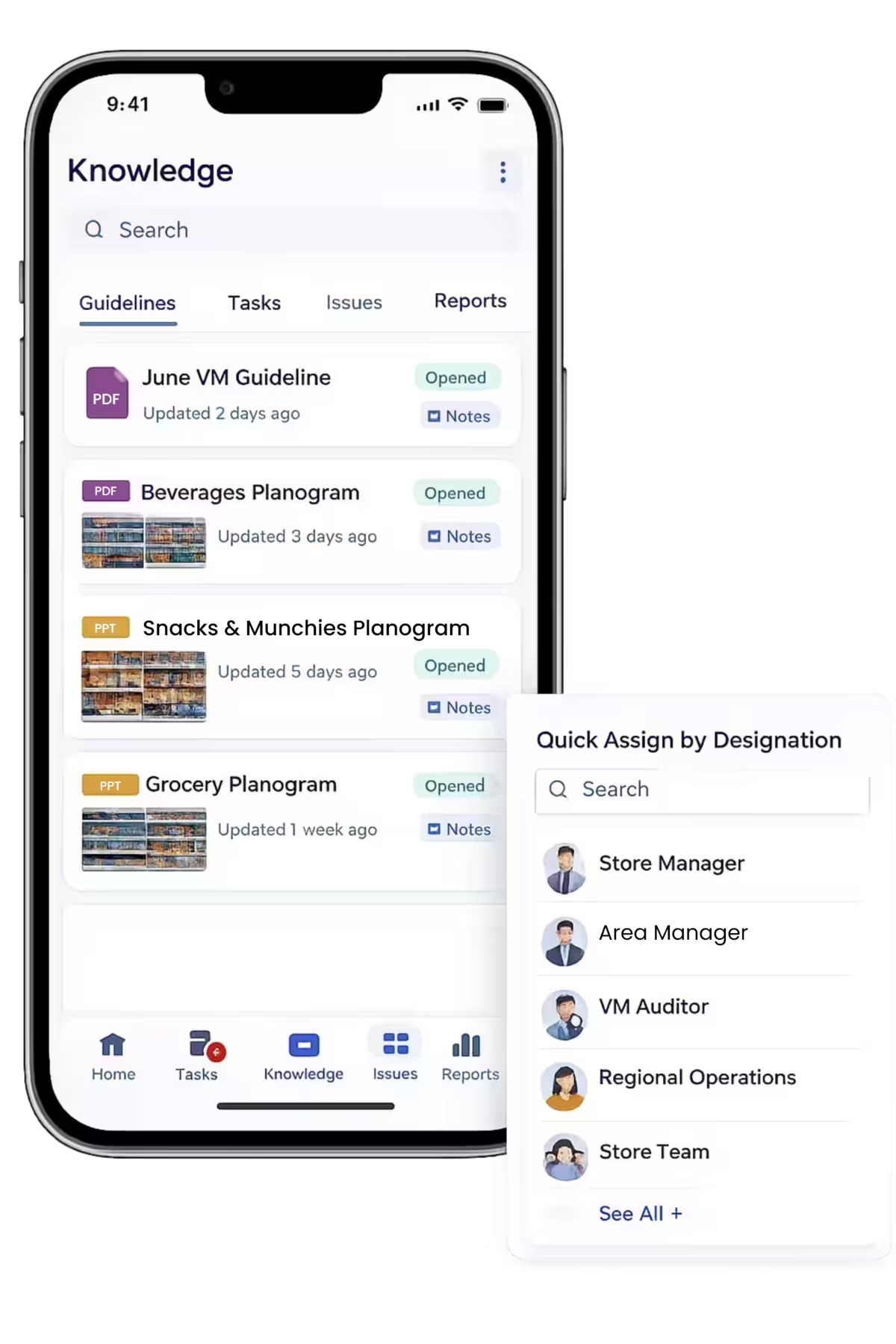
Upload planograms, reference images, campaign instructions, videos, PDFs, and display standards.
Ensure stores receive and acknowledge the latest guideline while older versions leave active use.
Set store, category, owner, instructions, deadline, and required proof for each rollout.
Store teams complete VM checks and audits on mobile with live images against each requirement.
Review execution by department, category, campaign, region, or store, with AI-assisted deviation flags.
Create actions from the review with owners, deadlines, reminders, priorities, and escalations.
Updated proof returns to the VM team for approval, another correction, or reopening.
See what was assigned, what was completed, where execution deviated, who owns the correction, and whether the final result was approved.
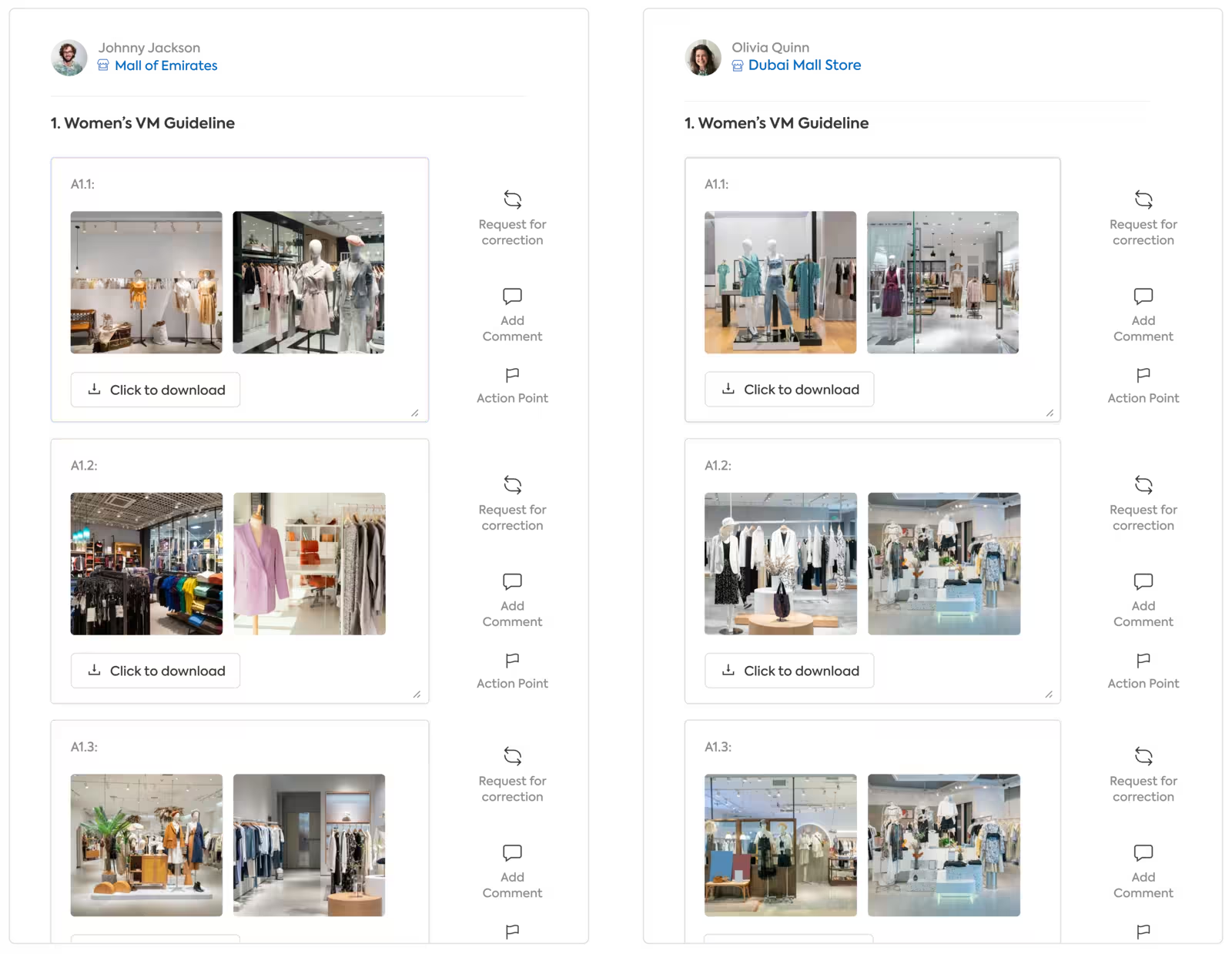
Every submission stays connected to its store, campaign, category, assigned guideline, completion time, submitted proof, reviewer feedback, and correction history.
Standardize how VM instructions are shared, executed, reviewed, and reported without relying on each store or region to interpret the process differently.
Use AI to scan store execution images and flag likely non-compliant displays, planogram deviations, missing products, incorrect placement, and other visual merchandising gaps. Your VM team can focus its time on the submissions that require attention instead of manually reviewing every store image.
Scan submitted store images against the approved VM guideline, display reference, or planogram.
Surface suspected non-compliant execution for review instead of placing every submission in a manual queue.
Let the VM team manually evaluate the stores and categories flagged by AI while compliant submissions move through the workflow faster.
Convert an identified deviation into a corrective action without separating it from the original image and review.
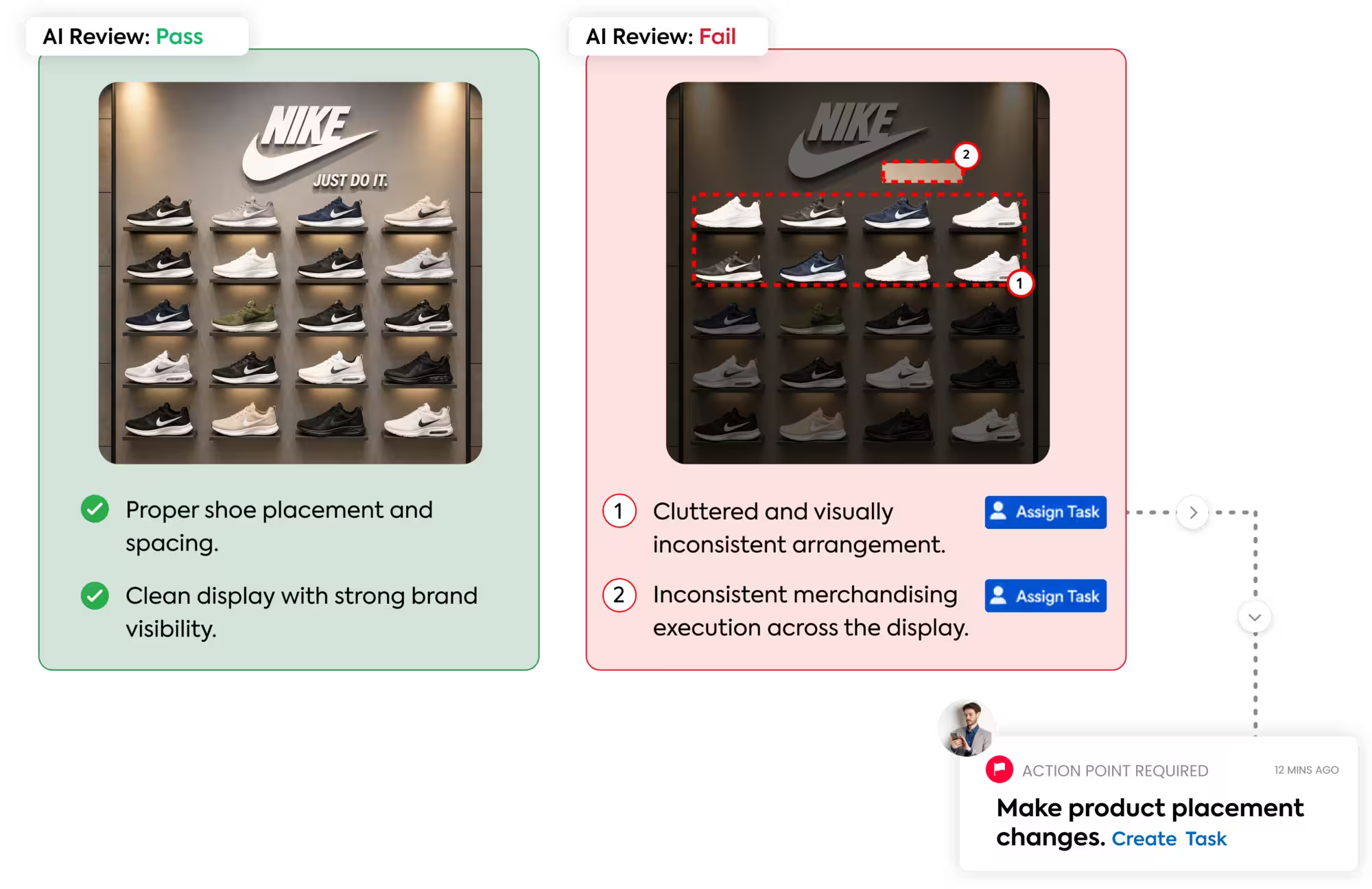
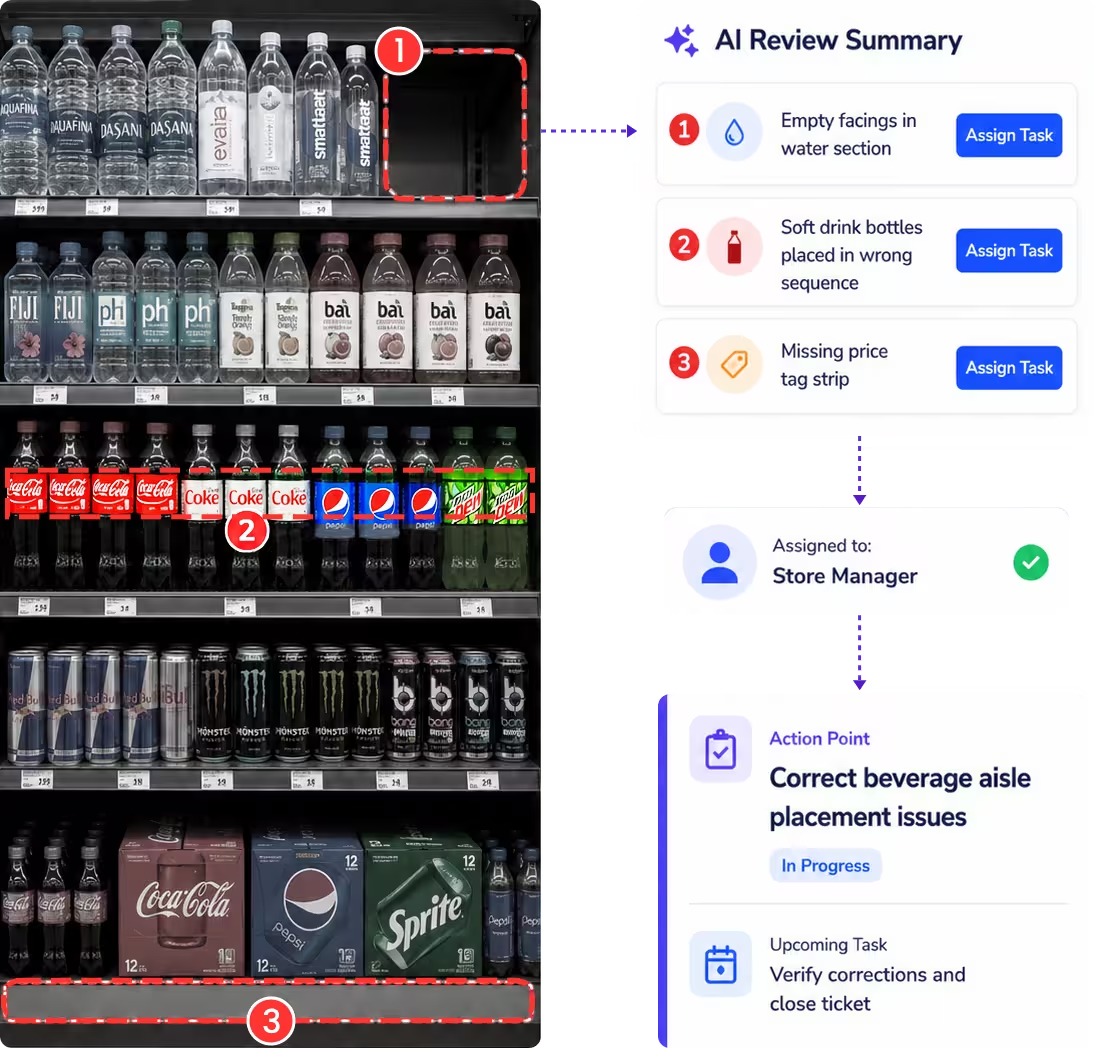
Create corrective actions directly from the VM execution report, submitted store image, or AI finding. Keep the original reference, deviation, owner, deadline, correction proof, and final validation connected in one record.
Record the incorrect display, reviewer observation, and submitted store image against the original VM requirement.
Assign the correction to the relevant store employee, manager, department, or regional team with a clear due date.
Notify the owner before the deadline and escalate overdue VM corrections through the configured reporting hierarchy.
Store teams upload the corrected execution image, which returns to the VM team for approval, rejection, or reopening.
Use ready-made VM checklists or customize them for your brand, store format, campaign, department, and category. Add reference images, proof requirements, reviewer instructions, deadlines, and corrective-action rules.
Hear from retail and restaurant teams using Taqtics to improve consistency, accountability, visibility, and execution across their locations.
Head of Information Technology, PT MAP Boga Adiperkasa
Felix shares how Starbucks Indonesia and MAP Group transformed cafe operations across 820 locations using Taqtics.
Multi-brand restaurant operationsHead of HR and Learning, PizzaExpress
Vidya shares how PizzaExpress modernized daily operations, strengthened accountability, and made reporting faster across restaurants.
Restaurant executionChief Digital Officer, Kisna
Ruvin shares how the team moved from paper, Excel, calls, WhatsApp, and scattered tools to one structured system for retail execution.
Multi-location retail executionVisual merchandising software is a broad category of retail technology used to plan, communicate, execute, review, and improve how products, displays, promotions, and brand standards appear across stores.
Not every visual merchandising platform solves the same problem. Some tools focus on store planning, space planning, floor layouts, or planogram creation. Others focus on execution: distributing approved VM instructions to stores, assigning tasks, collecting proof, reviewing compliance, correcting deviations, and reporting on performance.
Taqtics is focused on the execution side of visual merchandising. It helps head-office and regional VM teams make sure approved guidelines are received, implemented, evidenced, reviewed, corrected, and validated consistently across locations.
Used to plan layouts, product placement, space allocation, planograms, fixture arrangements, or other elements before the store team begins execution.
Used to distribute guidelines, assign VM activities, collect store proof, review execution, identify deviations, and manage corrective action.
Used to compare execution across locations, campaigns, categories, or regions and understand where the approved visual standard has or has not been followed.
Visual merchandising, often shortened to VM, is the practice of presenting products and retail spaces in a deliberate way so customers can understand the assortment, notice priority products, experience the brand consistently, and navigate the store more effectively.
It can include windows, fixtures, product groupings, signage, lighting, promotional displays, focal points, shelf presentation, mannequins, campaign zones, and other customer-facing visual elements.
Merchandising covers the wider commercial process around products, assortment, pricing, availability, promotion, and selling. Visual merchandising focuses specifically on how products and the retail environment are presented visually.
VM teams may create a strong campaign or display concept centrally, but store teams still need clear instructions, deadlines, reference material, and a way to prove that the plan was implemented correctly.
Once the same campaign reaches dozens or hundreds of stores, execution needs a structured review process rather than relying only on store visits, messages, or manually organized photos.
The deleted guide centered visual merchandising around three practical elements that shape how a retail environment looks and how products are discovered.
Use store layout, fixtures, signage, lighting, color, focal points, and customer flow to create a coherent retail environment that supports the intended brand experience.
Position priority categories and products where customers can notice and access them, while grouping merchandise logically and supporting planned promotions or seasonal priorities.
Use displays, campaign assets, product combinations, signage, and presentation to communicate the brand story and the idea behind a collection or promotion.
The value of VM execution software comes from reducing the gap between what the central team intended and what was actually delivered in each store.
Keep current campaign references, images, instructions, videos, PDFs, and execution requirements in one place instead of distributing them through scattered channels.
Send relevant VM instructions to the stores, regions, formats, categories, departments, or roles that actually need to execute them.
Convert a visual guideline into specific tasks and checks so store teams know what to do, what evidence is required, and when the work is due.
Collect current store images against the assigned requirement so VM teams can review real execution without visiting every location.
Identify non-compliant execution, provide feedback, assign correction ownership, and keep the original reference and correction proof connected.
Track which stores received, completed, missed, corrected, or passed a VM rollout and generate visual reports for review.
The old guide tied visual merchandising to customer experience, store attractiveness, selling effectiveness, and brand image. Software does not create those outcomes by itself, but it can help retailers execute the intended visual standard more consistently across locations.
Consistent presentation, product accessibility, clear signage, and well-executed displays support the shopping experience the brand intended to create.
Windows, focal displays, promotional zones, and presentation can help a store communicate what is new or relevant and give customers a reason to engage with the space.
Planned placement and presentation help priority products, collections, or promotions receive the visibility intended by merchandising and marketing teams.
When the same campaign is executed accurately across locations, customers encounter a more consistent expression of the brand regardless of store.
Choose the software based on the VM problem you actually need to solve. If your challenge is store execution across a network, evaluate how well the system connects guidelines, proof, review, correction, and reporting.
Stores should be able to find the current approved instruction rather than relying on old attachments or local copies.
VM programs should be assignable by location, format, campaign, category, department, role, or other relevant grouping.
Store teams need an easy way to view instructions and submit the required images or checklist evidence from the floor.
VM teams should be able to compare submissions, identify deviations, comment, reject, approve, or create follow-up work.
Deviations should remain linked to the responsible store, original guideline, owner, deadline, correction proof, and final validation.
Management should be able to compare rollout completion, compliance, repeat deviations, correction status, and visual evidence across the network.
Visual merchandising software is a broad category of retail technology used to plan, communicate, execute, review, and improve visual merchandising across stores. Execution-focused software helps distribute guidelines, assign VM tasks, collect store proof, review compliance, track corrections, and report on performance.
VM stands for visual merchandising. It refers to how products, displays, signage, fixtures, promotions, lighting, and other visual elements are arranged and presented in a retail environment.
Merchandising is the broader commercial process covering products, assortment, pricing, availability, promotion, and selling. Visual merchandising is the part focused specifically on the visual presentation of products and the retail environment.
Three core elements highlighted in the original guide are layout and design, product placement, and visual storytelling. Together they shape how customers move through the space, notice products, and experience the brand.
Taqtics is focused on VM execution rather than store-layout or planogram authoring. Teams can share approved planograms, reference images, campaign instructions, and display standards, then verify how stores execute them.
Yes. Guidelines can be assigned by store, region, department, category, role, designation, campaign, or store format so teams receive the instructions relevant to them.
Store teams can capture execution images against assigned references. AI can help flag possible deviations, while the VM team retains control of final review and validation.
Yes. A rejected submission can become a tracked corrective action with an owner, deadline, priority, escalation, correction proof, and validation status.
Yes. VM reports can include reference images, submitted images, observations, AI findings, reviewer comments, corrective actions, and status information in supported report formats such as PDF or presentation output.
Yes. Store teams can access assigned instructions and submit execution proof through the mobile workflow.
Begin with a focused VM execution workflow for one category, campaign, or store cluster. Taqtics helps your team digitize guideline sharing, proof capture, AI review, corrective actions, and reporting before scaling across your network.