
Retail Operations Management
Retail Operations Software for Store Teams
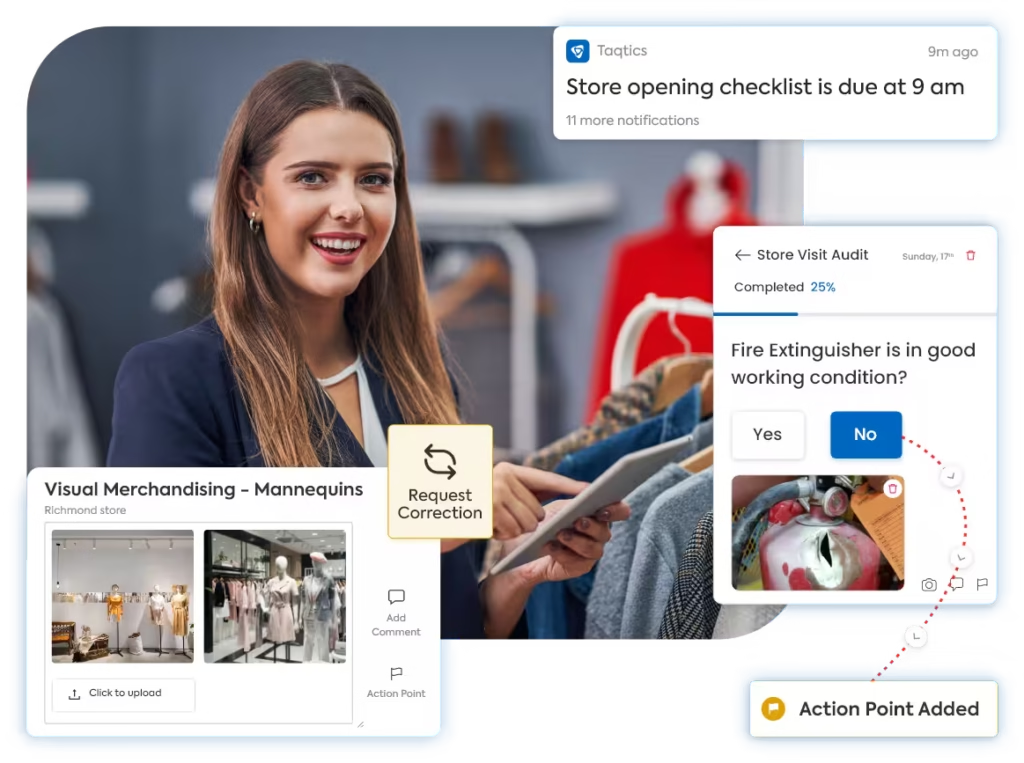
In retail, execution is everything. Taqtics equips teams to deliver brand-compliant, well-maintained, and customer-ready stores—every single day.


Loved by Customers,
Trusted by Experts!








Run High-Performing Stores with Operational Excellence
Digitize store audits, checklists, and issue tracking to drive consistency, reduce downtime, and elevate customer experience — at scale.
Customer Experience
Improve Customer Experience Through Ops Execution
Great in-store experiences don’t happen by chance—they’re built daily through operational discipline.
With Taqtics, ensure every store is clean, welcoming, and ready to delight customers through structured SOPs, periodic audits, and frontline training.
Brand Consistency
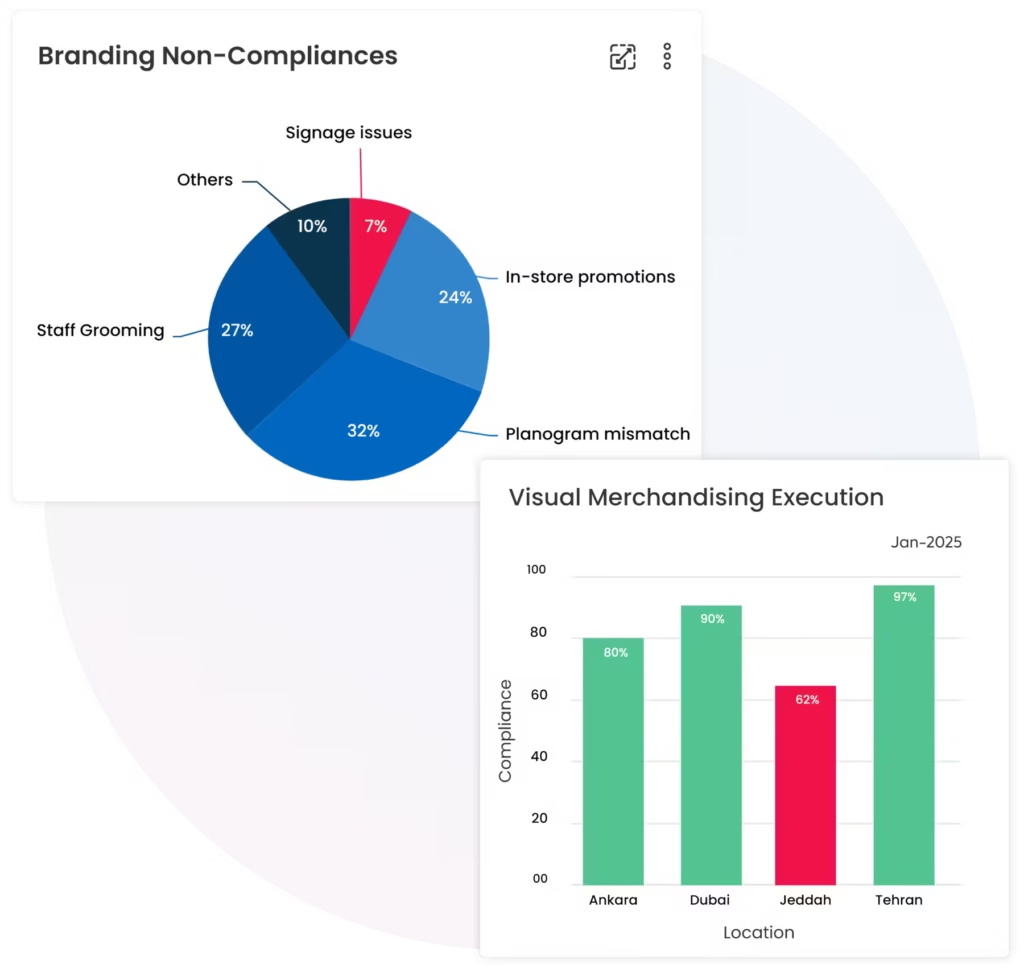
Ensure Brand Consistency at Storefronts
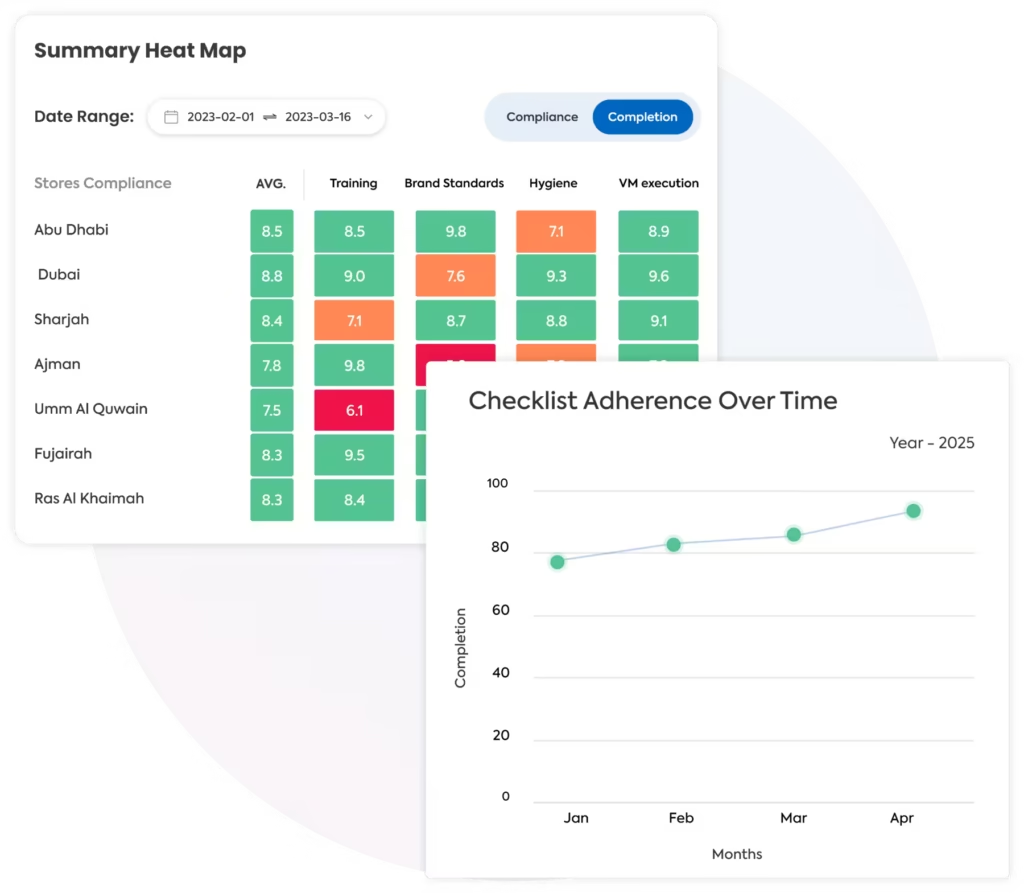
In retail, even small inconsistencies in signage, lighting, or uniforms can dilute brand trust.
Taqtics ensures every store presents your brand the way it’s meant to be clean, consistent, and instantly recognizable across all formats and locations.
Asset Management
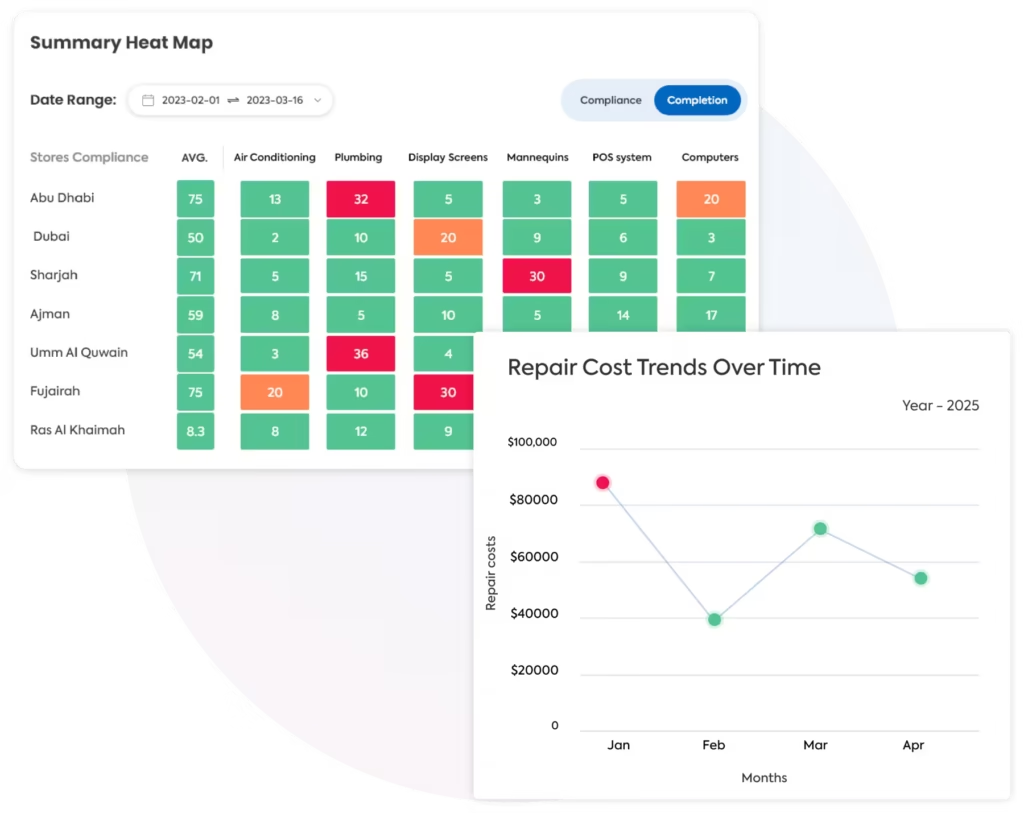
Reduce Asset Downtime & Extend Equipment Lifespan
Non-saleable assets are often overlooked—but they quietly drain budgets when mismanaged.
With Taqtics, you can map every in-store asset, monitor its lifecycle, and act before repairs, renewals, or transfers slip through the cracks. From equipment to licenses, nothing goes unnoticed.
Store Openings
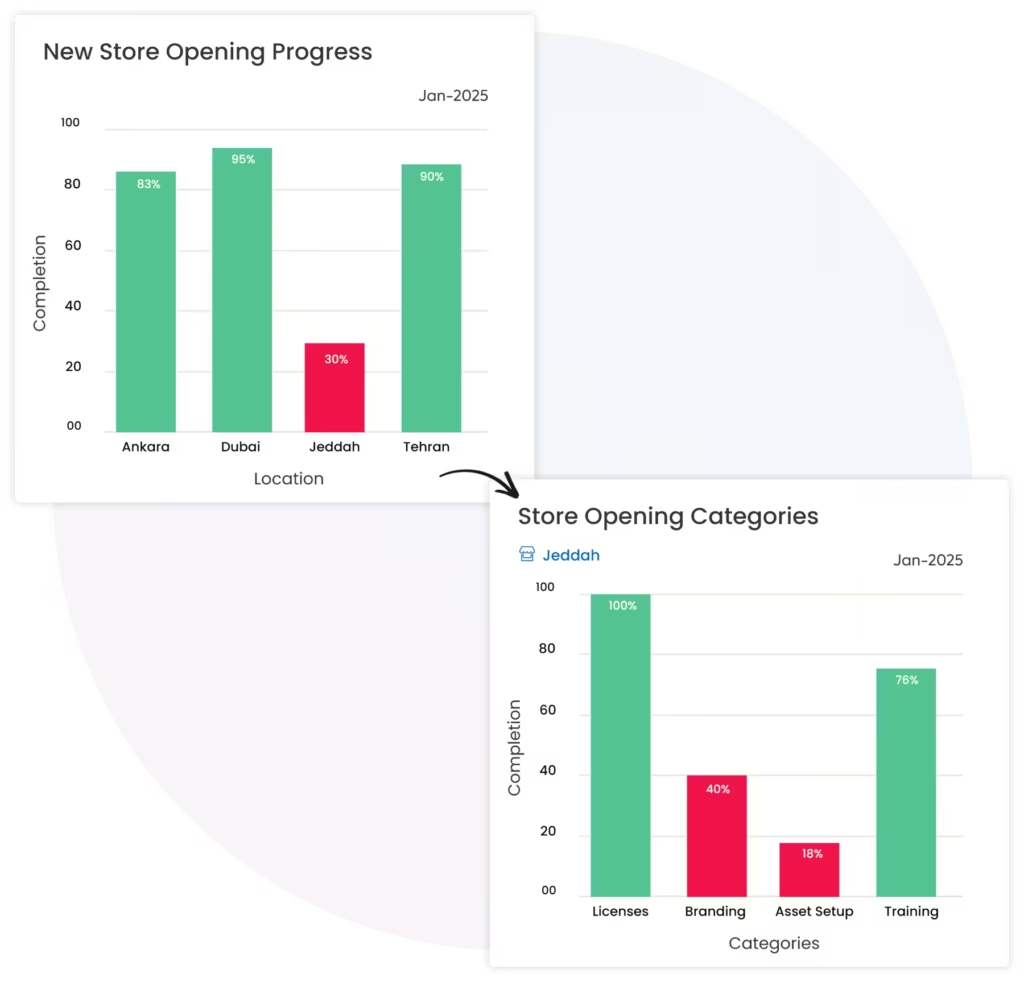
Drive Faster New Store Openings
Launch new stores without the chaos.
From licenses to equipment to last-mile readiness—Taqtics ensures every checklist is ticked, every asset is tracked, and every roadblock is resolved before go-live.
Success Stories
See How Retail Teams Improve Store Execution
Explore how multi-location retail teams use Taqtics to standardize audits, track issues, improve compliance, and strengthen store visibility.

Solitario Lab Grown Diamonds
How Solitario improved audit coverage, standardized SOP checks, tracked issues, and scaled compliance across 50+ stores.
Global Sportswear Retail Brands
How sportswear stores standardized audits, SOP routines, visual merchandising, issue resolution, and asset tracking.


Global Supermarket Chains
How supermarket teams digitized store audits, reviews, corrective actions, inventory checks, and leadership dashboards.
Client Testimonials
Hear How Multi-Location Teams Improve Execution With Taqtics
Real stories from teams using Taqtics to improve visibility, accountability, consistency, and execution across locations.
Felix Amando Hadisaputra
Head of Information Technology, PT MAP Boga Adiperkasa
Felix shares how Starbucks Indonesia and MAP Group transformed operations across 820 locations using Taqtics.
Vidya Mudaliar
Head of HR and Learning, PizzaExpress
Vidya shares how PizzaExpress modernized daily operations, strengthened accountability, and made reporting faster across locations.
Ruvin Dholakiya
Chief Digital Officer
Ruvin shares how retail execution moved from paper, Excel, calls, WhatsApp, and scattered tools to one structured operating system with Taqtics.
Retail Management Software
What Is Retail Management Software?
Retail management software is a broad category of technology used to organize, automate, monitor, and improve the processes required to run retail stores and multi-location retail networks.
For store operations teams, retail management software brings routine execution into a structured system: daily tasks and SOPs, audits, issue resolution, visual merchandising, training, attendance, asset controls, evidence capture, reporting, and performance visibility.
The wider retail technology stack can also include POS, inventory, ERP, CRM, ecommerce, workforce, and supply-chain systems. These systems manage transactions and business data, while an operations execution platform focuses on whether the required work is actually completed correctly at each store.
Retail Management Software
An umbrella term for software used to manage retail processes, store performance, people, workflows, inventory, transactions, customer experience, and operational visibility.
Store Management Software
Focuses more directly on everyday store activities such as opening routines, staff tasks, issue handling, store readiness, training, maintenance, and closing procedures.
Retail Operations Management Software
Connects headquarters, regional teams, and stores so standards, recurring workflows, audits, corrective actions, and performance can be managed consistently across locations.
Core Capabilities
What Should Retail Operations Management Software Help You Manage?
The strongest platforms connect the recurring work performed by store teams with evidence, accountability, corrective action, and network-level visibility.
Daily Tasks & SOP Checklists
Schedule recurring and ad-hoc work by location, shift, department, role, or operating period and track whether it was completed on time.
Audits & Inspections
Standardize store audits with scoring, critical questions, evidence, reviewer controls, and structured follow-up for non-compliance.
Issue & Corrective Action Tracking
Route operational problems to the right owner, define due times, escalate delays, and verify closure with proof.
Visual Merchandising Execution
Distribute campaign guidance, collect store submissions, review visual execution, and act on deviations without scattered email or chat threads.
Frontline Training
Give store teams access to learning content, assessments, and refresher training connected to their operational responsibilities.
Attendance & Team Execution
Track attendance and location-level activity so managers can understand whether the right people and operating routines are in place.
Asset & Maintenance Controls
Maintain visibility over store assets, preventive checks, faults, service requests, and ownership of maintenance-related actions.
Reports, Dashboards & Analytics
Compare completion, audit scores, recurring gaps, open issues, overdue actions, and store performance across the network.
How It Fits Together
Retail Management Software Is Usually a Stack, Not One System
Older retail software discussions often group every system under one label. In practice, retailers usually use several connected platforms with different responsibilities.
Business Impact
Benefits of Retail Management Software for Multi-Location Operations
The value comes from making routine execution easier to repeat, easier to verify, and easier to improve across every location.
Standardized Store Execution
Turn operating standards into repeatable workflows so each location understands what needs to happen and when.
Real-Time Operational Visibility
Give managers a current view of completed tasks, failed audits, open issues, overdue actions, and location-level exceptions.
Clearer Accountability
Assign work and corrective actions to named roles or teams with deadlines, evidence requirements, and escalation paths.
Faster Issue Resolution
Reduce dependence on calls, spreadsheets, email, and messaging threads by routing store problems through one trackable process.
Scalable Training & Compliance
Make standards, learning, audits, and proof of execution accessible as the store network grows.
Better Operational Decisions
Use recurring execution data to identify stores, processes, or areas that need support instead of relying only on periodic visits.
Buying Guide
How to Choose Retail Management Software
Feature volume alone is not a good selection method. The platform needs to fit how store teams actually work and how management wants to monitor execution across locations.
Implementation
How to Implement Store Management Software Across Retail Locations
A successful rollout is less about switching on software and more about translating store processes into clear workflows that teams can adopt.
Map Locations & Roles
Set up stores, regions, departments, users, responsibilities, and operating hierarchies.
Digitize Core Workflows
Start with the SOPs, checklists, audits, issues, and routines that matter most to daily execution.
Train Store Teams
Teach users how and when to complete work, attach evidence, raise issues, and respond to corrective actions.
Monitor Adoption
Review completion, overdue work, submission quality, store participation, and recurring implementation gaps.
Improve With Data
Use reports and trends to refine workflows, remove unnecessary tasks, and strengthen controls that need attention.
Common Pitfalls
Why Retail Software Rollouts Underperform
Technology does not automatically improve operations. Weak process design, low adoption, or fragmented ownership can recreate the same problems inside a new system.
Moving every old spreadsheet or form into software without simplifying the process can increase friction instead of reducing it.
A platform selected only for head-office reporting can fail if store teams find routine completion slow or confusing.
Teams need role-based onboarding, clear expectations, and support after launch rather than a one-time product walkthrough.
Capturing a failed check has limited value unless the workflow defines who acts, by when, and how closure is verified.
Reports should feed regular management reviews so recurring gaps lead to changes in process, training, staffing, or support.
Separate apps for tasks, audits, issues, VM, training, and maintenance can make store execution harder to manage and compare.
FAQs
Retail Management Software FAQs
What is retail management software?+
Retail management software is a broad category of software used to manage retail processes, stores, teams, workflows, business data, and performance. Depending on the platform, it may focus on transactions, inventory, workforce management, customer data, or operational execution.
What is retail operations management software?+
Retail operations management software focuses on how standards and recurring processes are executed across stores. Typical use cases include SOP checklists, audits, issue tracking, corrective actions, visual merchandising, training, asset controls, and operational reporting.
What is store management software?+
Store management software helps organize day-to-day store activities. Depending on the solution, this can include opening and closing routines, employee tasks, store readiness, audits, maintenance, training, issue resolution, and manager reporting.
Is retail management software the same as POS software?+
No. POS software primarily manages sales transactions and checkout activity. Retail management is a wider category. Many retailers use POS, ERP, inventory, workforce, CRM, and operations software together, with each system responsible for a different part of the retail operating model.
What features should multi-location retailers look for?+
Useful capabilities include multi-location scheduling, mobile execution, configurable workflows, live evidence, audits, issue routing, corrective actions, escalation, role-based access, dashboards, analytics, and integration options for the retailer's existing technology stack.
How does Taqtics support retail operations management?+
Taqtics helps multi-location teams manage operational execution through tasks and checklists, audits, issue tracking, visual merchandising, training, attendance, asset management, corrective actions, and reporting across stores.
Can retail management software be used during new store openings?+
Yes. Operational platforms can be used to coordinate readiness checklists, licenses, training, assets, branding, issues, ownership, and final approval before a new location goes live.
How should retailers evaluate ease of use?+
Evaluate the experience for the people who will use the system every day. Store associates and managers should be able to find assigned work, complete it on mobile, attach evidence, raise issues, and understand deadlines without extensive navigation or training.
Retail Operations
Do More, While Saving 30% in Cost with Taqtics!
Bring store execution, audits, visual merchandising, asset tracking, issue resolution, and frontline operations into one connected platform.