
Train Every Team Consistently Across Every Location
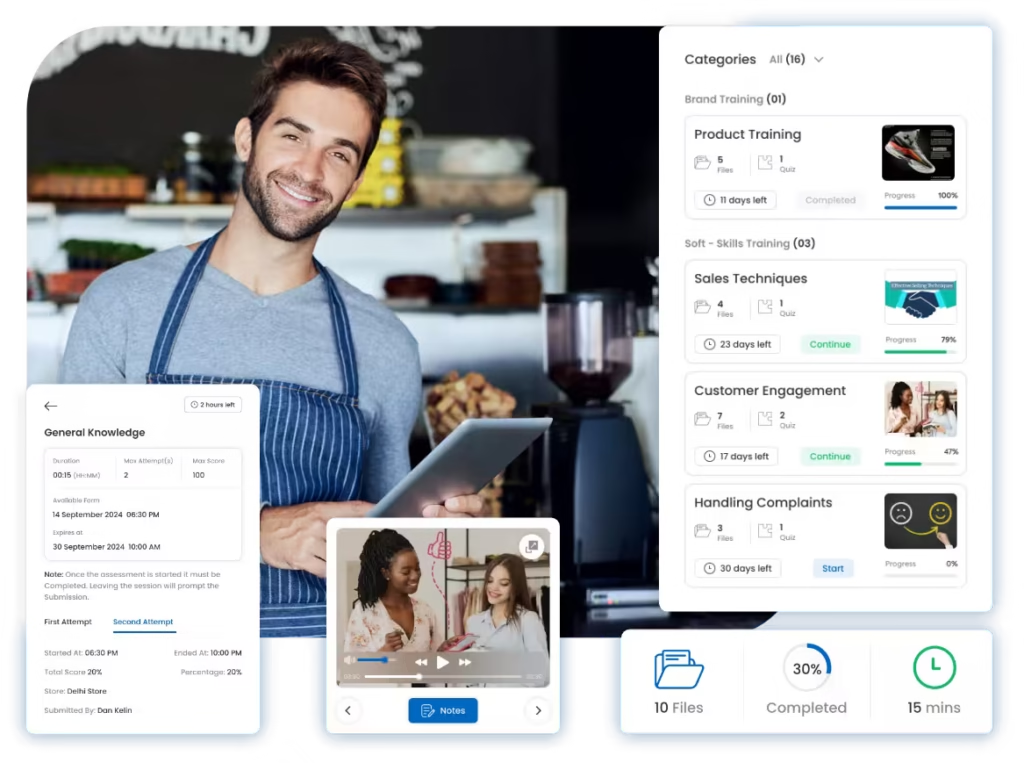
Create structured courses, assign training by role or location, deliver learning on mobile, validate knowledge with assessments, and track progress from one training management system.


Built for onboarding, SOP training, product updates, assessments, compliance learning, and continuous frontline development.
Trusted by multi-location teams across retail and restaurants
Loved by Customers,
Trusted by Experts






Training Becomes Inconsistent When Every Location Teaches Differently
Multi-location teams need to onboard new employees, reinforce SOPs, roll out product or menu updates, and keep frontline teams current without repeatedly bringing everyone into a classroom.
When training depends on individual managers, scattered files, and manual follow-up, head office cannot reliably know who received the latest information or who is ready to perform independently.
Training quality varies by manager and location
Employees can receive different explanations of the same SOP, process, product, or service standard.
Learning content becomes scattered or outdated
Videos, PDFs, presentations, and SOP documents sit across WhatsApp, email, drives, or local folders with weak version control.
Completion does not prove understanding
Watching a video or receiving a PDF does not show whether an employee understood the content or can apply it correctly.
Onboarding and operational updates take too long
Training teams repeatedly coordinate sessions and follow-ups when the same learning could be delivered consistently on demand.
HQ cannot see readiness or knowledge gaps
Completion, assessment scores, pass rates, and employees who need coaching are difficult to track across locations.
How Training Management Works in Taqtics
Build training once, deliver it to the right people, validate understanding, and continuously monitor learner readiness.
Build Training Content
Create courses using videos, documents, instructions, learning material, and short quizzes.
Assign the Right Learners
Publish training to selected stores, roles, designations, teams, or individual employees.
Complete Training on Mobile
Let frontline teams access assigned learning on mobile or desktop at a time that fits their work schedule.
Validate Knowledge
Use quizzes and formal assessments with scoring, pass criteria, attempts, and certificates where required.
Track Progress & Refresh
Monitor completion and scores, identify knowledge gaps, and reassign or update training when teams need reinforcement.
Consistent Training, Verified Learning, and Clear Team Readiness
Standardize how knowledge is delivered, confirm that employees understand it, and give managers real-time visibility into progress.
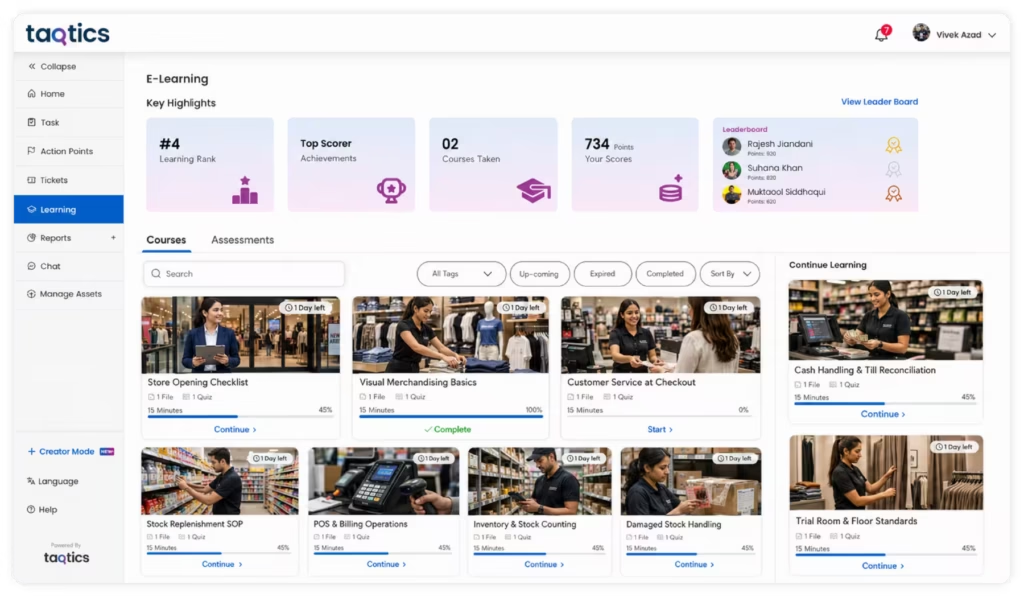
Give Every Employee the Same Approved Training
Centralize training content and deliver the same approved learning experience across locations without depending on individual managers to interpret or repeat the material.
Turn Passive Training Material Into Measurable Learning
Combine videos, documents, short quizzes, and mobile access so employees can learn in smaller modules while managers retain visibility into engagement and completion.
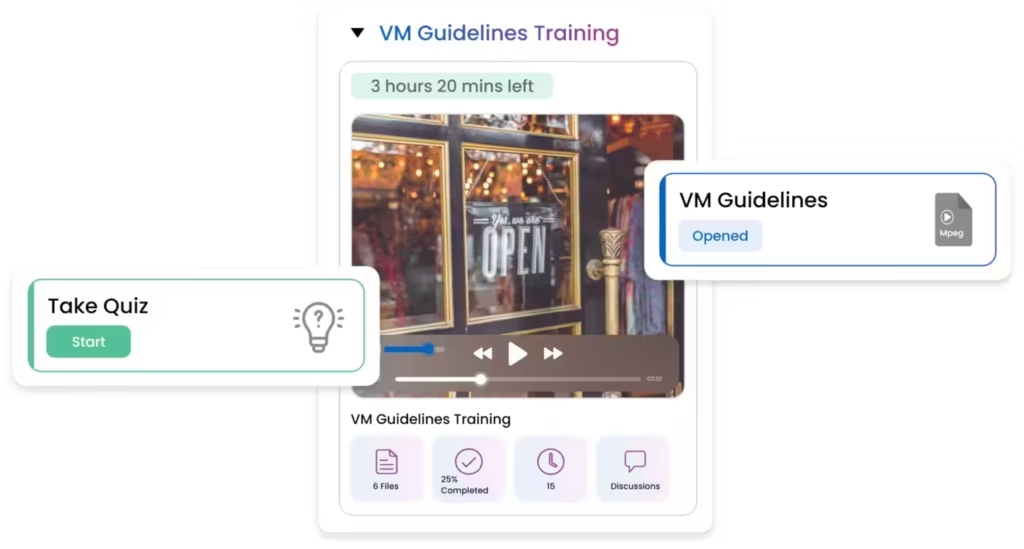
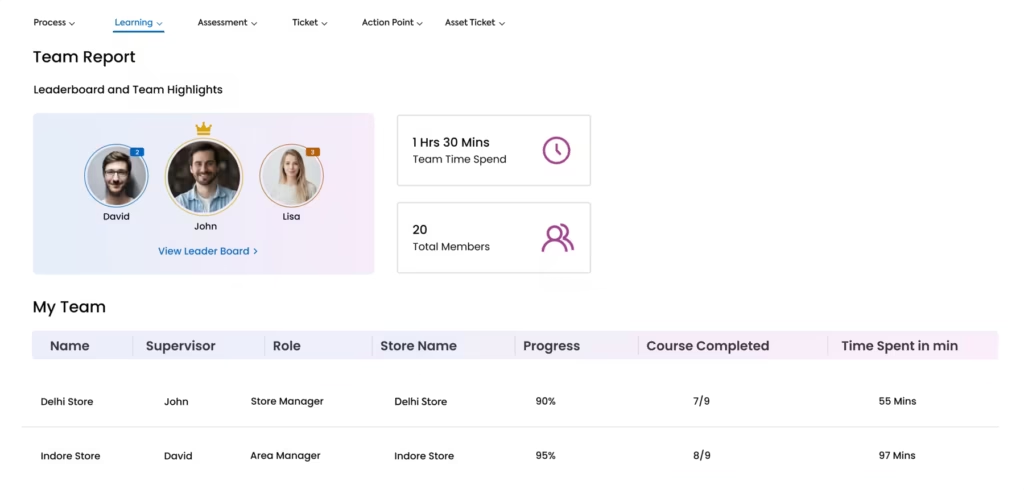
Know Who Is Ready and Who Needs More Coaching
Move beyond simply sharing training material. Track course completion, quiz performance, formal assessment results, and certification status across employees and locations.
Give Teams One Place to Find the Latest Operational Knowledge
Keep SOPs, brand guidelines, product information, process documents, and reference material accessible alongside training so teams do not depend on old PDFs or message threads.
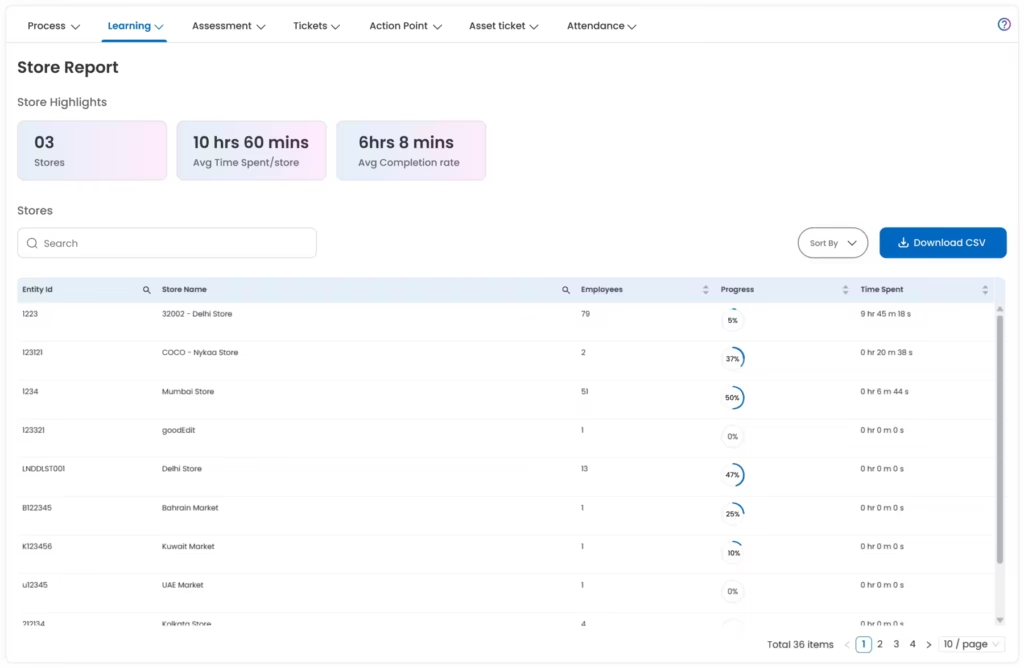
Build Repeatable Learning for the Training Your Teams Need Most
Use the same training system for onboarding, operational knowledge, compliance, role development, and recurring refresher learning.
New Employee Onboarding
Give new hires a structured learning path covering company basics, role expectations, processes, and store readiness.
SOP & Process Training
Teach teams how operational procedures should be performed before those procedures become daily execution tasks.
Product, Menu & Service Updates
Roll out new products, menus, service changes, campaigns, or customer-facing information across locations quickly.
Compliance & Safety Training
Deliver required learning and validate understanding with scored assessments and certificates where needed.
Customer Service & Role Skills
Reinforce service standards, role-specific knowledge, product expertise, and other frontline capability requirements.
Refresher Training & Recertification
Reassign learning when processes change, performance gaps appear, or certifications need to be renewed.
See How Multi-Location Teams Improve Operational Execution With Taqtics
Hear from retail and restaurant teams using Taqtics to improve consistency, accountability, visibility, and execution across locations.
Felix Amando Hadisaputra
Head of Information Technology, PT MAP Boga Adiperkasa
Felix shares how Starbucks Indonesia and MAP Group transformed café operations across 820 locations using Taqtics.
Vidya Mudaliar
Head of HR and Learning, PizzaExpress
Vidya shares how PizzaExpress modernized daily operations, strengthened accountability, and made reporting faster across its restaurants.
Ruvin Dholakiya
Chief Digital Officer, Solitario Diamonds
Ruvin shares how the team moved from paper, Excel, calls, WhatsApp, and scattered tools to one structured system for retail execution.
Common Questions About Training Management Software
Training management software helps organizations create and distribute learning content, assign training to employees, run quizzes or assessments, and track completion and performance across multiple locations.
Courses can include structured learning material such as videos, documents, and short quizzes so employees can learn and validate understanding inside the same flow.
Yes. Training and assessments can be published to selected stores, designations, teams, or other configured learner groups.
Yes. Assigned courses can be accessed on mobile or desktop, allowing frontline employees to complete learning without depending on a classroom session.
Yes. Assessments can include scoring, passing criteria, attempt limits, availability windows, result settings, and certificate generation when enabled.
Yes. Managers and administrators can monitor course completion, quiz performance, assessment results, and learning progress to identify who is up to speed and who needs support.
Yes. The training and knowledge experience can centralize operational learning material and reference documents so teams have easier access to current information.
Standardize Training, Validate Knowledge, and Track Readiness Across Locations
Replace repeated classroom sessions, scattered training files, and manual completion tracking with one system for courses, mobile learning, assessments, progress, and current knowledge.