
Track Every Asset, Renewal, and Repair Across Every Location
Create a real-time asset register, assign ownership, generate QR codes, schedule maintenance, track transfers, and preserve the complete history of every non-saleable asset.


Manage equipment, fixtures, devices, tools, licences, warranties, certifications, and other operational assets.
Trusted by multi-location teams across retail and restaurants
Loved by Customers,
Trusted by Experts








Assets Lose Value When Ownership, Location, and Maintenance Are Not Visible
Multi-location teams manage equipment, fixtures, devices, tools, warranties, licences, and compliance documents across stores, offices, warehouses, and support teams.
When these records live in spreadsheets or local files, assets are difficult to find, renewals are missed, maintenance becomes reactive, and accountability weakens.
No reliable view of what is owned or where it is
Head office cannot easily confirm the current location, user, condition, status, or availability of each asset.
Renewals and service dates depend on spreadsheets
Licence, warranty, AMC, and maintenance deadlines can be missed when reminders are not connected to the asset record.
Breakdowns repeat without lifecycle visibility
Teams see the latest repair but not the full history of failures, service costs, transfers, and previous fixes.
Transfers and ownership changes are poorly recorded
Assets move between stores or employees without a clear, searchable trail of custody and responsibility.
Replacement decisions lack evidence
Management cannot easily compare repair frequency, downtime, maintenance cost, and asset age before approving replacement.
How Asset Management Works in Taqtics
Create and identify every asset, assign clear ownership, and manage maintenance, repairs, transfers, and history from one system.
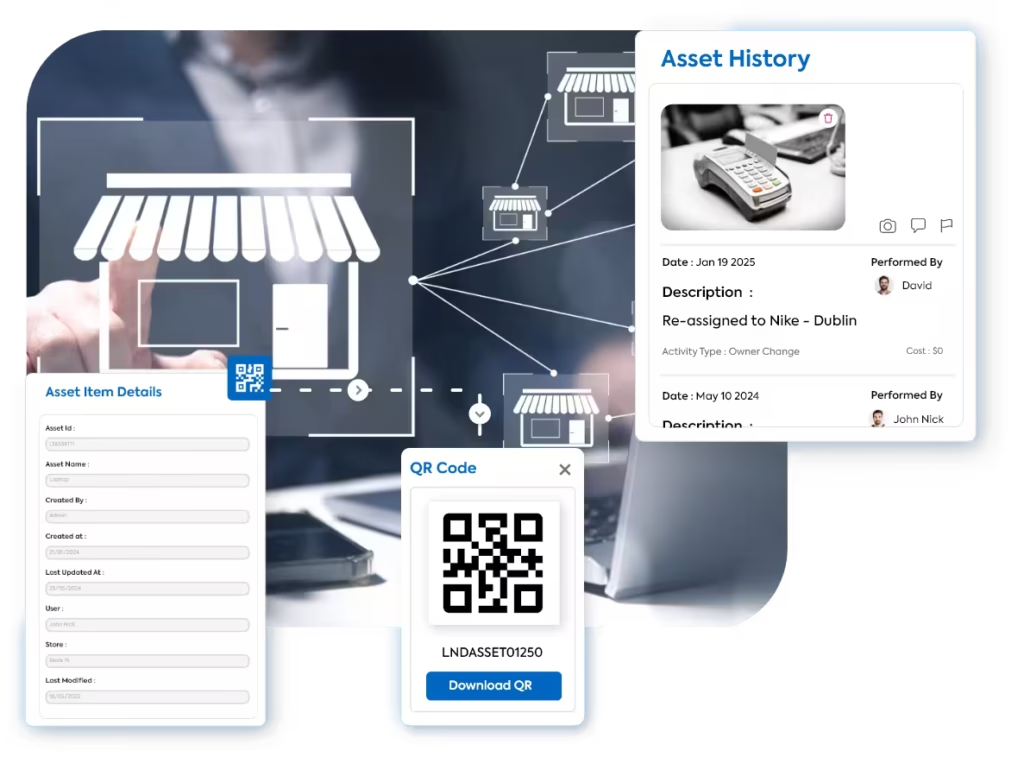
Create Asset Records
Add the asset ID, category, serial number, purchase details, condition, documents, and other required information.
Generate QR Codes
Give every asset a unique QR code for faster identification, record access, verification, and physical checks.
Assign Owners and Locations
Allocate assets to the responsible store, employee, department, team, or other custodian.
Manage Repairs and Maintenance
Schedule preventive maintenance, set reminders, create repair tasks, and track service work through completion.
Track Transfers and Asset History
Record location and ownership changes while preserving the full history of transfers, repairs, services, and related activity.
Visibility, Longer Asset Life, and Complete Accountability
Give operations and finance teams one reliable view of every asset, upcoming obligation, movement, repair, and lifecycle decision.

Know What You Own, Where It Is, and Who Is Responsible
Maintain one current register of every asset across locations, categories, users, departments, and operational teams.
Act Before Assets Break Down or Compliance Dates Expire
Connect maintenance, warranty, AMC, licence, certification, and renewal reminders directly to the asset record.


Preserve Every Transfer, Repair, Service, and Ownership Change
Keep a continuous asset history from purchase and allocation through maintenance, breakdown, repair, transfer, reallocation, and retirement.
Identify Assets That Cost More to Repair Than They Deliver
Use age, condition, downtime, repair frequency, service cost, and asset history to decide whether to repair, reallocate, replace, or retire.
Track Physical Assets, Operational Equipment, and Renewal-Based Records
Configure asset categories and data fields around the way your operation identifies, allocates, services, transfers, and retires assets.
POS and IT Equipment
POS terminals, tablets, laptops, printers, routers, handheld devices, scanners, and related technology.
Operational Equipment
Refrigeration units, ovens, coffee machines, AC units, generators, kitchen equipment, and machinery.
Fixtures and Furniture
Shelving, counters, display units, tables, seating, storage, signage, and customer-facing fixtures.
Tools and Maintenance Assets
Repair tools, cleaning equipment, testing devices, ladders, service kits, and maintenance inventory.
Licences and Certifications
Store licences, safety certificates, permits, warranties, compliance documents, and renewal-based records.
Custom Asset Categories
Create category-specific fields, statuses, reminders, ownership rules, and documents for any non-saleable asset.
See How Multi-Location Teams Improve Operational Control With Taqtics
Hear from retail and restaurant teams using Taqtics to improve visibility, accountability, and execution across their locations.
Felix Amando Hadisaputra
Head of Information Technology, PT MAP Boga Adiperkasa
Felix shares how Starbucks Indonesia and MAP Group transformed café operations across 820 locations using Taqtics.
Vidya Mudaliar
Head of HR and Learning, PizzaExpress
Vidya shares how PizzaExpress modernized daily operations, strengthened accountability, and made reporting faster across its restaurants.
Ruvin Dholakiya
Chief Digital Officer, Kisna
Ruvin shares how the team moved from paper, Excel, calls, WhatsApp, and scattered tools to one structured system for retail execution.
Common Questions About Asset Management Software
Asset management software helps teams register assets, assign ownership, track location and status, schedule maintenance and renewals, record transfers and repairs, and maintain a complete lifecycle history across locations.
Yes. Each asset can have a unique QR code that links users to its record, ownership, location, status, history, and related details.
Yes. Assets can be reassigned or transferred while preserving the previous store, owner, transfer date, comments, and complete movement history.
Yes. Teams can set one-time or recurring reminders for preventive maintenance, warranty, AMC, licence, certification, and other asset-specific deadlines.
Yes. Service tasks, issue tickets, due dates, assigned teams, comments, costs, documents, and completion evidence can remain connected to the asset history.
Yes. Licences, permits, certificates, warranties, and other renewal-based records can be configured as asset categories with store ownership, documents, expiry dates, and reminders.
Yes. Asset records can be filtered and reviewed by location, category, owner, status, condition, age, movement, service, breakdown, repair, and renewal history.
Track Ownership, Prevent Missed Renewals, and Extend Asset Life
Replace scattered spreadsheets with one asset workflow for registration, QR tagging, allocation, maintenance, renewals, transfers, repair history, and lifecycle reporting.