
NEW Introducing TimeShift - AI-powered shift planning
ISO Auditing Software

Conduct ISO Audits With Evidence Behind Every Finding

Structure audits around defined criteria, document the samples examined, capture objective evidence, record nonconformities, perform root cause analysis, and track correction and corrective action through verified closure.
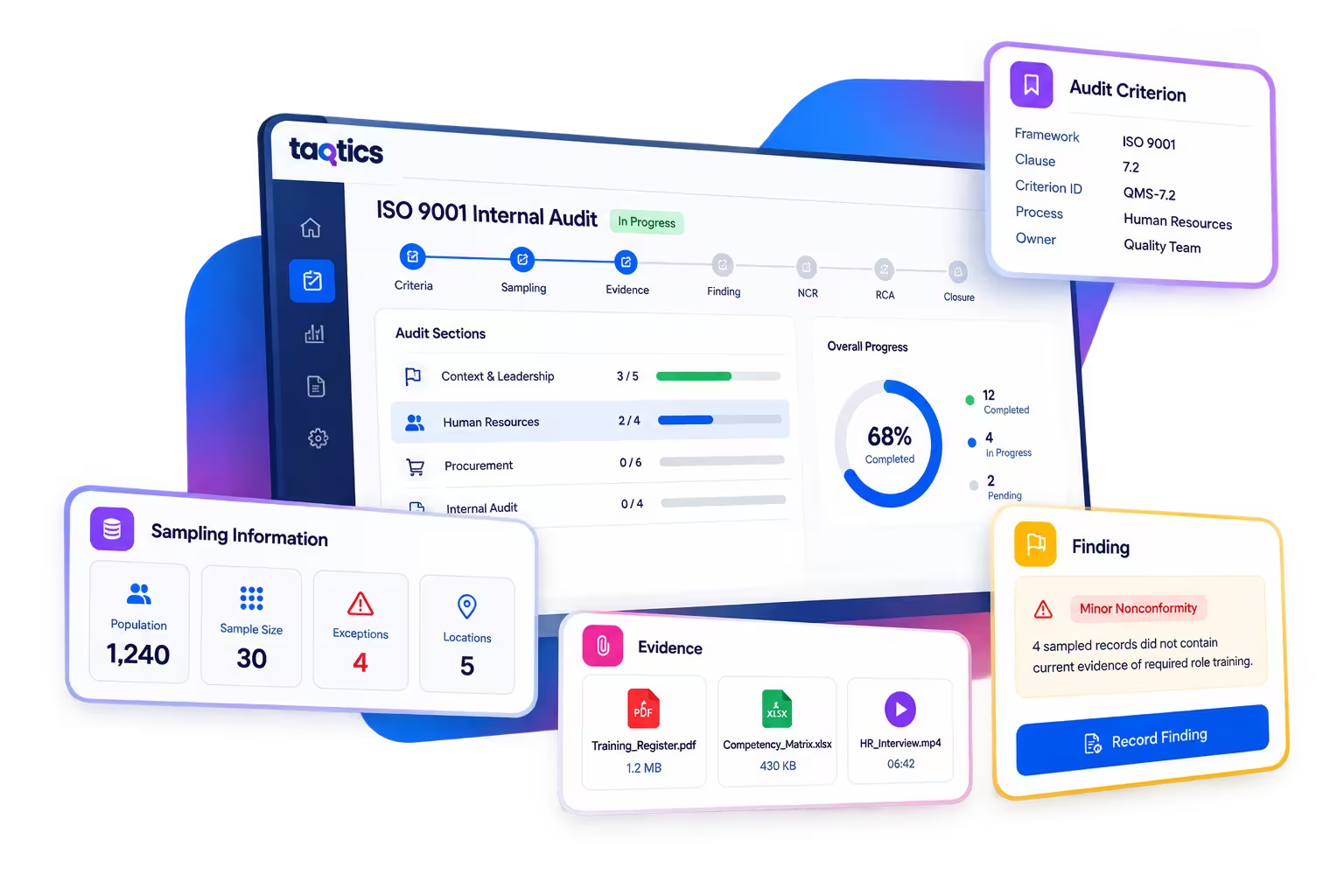
Audit Criteria Document Sampling Objective Evidence NCR Root Cause Analysis Corrective Action
Taqtics ISO auditing software showing audit criteria, sampling, evidence and finding management
Structured Audit Execution

ISO Audits Require More Than a Pass or Fail

A standards-based audit needs to show what requirement was tested, what the auditor examined, how evidence was sampled, what was found, and how every nonconformity was addressed.

01

Defined Audit Criteria

Give every audit point a clear reference to the framework, clause, process, requirement or procedure being evaluated.

02

Structured Sampling

Record the population, sample size, locations examined, exceptions identified and the records selected by the auditor.

03

Objective Evidence

Connect documents, interviews, video, images, auditor notes and sampled records directly to the audit conclusion.

04

Controlled Closure

Convert nonconformities into NCR, root cause analysis, correction, corrective action and effectiveness-verification workflows.

ISO Audit Workflow

From Audit Criterion to Verified Closure

Keep the evidence, auditor reasoning, nonconformity and follow-up process connected from the moment an audit starts.

1
Audit Criteria Define the clause, process or requirement being evaluated.
2
Audit & Sampling Review selected records, locations, people and processes.
3
Objective Evidence Capture documents, observations, interviews and supporting proof.
4
Finding Record the conclusion supported by the evidence examined.
5
NCR & Root Cause Document the nonconformity and investigate why it occurred.
6
Corrective Action Assign the immediate fix and the action addressing the cause.
7
Effectiveness Verification Verify implementation and close only after the action is effective.
Audit Criteria Register

Give Every Audit Point a Defined Criterion

An audit section tells an auditor where they are in the audit. The criterion tells them what requirement they are evaluating against.

Taqtics lets you maintain each audit criterion as a structured record instead of burying standards references inside question descriptions or spreadsheets.
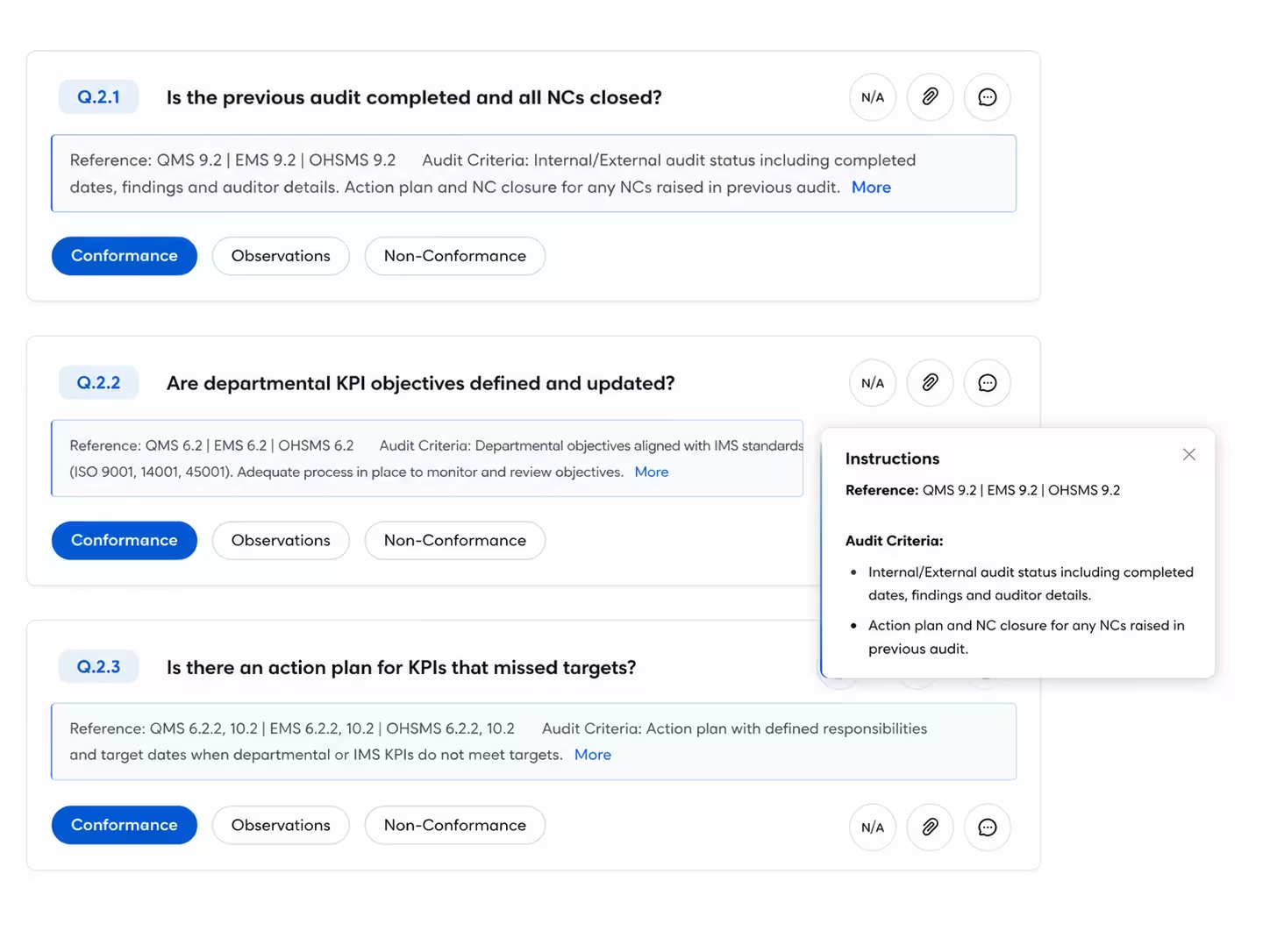
Example: Framework → Version → Clause → Criterion ID → Process → Department → Owner → Supporting Procedure → Status.
Searchable criteria register Maintain applicable requirements in one structured, filterable reference library.
Configurable criterion fields Capture framework, version, clause, process, responsibility and organisation-defined reference data.
Supporting documents attached Keep procedures, policies and reference files connected to the criterion record.
Taqtics audit criteria register showing structured ISO audit criterion records
Document & Record Sampling

Record What Was Examined, Not Just the Answer

Auditors rarely inspect every record in a large population. Configure audit questionnaires to record how the sample was selected, what evidence was examined and how many exceptions were found.
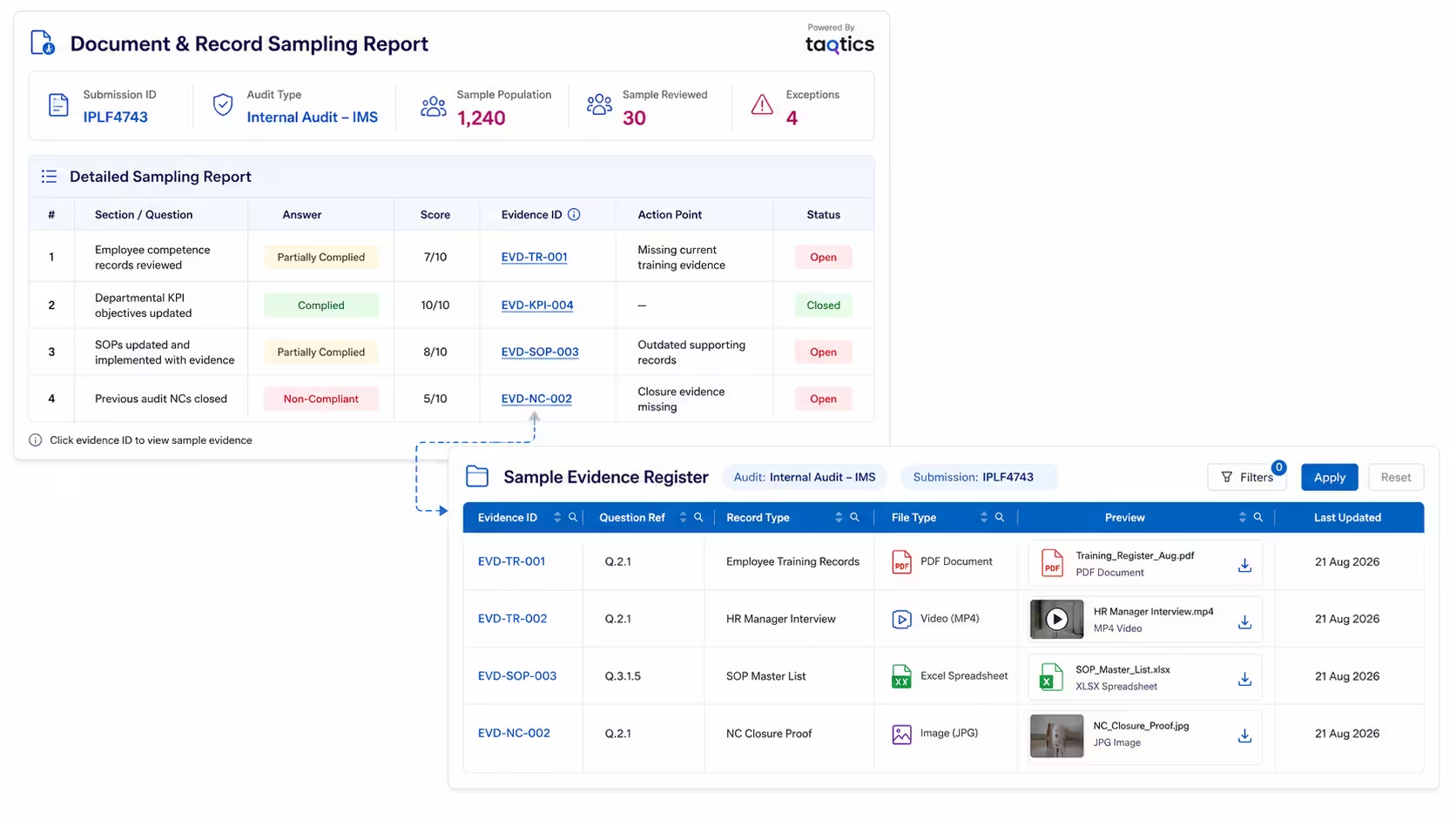
Define the audit population Record the document or evidence type and total population being evaluated.
Document sample size and exceptions Capture sample size, locations sampled, exceptions and auditor observations.
Upload the records actually reviewed Attach PDF, Word, spreadsheet, presentation, video and supporting files directly against the audit point.
Capture interviews as evidence Retain interview recordings and supporting material alongside document-based evidence.
Taqtics ISO document sampling showing total population sample size exceptions and evidence examined
Objective Evidence

Make the Auditor's Conclusion Traceable

Keep a clear connection between the requirement being audited, the sample examined, the objective evidence recorded and the resulting finding.

01
Audit Criterion What requirement is being evaluated?
02
Sample Examined Which records, people or processes were reviewed?
03
Objective Evidence What did the auditor actually observe?
04
Finding Does the evidence demonstrate conformity?
05
Classification Record the finding according to your audit methodology.
Nonconformity Reporting

Turn Every Nonconformity Into a Structured NCR

A failed audit point should not disappear into a report. Create a structured Nonconformity Report that preserves the requirement, evidence, auditor finding, classification, responsible owner and response deadline.
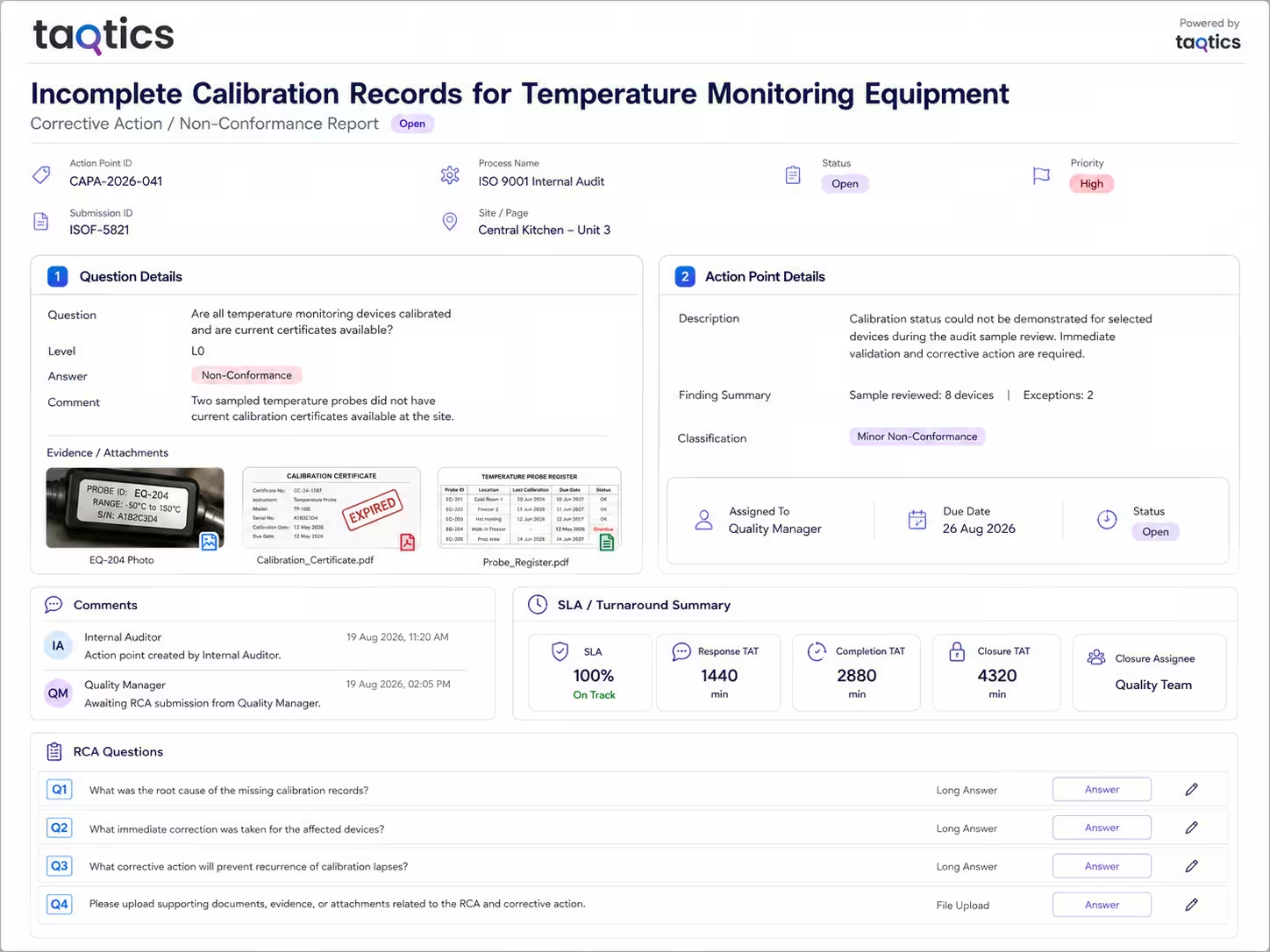
Link NCR back to the audit criterion Maintain the connection between the source audit, criterion, clause, process and finding.
Preserve the objective evidence Attach the sampled records, interviews and auditor observations supporting the nonconformity.
Assign ownership and deadlines Route the response to the relevant process owner, department or responsible team.
Separate the follow-up workflow Track correction, root cause analysis and corrective action as distinct steps.
Taqtics nonconformity report showing ISO audit finding evidence owner and NCR workflow
Root Cause Analysis

Investigate Why the Nonconformity Happened

For findings requiring deeper investigation, assign a dedicated Root Cause Analysis checklist instead of recording the cause as a loose remark.

Configure the RCA around your own methodology, including problem statements, 5 Whys, contributing factors, root cause, supporting evidence and recommended corrective action.
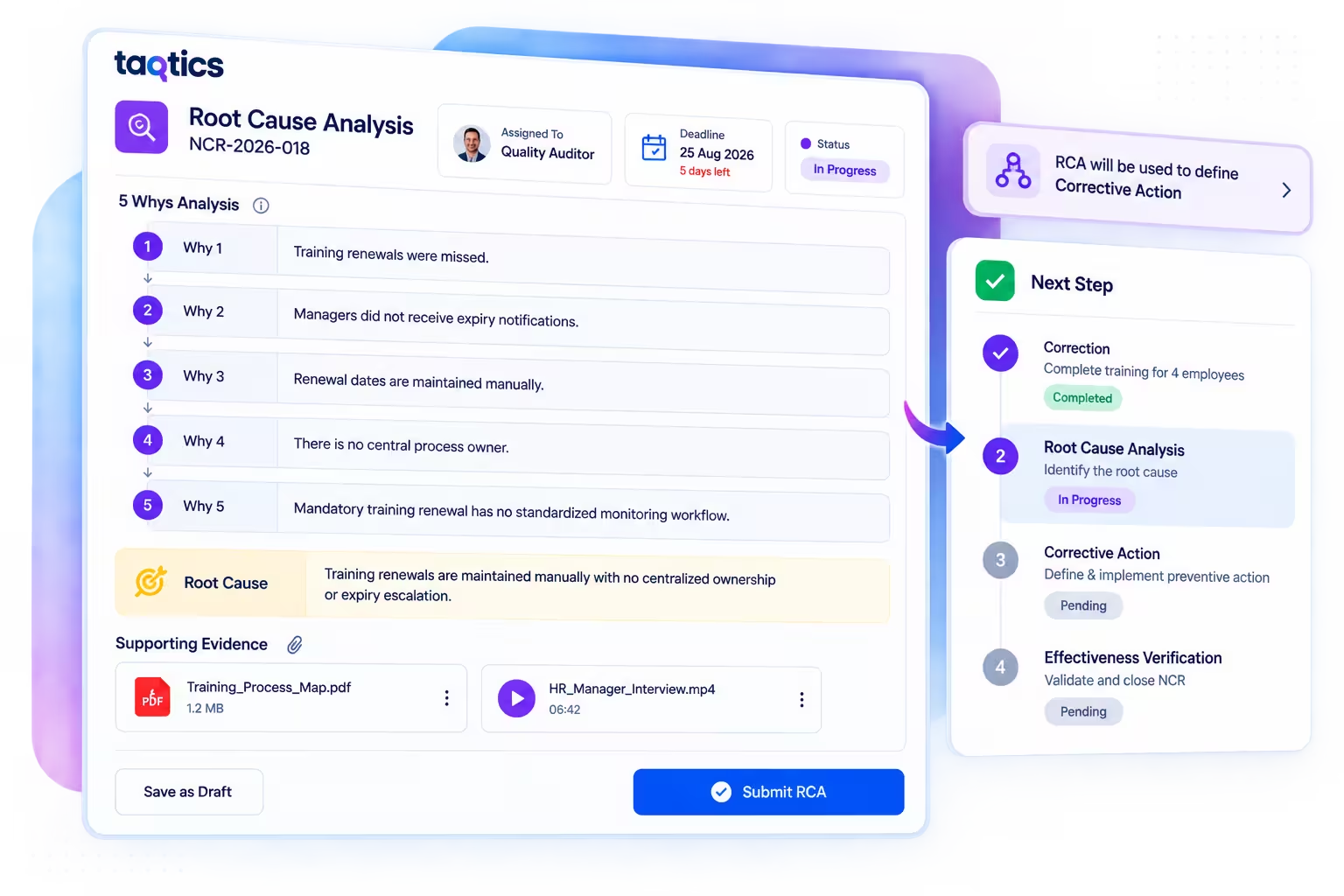
Dedicated RCA assignment Assign investigation to the auditor, quality team or responsible investigator with a deadline.
Structured 5 Whys analysis Record the investigation systematically rather than relying on one free-text root-cause field.
Use RCA to define corrective action Connect the identified root cause to the system-level action required to reduce recurrence.
Taqtics root cause analysis checklist showing 5 Whys and corrective action workflow
Corrective Action Management

Track the Immediate Fix and the Systemic Fix Separately

A correction resolves the problem that was detected. Corrective action addresses the underlying cause so the problem is less likely to recur.

Correction

Fix the Issue Found During the Audit

Assign the immediate correction to the relevant employee, process owner or department with a clear deadline, escalation and completion proof.

Example:
Four employees are missing current mandatory training evidence. Complete the required training and update the four affected employee records.
Corrective Action

Address the Cause Behind the Failure

Use the root cause analysis to assign changes to the process, control, ownership or monitoring system that allowed the nonconformity to occur.

Example:
Introduce a centralized training renewal register with defined ownership, advance reminders and escalation for expired mandatory training.
Evidence & Verification

Require Proof Before the NCR Is Closed

Responsible teams can upload completion evidence including revised procedures, certificates, training records, spreadsheets, photographs and videos. Follow-up verification can then assess whether the corrective action was implemented effectively before final closure.

ISO Audit Reporting

See Findings, NCRs and Corrective Actions Across the Audit Program

Give quality, audit and management teams a central view of audit completion, finding classifications, open NCRs, corrective-action status, overdue responses and closure performance.
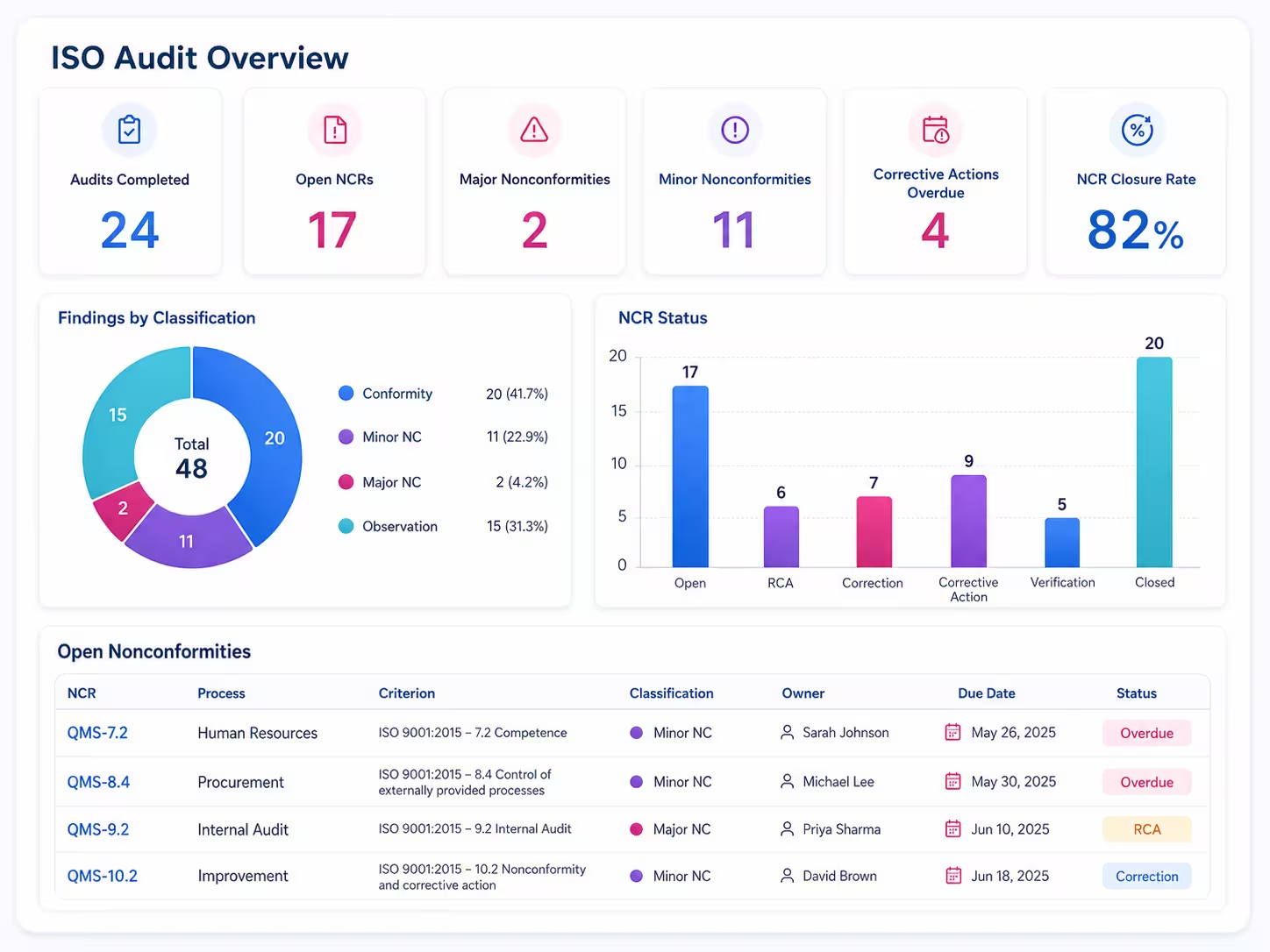
Taqtics ISO audit dashboard showing findings nonconformities NCR status and corrective action closure
Flexible Audit Design

Configure Taqtics Around Your ISO Audit Program

Different standards, organisations and audit methodologies require different criteria, evidence structures, classifications and follow-up workflows. Configure the audit rather than forcing every program into the same template.

Quality ISO 9001 Configure quality-management audit criteria, evidence, nonconformities and corrective-action workflows.
Environment ISO 14001 Structure environmental management audits around applicable criteria, evidence and findings.
Health & Safety ISO 45001 Digitize occupational health and safety audit execution and nonconformity follow-up.
Food Safety ISO 22000 Configure food-safety management system audits with evidence, sampling and corrective-action tracking.
Combined Integrated Audits Coordinate multiple applicable management-system requirements within one structured audit program.
Why Taqtics

Detailed Enough for Auditors. Practical Enough for the Teams Who Must Fix the Findings.

Keep audit evidence rigorous without disconnecting the audit from the people, departments and locations responsible for corrective action.

01
Criterion-Based Auditing Give each audit point a structured reference to what is being evaluated.
02
Document Sampling Capture populations, sample sizes, exceptions and reviewed records.
03
Flexible Evidence Use documents, spreadsheets, video, images, interviews and auditor notes.
04
Structured NCR Keep the criterion, evidence, finding, owner and deadline together.
05
RCA & Corrective Action Investigate the cause and route follow-up work to the responsible teams.
06
Audit Program Visibility Review finding classifications, open NCRs, overdue actions and closure performance centrally.

Client Testimonials

Hear how teams run better food quality audits with Taqtics.

Real stories from teams using Taqtics' food quality management system, visibility, accountability, and execution across locations.

Felix Amando Hadisaputra

Head of Information Technology, PT MAP Boga Adiperkasa (Starbucks, Subway, )

Felix, Head of IT at MAP Boga, shares how Starbucks Indonesia and MAP Group transformed cafe operations across 820 locations using Taqtics.

Vidya Mudaliar

Head of HR and Learning, PizzaExpress

Vidya Mudaliyar, Head of HR & Learning & Development at PizzaExpress, shares how the organization modernized daily operations, strengthened accountability, and made reporting significantly faster across its restaurants.

Ruvin Dholakiya

Chief Digital Officer, Solitario Diamonds

Ruvin Dholakiya, Chief Digital Officer at Kisna, shares how Kisna uses Taqtics to move from paper, Excel, calls, WhatsApp messages, and scattered internal tools to one structured operating system for retail execution

ISO Audit Software Questions

Frequently Asked Questions

ISO auditing software helps audit teams structure and conduct audits, capture evidence, document findings, manage nonconformities and track corrective action against the audit criteria defined for their program.
Yes. Organisations can configure internal audit workflows in Taqtics using their applicable audit criteria, questions, sampling information, evidence requirements, finding classifications, NCR and corrective-action processes.
Yes. Criteria can be configured as structured records containing information such as framework, version, clause, criterion ID, process, department, owner, applicability and supporting documentation.
Yes. Audit questionnaires can be configured to record the evidence or record type, total population, sample size, locations sampled, number of exceptions and auditor notes.
Yes. Audit evidence is not limited to live photographs. Supporting documents, spreadsheets, presentations, videos, interviews and other files can be attached to audit responses and made available for reporting.
An NCR, or Nonconformity Report, is the structured record of a requirement that was not fulfilled. Taqtics can be configured to record the source audit criterion, objective evidence, finding, classification, responsible owner, deadline, correction, root cause analysis, corrective action and follow-up status.
A correction addresses the detected issue. Corrective action addresses the underlying cause of the nonconformity with the objective of reducing or preventing recurrence. Taqtics can track the two workflows separately.
Yes. A dedicated RCA checklist can be assigned to the auditor, quality team or responsible investigator to document the problem statement, 5 Whys, root cause, supporting evidence and recommended corrective action.
No. Taqtics is audit-management software. It helps organisations digitize and manage audit execution but does not act as an ISO certification body or issue ISO certification.
Taqtics provides the configurable software structure used to conduct audits. Organisations should use their authorised copies of applicable standards and their approved audit criteria when configuring the audit program.

Run ISO Audits Without Losing the Detail Behind the Finding

Give auditors a structured system for criteria, sampling, evidence, nonconformities, root cause analysis, corrective action and verified closure.

Taqtics is audit-management software and is not an ISO certification body. ISO standards and their contents remain subject to the applicable rights and licensing terms. Organisations should use authorised standards and their approved audit criteria when configuring audits in Taqtics.