
Planogram Audit Software for Multi-Location Retail Teams
Audit planogram execution, product placement, shelf availability, display compliance, photo proof, scoring, and corrective actions across every retail store.
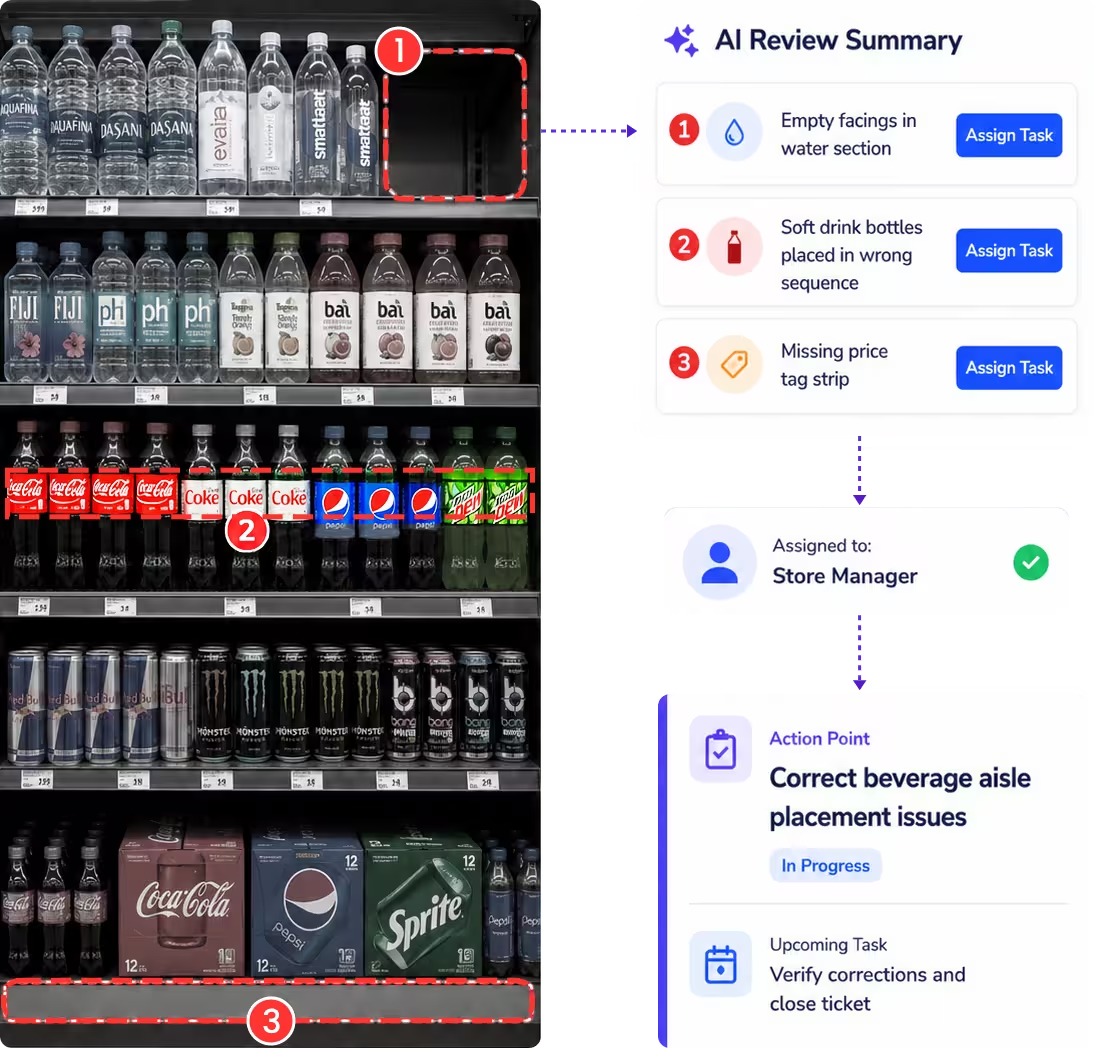
A clearer way to manage shelf and display execution
Taqtics brings planogram templates, mobile execution, shelf-image evidence, scoring, reports, and corrective actions into one connected workflow across every retail location.
Where manual planogram audits break down
Select a common gap to see why disconnected reviews reduce trust and delay correction.
The same planogram is interpreted differently across stores
Without precise shelf instructions and objective scoring, product sequence, facings, and placement are judged differently.
Photos are difficult to verify and compare
Images shared through email or chat are hard to link to the exact store, shelf, audit question, score, and follow-up action.
Shelf and availability gaps become visible too late
Missing SKUs, empty facings, incorrect labels, and misplaced products can remain unnoticed until sales or campaigns are affected.
Planogram deviations remain open after the audit
When ownership, deadlines, escalation, and closure proof are managed separately, display and shelf gaps are easily missed.
What a Planogram Audit Should Cover
Move through five planogram areas to review product placement, shelf availability, labels, promotional execution, visual standards, evidence, and required follow-up.
Shelf layout and product placement execution
Confirm that every shelf, fixture, and product block follows the approved planogram.
Shelf availability, missing SKUs, and label accuracy
Identify availability gaps while confirming that customers see the correct pricing and product information.
Promotional displays and visual merchandising standards
Review the presentation of campaigns, end caps, gondolas, launches, and brand-facing display areas.
Category, aisle, and adjacent-product execution
Confirm that category blocks and surrounding product relationships support navigation and commercial intent.
Photo evidence and corrective action requirements
Capture the proof needed to validate execution and trigger accountable follow-up when standards fail.
How Taqtics Digitizes Planogram Audits
Convert planogram and merchandising standards into structured mobile audits that can be assigned, completed, reviewed, scored, and followed up across every location.
Review Planogram Execution With Photo Evidence
Review shelf and display images alongside audit responses, scores, comments, and corrective actions, so HQ can quickly identify where store execution differs from the approved planogram.
Make Every Planogram Observation Easier to Trust
Verify the location, time, shelf evidence, score, and follow-up behind every finding. All reliability controls remain visible for quick review.
Are products placed according to the approved shelf layout?
Field is requiredAre all required SKUs available with the correct number of facings?
Are shelf labels and promotional tags accurate and visible?
Validated observations
Confirm where, when, and with what proof each planogram response was submitted.
- Geo-fenced and time-bound submissions
- Live shelf and display photo capture
- Comments, timestamps, and audit trail
Standardized scoring
Apply the same placement instructions, proof requirements, answer types, and scoring logic across stores.
- Question-level instructions and objective answers
- Required photo proof and conditional logic
- Partial, zero, negative, and automated scoring
Corrective actions
Assign failed shelf and display checks and track every action through to closure.
- Owners, priorities, and deadlines
- Escalations for overdue actions
- Closure proof and status tracking
Connect audits with corrective action tracking software so planogram gaps are fixed instead of remaining as observations.
Planogram Reports That Show Execution Gaps
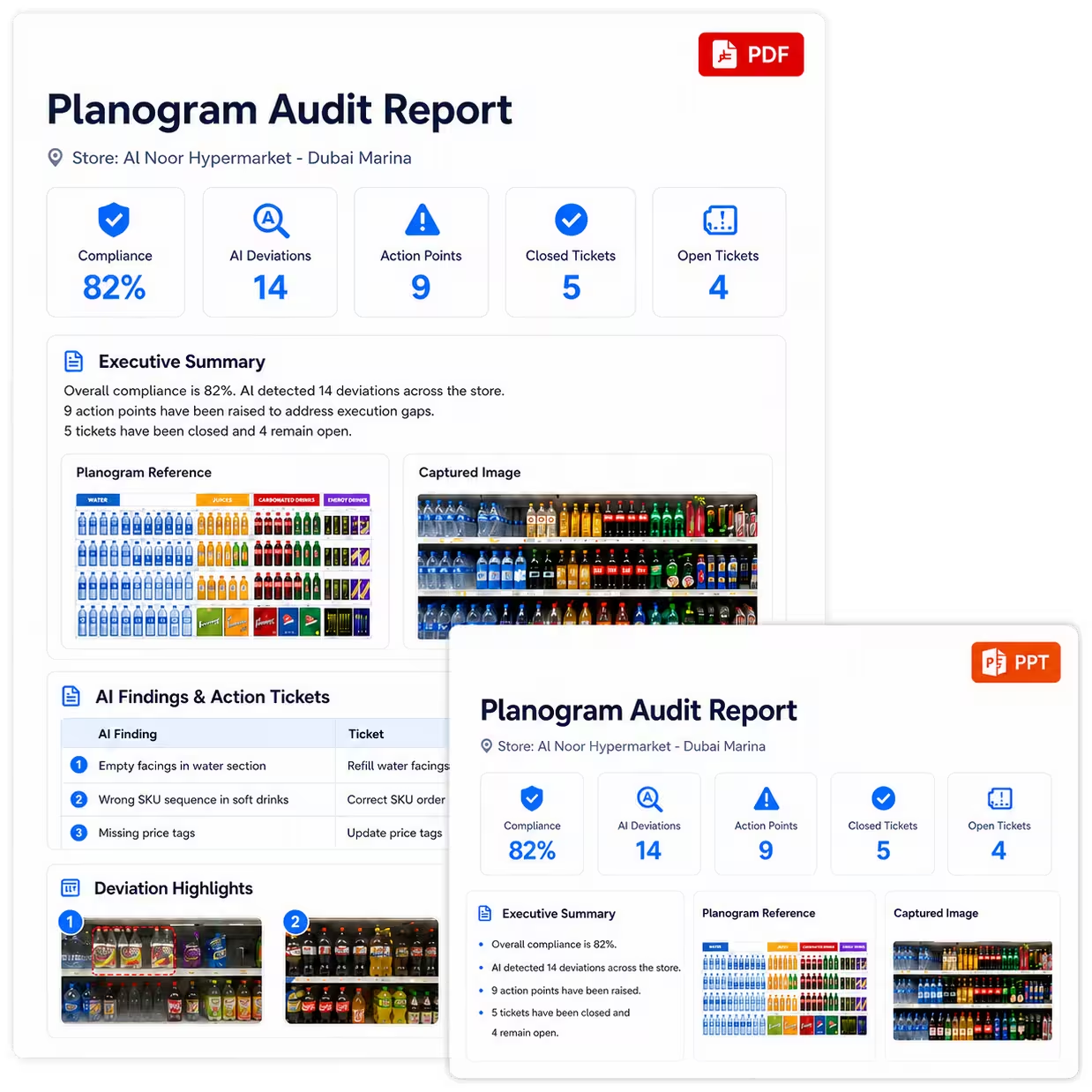
Turn planogram audit data into clear visibility across shelf execution, missing SKUs, product-placement gaps, campaign compliance, corrective actions, and region-wise trends.
View all report insights
- Planogram compliance score by location
- Stores with weak shelf execution
- Most common product placement gaps
- Missing SKU and shelf availability issues
- Campaign and promotional display compliance
- Open vs closed corrective actions
- AI-based recurring pattern detection from historical audit data
Start With a Planogram Audit Checklist
Define shelf-layout checks, placement rules, image requirements, scoring logic, and corrective-action triggers that can be digitized inside Taqtics.
See How Retail Teams Improve Planogram and Store Execution
Explore how multi-location supermarket, sportswear, and luxury retail teams use Taqtics to improve audits, visual execution, corrective actions, and store visibility.


Global Supermarket Chains
How supermarket teams digitized supervisor checklists, store audits, corrective actions, inventory checks, and leadership dashboards.


Global Sportswear Retail Brands
How sportswear stores standardized audits, SOP routines, VM execution, issue resolution, and asset tracking.

Solitario Lab Grown Diamonds
How Solitario improved audit coverage, standardized SOP checks, tracked issues, and scaled compliance across 50+ stores.
Planogram Audit Software Questions
What is planogram audit software?
Planogram audit software helps retail teams check whether products, shelves, displays, labels, and promotions are executed according to approved planogram and merchandising standards.
How does Taqtics verify planogram audit observations?
Taqtics supports geo-fencing, time-bound submissions, live photo capture, comments, timestamps, and location-level audit trails to make shelf and display findings easier to verify.
Can auditors attach shelf images during planogram audits?
Yes. Auditors can capture live shelf, fixture, display, and promotional execution images as proof while completing planogram audits on mobile.
Can planogram non-compliances create corrective actions automatically?
Yes. Failed planogram checks can automatically create corrective actions with owners, deadlines, priorities, escalations, and closure proof.
Can Taqtics generate planogram audit reports?
Yes. Reports can include planogram scores, responses, photo evidence, non-compliances, corrective actions, repeat gaps, and store-level execution insights.
Can Taqtics be used for visual merchandising audits too?
Yes. Planogram audits can be connected with visual merchandising audits, campaign checks, display reviews, and retail brand standards audits.
Make Every Planogram Audit Reliable and Actionable
Digitize planogram audits, validate shelf execution, capture photo proof, generate reports instantly, and close corrective actions faster across every retail store.