
Raise the issue
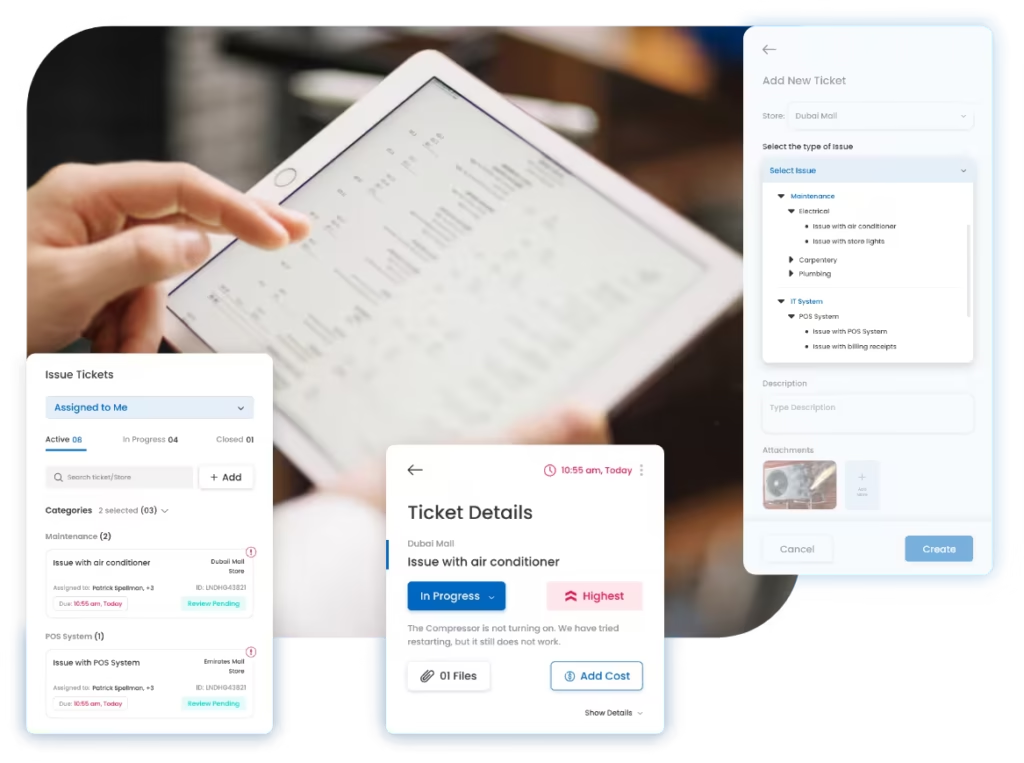
Select the category, describe the problem, and attach live photos or videos from the store.
Make it easy for store teams to report issues, automatically route every ticket to the right team, track deadlines and escalations, and verify the resolution before closure.


Built for retail, restaurant, QSR, café, and multi-location operations teams.
Trusted by multi-location teams across retail and restaurants
Loved by Customers,
Trusted by Experts








A store issue may require coordination between the store team, area manager, maintenance, IT, facilities, quality, operations, or an external vendor.
When reporting happens through calls, messages, email, or spreadsheets, ownership becomes unclear and follow-up depends on people remembering what is still open.
Issue details, urgency, evidence, category, and location are shared inconsistently, creating missing context and repeated clarification.
The issue may be reported, but the store cannot always see who owns it or whether the correct team has received it.
Without response times, due dates, reminders, and escalation rules, urgent issues remain open longer than they should.
A ticket may be marked resolved without adequate repair proof, store confirmation, or a clear validation step.
Leadership lacks a reliable view of repeat failures, slow-closing categories, SLA breaches, and affected locations.
A connected workflow moves every store issue from initial reporting to verified closure while keeping ownership, deadlines, evidence, and status visible.
Select the category, describe the problem, and attach live photos or videos from the store.
Structure tickets by category, severity, priority, department, asset, or business impact.
Route the ticket by issue type, location, department, responsible team, role, or hierarchy.
Owners update status, add comments, coordinate work, and submit resolution evidence.
Send reminders before deadlines and escalate unresolved tickets when SLA limits are crossed.
The store or designated reviewer approves the fix or reopens the ticket when the result is insufficient.
Track recurring issues, resolution time, SLA performance, and stores or categories requiring attention.
Give every team a structured way to report, own, resolve, validate, and learn from store issues across the entire network.
Standardize how issues are raised so the assigned team receives the correct location, category, description, priority, and supporting proof without repeated clarification.
Use routing rules to assign tickets based on issue type, store, region, department, responsible team, role, or escalation hierarchy.
Keep the original issue, assigned owner, work updates, deadline, resolution proof, and final validation connected in one complete record.
Turn ticket history into a clearer view of repeated problems, slow-closing categories, affected locations, SLA performance, and issues creating operational disruption.
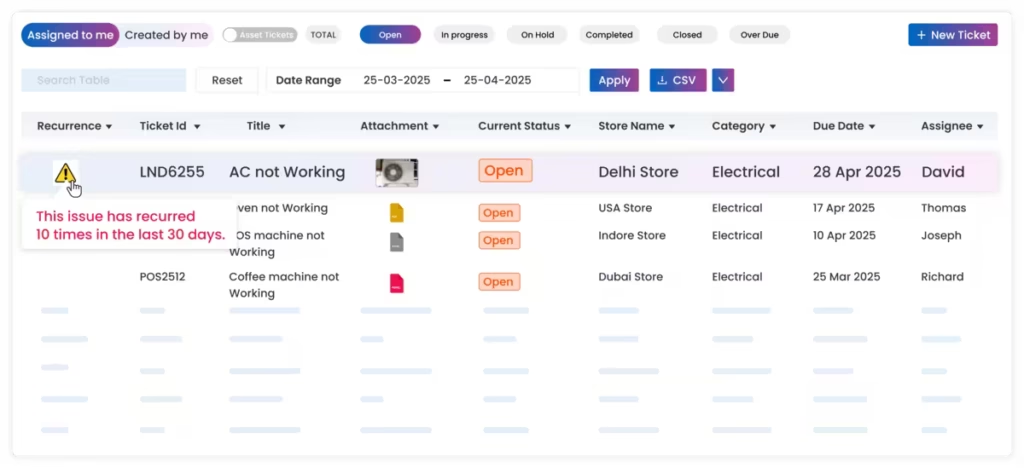
Identify repeated failures before they become accepted operating problems.
Give every team the context and access it needs while keeping accountability and management visibility inside one issue-resolution process.
Raise issues, attach evidence, follow status, and confirm whether the completed fix has resolved the problem.
Monitor unresolved tickets, escalations, recurring problems, and locations requiring management attention.
Receive equipment and infrastructure tickets with store details, visual proof, priority, and deadline.
Manage POS, network, device, application, and access issues across the store network.
Resolve hygiene, safety, process, customer experience, and compliance-related issues.
Track ticket volumes, SLA performance, recurring problems, business impact, and closure trends across locations.
Use the same issue-resolution platform while adapting categories, routing rules, SLAs, ownership, and reports to the way each operation works.
Track store maintenance, POS, lighting, fixtures, visual merchandising, refrigeration, security, housekeeping, and customer-facing issues across every retail location.
Restaurant & QSR OperationsTrack kitchen equipment, refrigeration, plumbing, hygiene, pest sightings, POS, utilities, facilities, and service-area issues across restaurants, cafés, and QSR outlets.
Hear from retail and restaurant teams using Taqtics to strengthen accountability, visibility, and execution across their locations.
Head of Information Technology, PT MAP Boga Adiperkasa
Felix shares how Starbucks Indonesia and MAP Group transformed café operations across 820 locations using Taqtics.
Head of HR and Learning, PizzaExpress
Vidya shares how PizzaExpress modernized daily operations, strengthened accountability, and made reporting faster across its restaurants.
Chief Digital Officer, Kisna
Ruvin shares how the team moved from paper, Excel, calls, WhatsApp, and scattered tools to one structured system for retail execution.
Issue tracking software helps store teams report operational problems, assign them to responsible teams, track deadlines and escalations, capture resolution proof, and monitor closure across locations.
Yes. Routing rules can assign tickets using issue category, store, region, department, role, responsible team, or reporting hierarchy.
Yes. Response times, resolution deadlines, priorities, reminders, and escalation paths can be configured for different issue types and severity levels.
Yes. Users can attach visual evidence when reporting an issue and when submitting resolution proof.
Yes. A designated store user, manager, or reviewer can validate the resolution and reopen the ticket when the fix is incomplete.
Yes. Reports can group tickets by store, region, category, priority, department, status, resolution time, SLA performance, and recurrence.
No. The workflow can support maintenance, facilities, IT, operations, quality, hygiene, safety, equipment, and other store-level issue categories.
Replace calls, WhatsApp groups, email threads, and spreadsheets with one workflow for structured reporting, automatic assignment, deadlines, escalations, resolution proof, and real-time visibility.