
Compliance Audit Software for Consistent Execution Across Every Location
Verify approved procedures, work instructions, documentation, operating standards, approvals, handoffs, and process execution with structured mobile audits, verified evidence, scoring, and corrective actions.
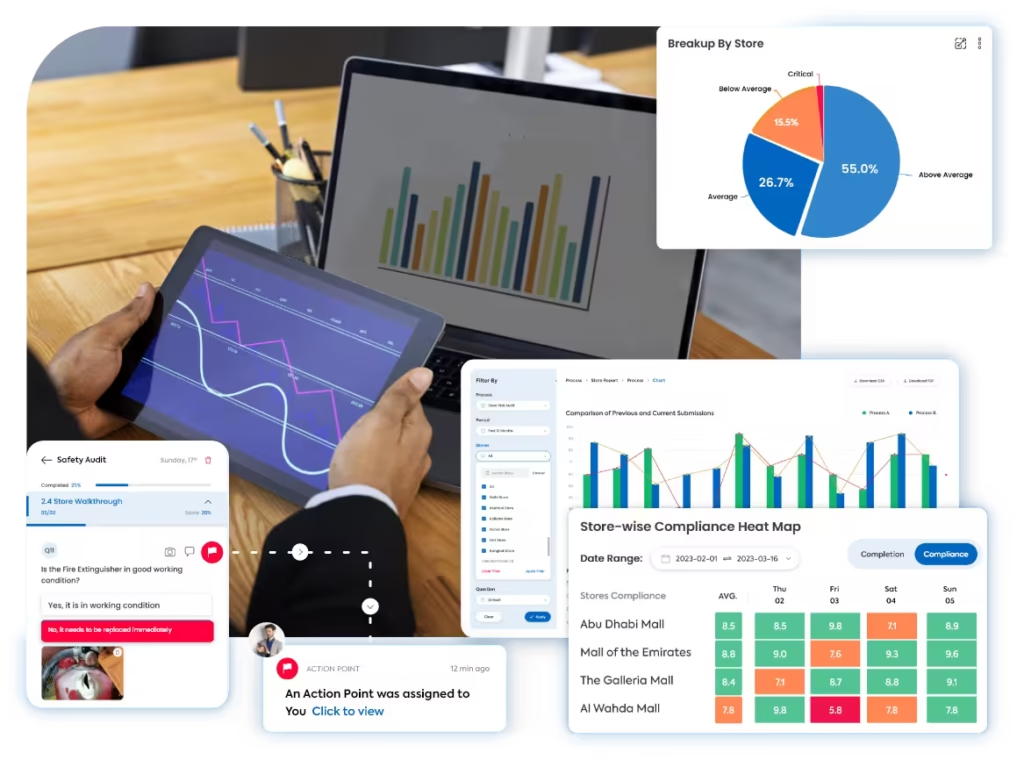
A clearer way to verify how approved processes are actually executed
Taqtics connects SOPs, work instructions, process checks, mobile evidence, scoring, approvals, reports, and corrective actions in one workflow across every location, role, shift, department, and operating process.
Where manual SOP and process audits break down
Select a common execution gap to see why disconnected procedures, spreadsheets, photos, and follow-ups make process consistency difficult to verify.
The same SOP is performed differently across teams and locations
Without clear questions, sequence checks, proof rules, and process criteria, teams can interpret the same procedure differently.
Old work instructions and process documents remain in use
When approved procedures change, outdated forms, local copies, and old instructions can continue guiding execution without a clear version trail.
Managers can see a failed step but not what actually happened
Manual audits often miss the location, time, process stage, version used, supporting photos, comments, and role context behind the deviation.
Process deviations remain audit notes instead of accountable actions
Missed steps, approval gaps, document failures, and repeat deviations are easily lost when ownership, deadlines, escalation, and closure proof sit outside the audit.
What an SOP & Process Audit Should Cover
Move through five execution areas to verify approved procedures, process control points, current documentation, handoffs, sign-offs, deviations, and corrective action closure.
Approved SOPs, work instructions, and required execution sequence
Confirm the team is following the current approved procedure and completing each required step in the expected order.
Process control points, tolerances, and execution checks
Verify critical process stages, checkpoints, limits, approvals, and handoffs are completed before work moves forward.
Current documents, records, forms, and version control
Confirm teams are using the right process documents and that supporting records remain complete, current, and traceable.
Approvals, role ownership, handoffs, and sign-off discipline
Check whether work moves between people, shifts, teams, and process stages with the required authorization and confirmation.
Process deviations, root cause, corrective actions, and re-verification
Turn failed process steps into accountable follow-up and confirm the required process is restored before closure.
How Taqtics Digitizes SOP & Process Audits
Set the approved process once, guide teams through execution, verify each critical step with evidence, and convert deviations into accountable corrective action.
Make Every Process Observation Easier to Trust
Verify the location, time, SOP version, process stage, evidence, score, responsible role, and corrective-action history behind every process finding.
Was the approved opening procedure completed in the required sequence with supervisor verification?
Sequence and supervisor proof requiredIs the team using the current approved SOP version and required process records?
Were required approvals and handoff confirmations completed before the next process stage?
Validated observations
Confirm where, when, and against which process or SOP version each execution response was submitted.
- Geo-fenced and time-bound submissions
- Live photos, comments, document references, and process evidence
- Timestamped location, role, and process-level audit trail
Standardized scoring
Apply the same procedure instructions, critical-step rules, answer types, evidence requirements, and scoring logic across locations.
- Objective process questions and execution criteria
- Critical-step, weighted, partial, and conditional scoring
- Automated SOP adherence and process score calculation
Corrective actions
Assign process deviations, missed approvals, document gaps, and repeat execution failures and track them through verified closure.
- Owners, priorities, and process-based deadlines
- Root-cause notes and escalation for repeat deviations
- Closure proof, re-verification, and status tracking
Connect audits with corrective action tracking software so process deviations are not left unresolved.
Run Different Audits for Different Execution Risks
SOP and process execution is not one checklist. Use focused audits to control what should happen, verify what actually happened, and correct the process when execution deviates.
SOP Adherence Audits
Approved steps, sequence, required controls, role responsibilities, exception handling, and evidence of execution.
Documentation & Version Audits
Current SOP versions, forms, records, local copies, obsolete-document removal, acknowledgements, and supporting evidence.
Process Execution Audits
Control points, operating sequence, tolerances, output checks, task completion, exceptions, and evidence at the point of work.
Approval & Handoff Audits
Supervisor sign-off, release approval, shift transfer, departmental handoff, role authorization, and acknowledgement.
Process Deviation Audits
Missed steps, incorrect sequence, exceptions, root cause, containment, responsible role, recurrence, and process restoration.
Corrective Action & Follow-Up Audits
Action owner, deadline, corrective step, preventive action, closure proof, reinspection, escalation, and repeat-failure verification.
SOP & Process Reports That Reveal Where Execution Is Breaking
Turn audit data into clear visibility across locations, processes, SOP adherence, repeat deviations, missing approvals, documentation gaps, corrective actions, and recurring execution patterns.
View all report insights
- SOP adherence score by location, process, role, or region
- Most common failed process steps and repeat deviations
- Documentation and version-control gaps
- Approval and handoff failure trends
- Open, overdue, and closed corrective actions
- Deviation closure time by owner or process
- AI-based recurring pattern detection from historical audit data
Opening and shift-handover procedures account for the highest repeat deviations across four locations. Review task sequencing, supervisor sign-off, and acknowledgement of the latest SOP version.
Start With a Ready-to-Use SOP Audit Checklist
Define procedures, work instructions, required process steps, approvals, evidence rules, scoring, and corrective-action triggers that can be digitized inside Taqtics.
See How Multi-Location Teams Improve SOP Execution
Explore how operational teams use Taqtics to standardize audits, improve SOP adherence, route issues, close corrective actions, and strengthen visibility across locations.

Solitario Lab Grown Diamonds
How Solitario improved audit coverage, standardized SOP checks, tracked issues, and scaled execution across 50+ stores.


Global Sportswear Retail Brands
How retail teams standardized audits, SOP routines, issue resolution, visual execution, and asset tracking.


Global Supermarket Chains
How supermarket teams digitized supervisor routines, store audits, approvals, corrective actions, and leadership dashboards.
What Is Retail Compliance Audit Software?
Retail compliance audit software helps multi-location retailers plan, execute, document, review, and follow up on audits used to verify whether stores are meeting defined legal, regulatory, internal-policy, safety, operational, and brand requirements.
In practical terms, it replaces disconnected paper checklists, spreadsheets, emails, photos, and manual follow-up with one structured audit workflow. Teams can configure the requirements to be checked, schedule audits, capture evidence, score findings, assign corrective actions, and compare compliance performance across locations.
The software supports the execution and documentation of a compliance program. Retailers still need to identify which laws, standards, internal policies, and control requirements apply to their business and translate those requirements into the appropriate audit criteria.
Compliance Audit Software
Focuses on planning and performing audits, collecting evidence, recording findings, scoring compliance, reporting results, and managing corrective action.
Retail Compliance Software
Applies compliance workflows across stores, regions, teams, and retail processes such as safety, operations, product handling, cash controls, and brand standards.
Retail Compliance Management Software
Extends beyond one audit to help teams coordinate recurring checks, responsibilities, records, issues, actions, reviews, and management visibility over time.
What Retail Compliance Audits Can Cover
Retail compliance is broader than one regulation or one checklist. The audit scope should reflect the requirements that actually apply to the retailer, its locations, products, people, and operating model.
SOP & Process Compliance
Verify approved procedures, opening and closing routines, process controls, handoffs, documentation, and required approvals.
Health, Safety & Security
Check hazards, emergency readiness, equipment, access controls, incident procedures, housekeeping, and store safety requirements.
Labor & Employment Controls
Review store-level controls around required records, schedules, role responsibilities, training, authorizations, and applicable workforce procedures.
Product & Quality Compliance
Verify product handling, labeling, storage, expiry, quality checks, returns, damaged stock, and category-specific operating controls.
Environmental & Sustainability Controls
Audit waste handling, resource-use procedures, storage, disposal, environmental records, and other sustainability controls defined by the business.
Cash & Transaction Controls
Review tills, floats, refunds, discounts, overrides, safe custody, deposits, approvals, and transaction-exception procedures.
Brand & Marketing Compliance
Confirm approved signage, promotions, pricing communication, visual standards, campaign execution, and customer-facing requirements.
Supplier & Contractor Compliance
Check required documentation, service standards, site procedures, evidence, corrective actions, and agreed operating requirements.
Location-Level Compliance
Combine critical controls into recurring store audits so managers can see which locations are compliant, at risk, or overdue for action.
How to Conduct a Retail Compliance Audit
A useful compliance audit starts with clearly defined requirements and ends only after failed controls have been corrected and verified.
Define Scope
Identify locations, processes, requirements, policies, standards, and risks included in the audit.
Assign Responsibility
Define who performs the audit, who reviews it, and which teams own different compliance controls.
Build the Audit
Translate requirements into objective questions, critical controls, scoring rules, and evidence requirements.
Schedule Reviews
Set audit frequency by location, risk, operating cycle, event, department, or compliance requirement.
Execute & Capture Proof
Record responses, photos, comments, documents, timestamps, locations, approvals, and other required evidence.
Review Findings
Identify failed controls, critical findings, repeat gaps, and areas requiring immediate containment or escalation.
Correct Non-Compliance
Assign owners, deadlines, priorities, root-cause work, corrective actions, and supporting closure evidence.
Verify & Improve
Recheck closure, analyze trends, update controls where needed, and use recurring findings to improve the compliance program.
What to Look for in Compliance Audit Software
The right platform should make audits easier to standardize in head office and easier to execute in the field, while preserving a reliable trail from finding to closure.
Create audit questions, sections, answer types, instructions, scoring, conditional logic, and critical controls around your own requirements.
Run recurring or ad-hoc compliance reviews by store, region, team, role, department, or risk level.
Use timestamps, geolocation controls, live photos, comments, documents, counts, and other evidence to support findings.
Apply weighted, partial, conditional, negative, or critical-failure logic so important controls are not hidden inside an average score.
Route completed audits through reviewer checks where the operating model requires validation or management approval.
Convert findings into accountable work with owners, deadlines, escalation, evidence, and closure verification.
Compare audit scores, failed controls, overdue actions, recurring findings, location trends, and compliance status across the network.
Evaluate role-based access, traceability, data export, integration needs, and how well the platform fits the retailer's wider systems.
Why Multi-Location Retailers Use Compliance Software
Digitization is most valuable when it improves the quality of the audit itself and makes the response to non-compliance faster and more accountable.
Standardized Compliance Checks
Apply the same criteria and evidence requirements across locations while allowing controlled variations where needed.
Better Audit Traceability
Keep responses, evidence, timestamps, findings, reviewer activity, actions, and closure history linked to the audit.
Faster Corrective Action
Move failed controls directly into assigned actions instead of relying on separate emails, spreadsheets, or follow-up calls.
Real-Time Visibility
See which locations have completed audits, where critical failures exist, and which actions remain open or overdue.
Risk-Based Prioritization
Use critical controls, scores, recurring failures, and overdue actions to focus management attention on higher-risk gaps.
Continuous Improvement
Use repeated findings and trend data to improve SOPs, training, ownership, audit design, and store support.
How to Choose Retail Compliance Management Software
Start with the controls and workflows your teams actually need to manage, then evaluate how easily the platform can scale across locations without weakening audit quality.
Document your audit types, locations, control areas, evidence rules, review requirements, and reporting needs before comparing platforms.
Confirm templates, scoring, critical questions, logic, workflows, permissions, corrective actions, and reports can reflect your operating model.
Auditors and store teams should be able to complete audits, add evidence, respond to actions, and understand priorities easily on mobile.
Make sure the structure works across more stores, regions, audit programs, roles, languages, and operating formats as the network grows.
Assess the vendor's security posture, role-based access, data handling, audit trail, and requirements relevant to your organization.
Evaluate onboarding, template migration, training, pilot support, integrations, reporting setup, and ongoing vendor support.
How to Implement Compliance Management Software Across Stores
Start with a controlled rollout, prove the workflow, then expand the program without simply digitizing every legacy form and manual step.
Prioritize Compliance Programs
List the audits, controls, locations, owners, frequencies, and evidence requirements that matter most.
Build Templates & Roles
Set questions, scoring, critical controls, schedules, users, approvals, actions, and reporting structure.
Test With Real Stores
Run a smaller pilot to validate usability, evidence quality, scoring, escalation, reporting, and closure workflows.
Roll Out & Improve
Train teams, monitor adoption, analyze recurring findings, refine templates, and expand the program across the network.
Who Uses Retail Compliance Audit Software?
Compliance execution usually spans several roles. The software should give each group the information and actions relevant to its responsibility.
Internal Audit & Compliance Teams
Design audit programs, review findings, monitor risk, track actions, and report compliance performance.
Regional & Area Managers
Compare store performance, prioritize high-risk locations, review repeat failures, and support corrective action.
Store Managers
Complete or support store audits, provide evidence, resolve findings, and maintain day-to-day compliance controls.
Quality, Safety & Operations Teams
Own specialist controls, investigate repeated gaps, update requirements, and verify remediation in their functional areas.
Training Teams
Use audit findings to identify knowledge gaps and target refresher training where recurring non-compliance indicates a capability issue.
Leadership
Use dashboards and trend reports to understand compliance health, open risk, corrective-action progress, and location-level patterns.
Retail Compliance Audit Software Questions
What is compliance audit software?
Compliance audit software is used to plan, perform, document, review, and follow up on audits that test whether defined requirements are being followed. It can centralize audit templates, schedules, evidence, findings, scores, reports, corrective actions, and closure records.
What is retail compliance management software?
Retail compliance management software helps retailers coordinate recurring compliance work across stores, regions, and teams. It can support scheduled checks, audits, evidence collection, issue management, corrective actions, approvals, dashboards, and historical records across locations.
What types of retail compliance audits can be digitized?
Retailers can digitize audits for SOP and process compliance, health and safety, product and quality controls, cash procedures, brand standards, labor-related store controls, environmental procedures, supplier requirements, store readiness, and other internal or external requirements relevant to their business.
How do you conduct an effective retail compliance audit?
Define the audit scope and applicable requirements, assign responsible auditors, translate requirements into objective checks, schedule the audit, capture evidence, review findings, assign corrective actions, verify closure, and analyze repeat gaps to improve the program.
What evidence can be captured during a compliance audit?
Depending on the audit design, evidence can include photos, videos, comments, documents, counts, readings, timestamps, location information, approvals, acknowledgements, and other records needed to support the audit finding.
Can failed compliance checks create corrective actions?
Yes. Failed or critical checks can be routed into actions with an owner, priority, due date, escalation path, required closure evidence, and re-verification so the audit does not end with an unresolved finding.
Can managers compare compliance performance across stores?
Yes. A digital audit platform can compare scores, failed controls, critical findings, recurring issues, overdue actions, closure rates, and trends across stores, regions, audit types, and time periods.
Does compliance audit software automatically guarantee regulatory compliance?
No. Software can standardize, document, monitor, and improve the execution of a compliance program, but the organization remains responsible for identifying the laws, regulations, standards, policies, and controls that apply to its operations and for keeping those requirements current.
How should a retailer choose compliance audit software?
Evaluate requirement fit, template flexibility, mobile usability, evidence controls, scoring, critical-failure handling, corrective actions, reporting, multi-location scalability, access controls, integrations, implementation support, and how easily store teams can adopt the workflow.
Make Every SOP & Process Audit Reliable and Actionable
Digitize procedure and process audits, verify execution with evidence, identify recurring deviations, standardize scoring, and close corrective actions faster across every location.