
Store Inspection Software for Multi-Location Retail Teams
Run routine store inspections from mobile devices, document current conditions with photo, time and location proof, flag defects immediately, and route every issue to the right team for resolution.
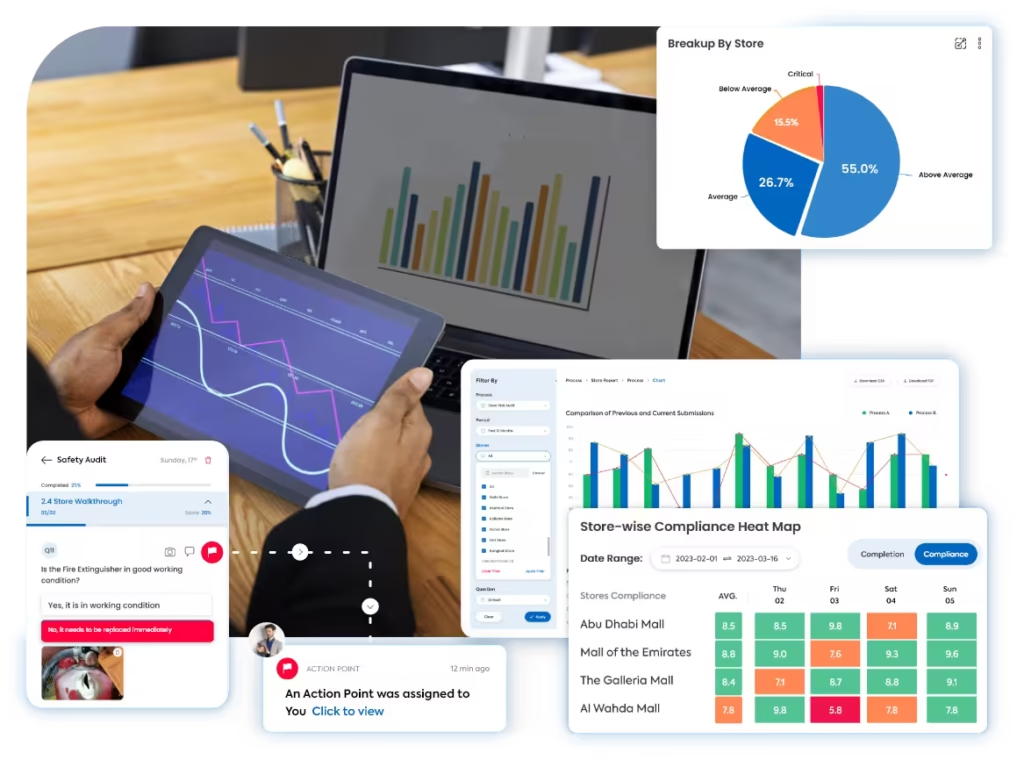
A Faster Way to Inspect Store Conditions and Fix What Is Wrong
Taqtics connects inspection rounds, mobile observations, field evidence, issue ownership and closure verification in one workflow across every retail location.
Where Manual Store Inspection Rounds Break Down
Select a common gap to see why paper forms, spreadsheets and follow-up messages make routine store-condition checks harder to manage.
Different stores get checked in different ways
Without a standard mobile inspection flow, managers can skip areas, use different forms or record observations with different levels of detail.
Head office cannot verify the store condition
Photos, comments, time and location are often stored separately or captured after the inspection round.
Defects sit in reports instead of reaching the right team
A maintenance, VM, IT, safety or stock issue can lose valuable time when ownership starts only after someone manually reviews the inspection.
An issue is marked fixed without proof
When follow-up happens through calls and messages, deadlines, escalation and evidence of the final correction are difficult to track consistently.
What Can Retail Teams Inspect During a Store Walk?
Inspect the current condition of customer-facing areas, stock, systems, equipment, safety controls, visual standards and back-of-house operations.
Storefront, entrance and customer readiness
Confirm the location is accessible, clean, safe and ready for customers before or during trading.
People, presentation and service readiness
Check whether frontline teams and service areas are ready to support customers properly.
POS, shelf availability and stock conditions
Review the store conditions that can interrupt transactions or leave customers unable to buy.
Cleanliness, facilities, safety and security
Identify current store conditions that create operational, safety or customer-experience risk.
Visual execution and back-of-house condition
Spot current merchandising deviations, storage problems and operational defects before they persist.
From Store Walk to Verified Fix in One Inspection Workflow
Standardize what needs to be checked, capture the current condition on mobile, route defects to the right team and verify that every important issue is resolved.
Store Inspection Software vs Retail Audit Software
Both workflows can use structured questions and evidence, but they solve different operating needs. Use store inspections for frequent condition checks and formal retail audits for scored assessments against a defined standard.
Know What Was Observed, Where It Happened and Whether It Was Fixed
Keep the original inspection observation, supporting evidence, issue owner, deadline, correction proof and final status connected in one record.
Is the store entrance clean and free from obstruction?
Photo evidence required for issueAre campaign displays installed and in good condition?
Are all customer-facing lights and fixtures operational?
Verified field observations
Confirm where and when the condition was observed and keep supporting proof attached.
Verified field observations
Confirm where and when the condition was observed and keep supporting proof attached.
- Geo-fenced and time-bound inspection submissions
- Live photos, comments, readings and documents
- Location-level inspection history
Issue routing and ownership
Move a failed condition directly to the team responsible for fixing it.
Issue routing and ownership
Move a failed condition directly to the team responsible for fixing it.
- Maintenance, VM, IT, safety, stock or store-level ownership
- Priority, due date and escalation rules
- Status visibility for store and regional teams
Closure proof and re-verification
Do not stop at “fixed”; verify the condition after corrective work is completed.
Closure proof and re-verification
Do not stop at “fixed”; verify the condition after corrective work is completed.
- Correction photos and completion comments
- Manager or reviewer validation where required
- Repeat-condition tracking across inspection rounds
Connect inspections with issue and corrective-action tracking so store defects do not disappear into reports.
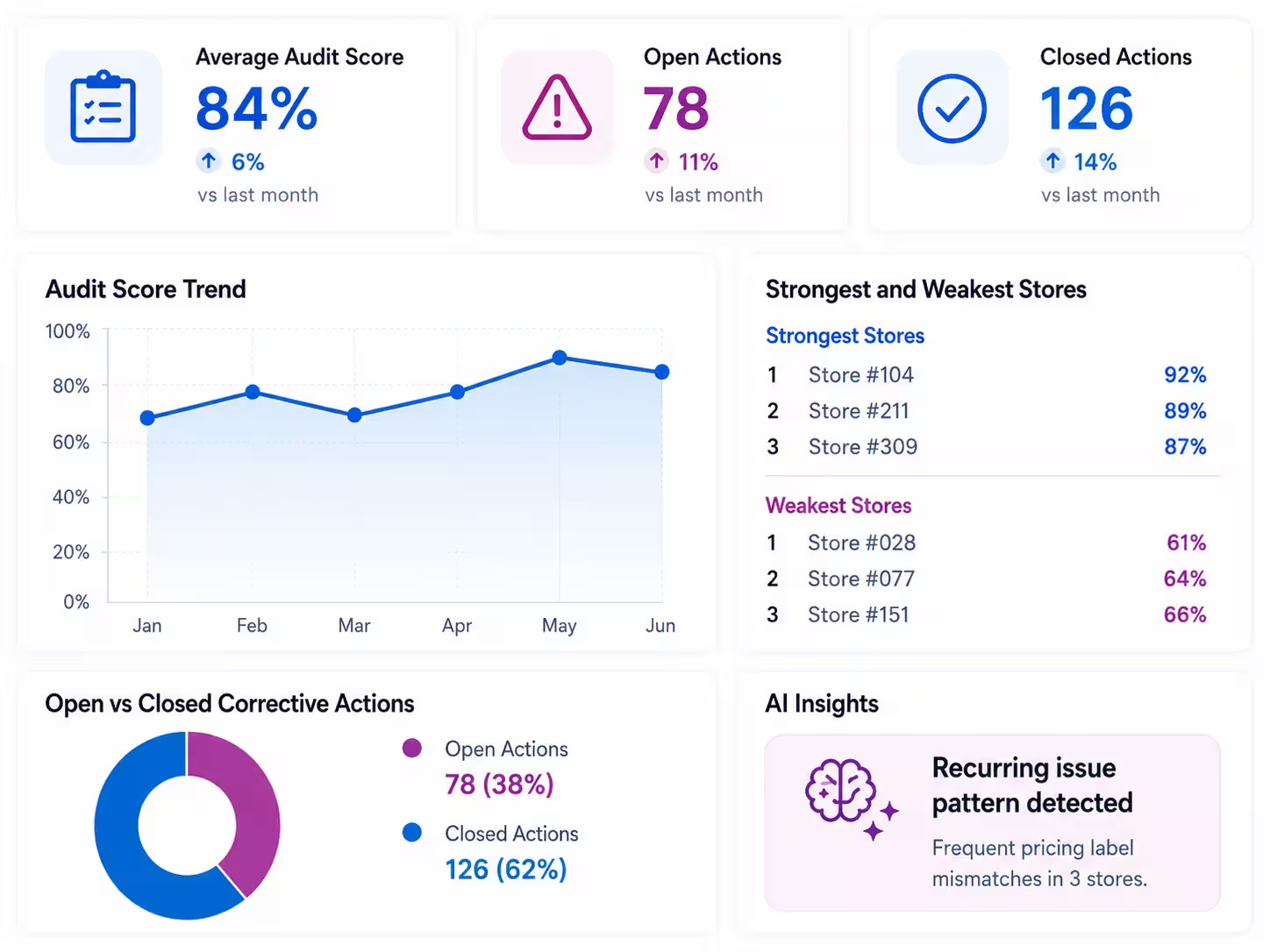
See Which Store Conditions Keep Creating Problems
Move beyond individual inspection forms to understand recurring defects, unresolved issues, location patterns and the operating areas that need attention.
View all inspection insights
- Inspection completion by location
- Most frequently observed store issues
- Open vs resolved defects
- Average issue-closure time
- Repeat defects by category
- Region-wise inspection activity
- Locations with recurring maintenance or readiness problems
Start With a Store Inspection Checklist That Matches the Store Walk
Use focused templates for store readiness, opening, closing, maintenance, safety and customer-facing conditions instead of turning every inspection into one oversized formal audit.
See How Retail Teams Improve Store-Level Execution
Explore how multi-location retailers use Taqtics to standardize store checks, surface issues, improve follow-up and strengthen visibility across locations.

Solitario Lab Grown Diamonds
How Solitario standardized store checks, SOP execution, issue follow-up and operational visibility across 50+ stores.


Global Sportswear Retail Brands
How sportswear stores standardized operating checks, visual merchandising, issue resolution and asset follow-up.


Global Supermarket Chains
How supermarket teams digitized store checks, corrective actions, inventory routines and leadership visibility.
Store Inspection Software Questions
What is store inspection software?
Store inspection software helps retail teams run recurring checks of current store conditions, capture evidence on mobile devices, flag operational defects, assign issues and verify that important problems are resolved.
What is the difference between store inspection software and retail audit software?
Store inspection software is best suited to frequent condition checks and issue resolution. Retail audit software is better suited to formal, scored assessments against defined standards, often with weighted scoring, audit reports and cross-location benchmarking.
Can store inspections be completed on a mobile app?
Yes. Retail teams can complete store inspections on mobile devices, record the current condition, capture photos and comments, and submit evidence from the store.
What can be inspected during a retail store walk?
Common inspection areas include the storefront, sales floor, cleanliness, stock availability, POS condition, fixtures, visual merchandising, maintenance, safety, security, stockroom and other back-of-house conditions.
Can an inspection issue be assigned automatically?
Taqtics can connect failed inspection conditions to issue workflows with an owner, priority, due date, escalation path and closure evidence.
Can managers verify that a store issue was actually fixed?
Yes. Teams can attach correction proof and track the issue through closure so managers can review the final condition rather than relying only on a verbal update.
Can Taqtics show recurring problems across stores?
Inspection history and issue data can be used to compare locations, identify repeated defects and see which operating areas continue to require attention.
Find Store Issues Faster. Route Them. Verify the Fix.
Run mobile store inspections, capture reliable field evidence, assign defects to the right team and track every important issue through closure.