
Run Daily Site Execution
Schedule recurring SOPs and checks by site, role, department, zone, or operating frequency.
Digitize recurring SOPs, site checks, audits, issue resolution, convenience-store execution, and corrective actions across every gas station from one multi-location operations platform.


For forecourts, convenience stores, foodservice, service bays, facilities, safety, supplier reviews, and network operations.
Trusted by multi-location operations teams






Gas station networks often already have systems for fuel, transactions, inventory, finance, or ERP. Taqtics focuses on the operational work around those systems: recurring SOPs, inspections, issue closure, evidence, visual standards, and site-level accountability.
Schedule recurring SOPs and checks by site, role, department, zone, or operating frequency.
Conduct mobile audits with location, time, readings, photos, scoring, and inspection history.
Route issues and failed checks to the correct owner with deadlines, escalations, and closure proof.
A gas station is not one operating area. Forecourts, convenience stores, foodservice, service bays, restrooms, facilities, and support teams all run different recurring checks.
When each team follows a separate process, management sees activity but not a reliable picture of whether standards were followed and problems were actually closed.
Daily routines vary by department, manager, and location when SOPs live in static forms and local processes.
A completed form does not confirm the correct location, timing, actual condition, reading, or visual proof.
Maintenance, safety, foodservice, restroom, POS, and facility problems can remain open when follow-up happens through calls or messages.
Shelf standards, promotions, cooler displays, and planograms are difficult to compare consistently across a large network.
Weak sites, repeat issues, delayed actions, foodservice gaps, and supplier performance are harder to spot early without live dashboards.
Connect recurring work, inspections, issue resolution, corrective actions, and management reporting in one operating flow.
Define locations, operating areas, roles, checklists, audit templates, and routing rules.
Auto-assign recurring tasks by location, role, department, shift, or required frequency.
Capture geo-verified observations, live photos, readings, comments, scores, and critical failures.
Assign the right owner and track deadlines, escalations, progress, and resolution proof.
Identify weak locations, recurring problems, overdue actions, and operational patterns.
Configure different checklists, audits, issue categories, evidence rules, and reports for each part of the gas station operation.
Pump condition, hoses, nozzles, signage, lighting, cleanliness, safety equipment, spill readiness, and exterior standards.
Opening readiness, shelves, pricing, promotions, coolers, POS readiness, cash controls, stock presentation, and customer areas.
Coffee, bakery, hot food, chilled products, temperatures, expiry, hygiene, cleaning, waste, and display readiness.
Bay readiness, tools, safety, service steps, housekeeping, equipment condition, consumables, and customer handover checks.
Restrooms, HVAC, lighting, plumbing, fire equipment, emergency readiness, hazards, housekeeping, and repair follow-up.
Customer service, employee presentation, mystery visits, contractor execution, and supplier performance checks.
Move from disconnected forms and follow-ups to an operating system that makes site standards measurable and action-oriented.
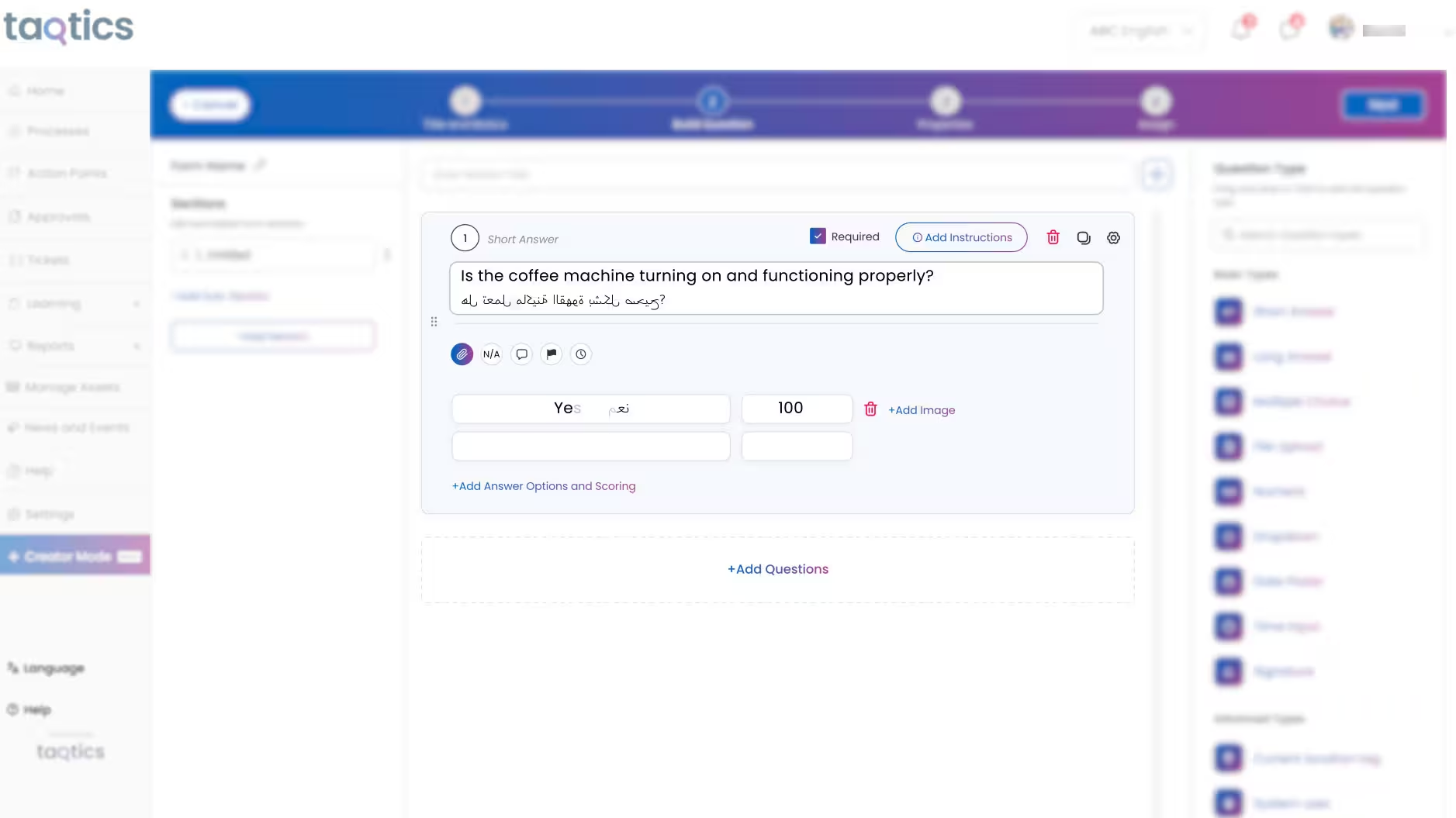
Turn daily, weekly, monthly, and shift-based routines into structured digital checklists automatically assigned to the correct teams.
Make audit results easier to validate with location controls, timestamps, live evidence, structured readings, scoring, and a complete site-level trail.
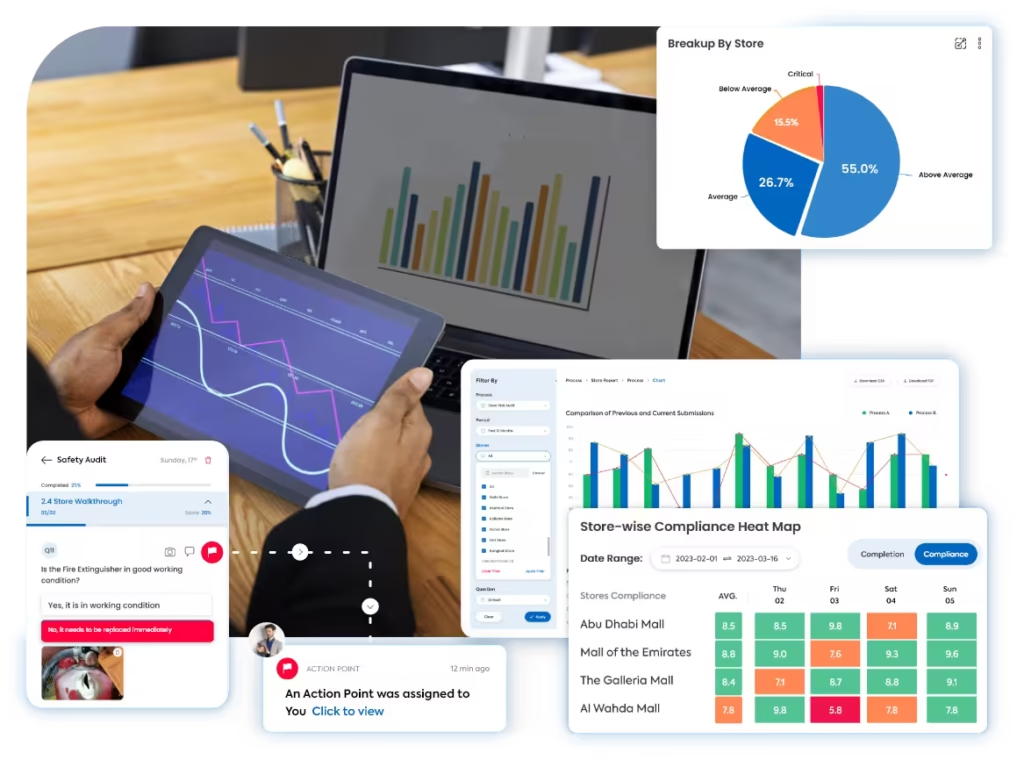
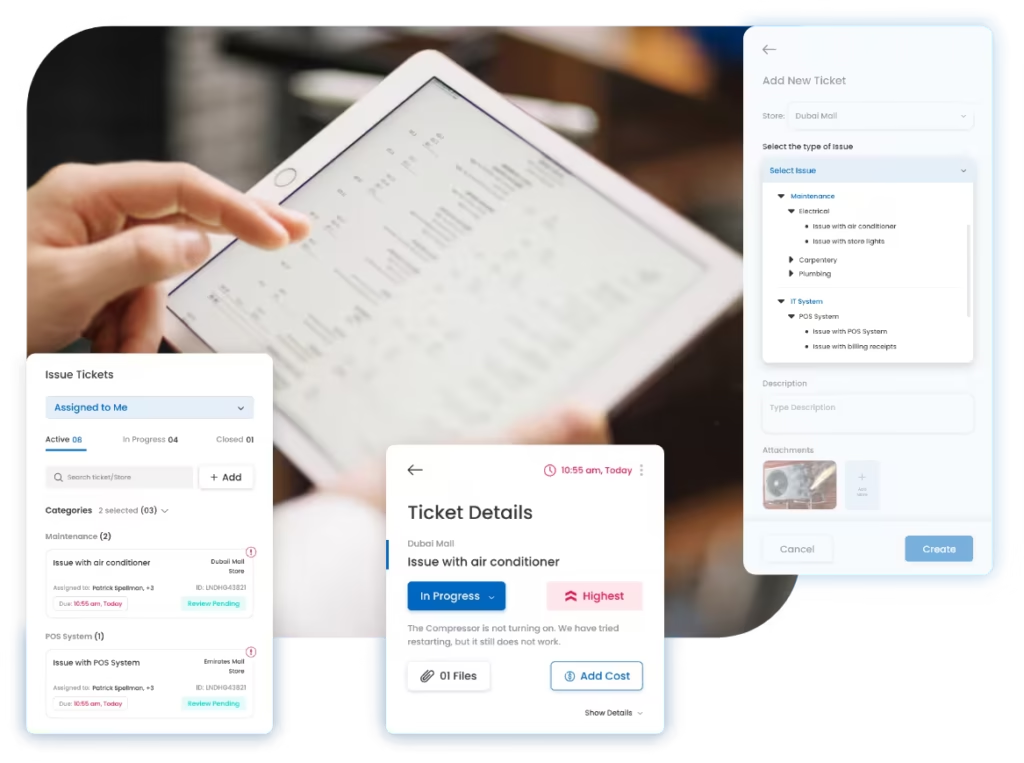
Connect operational problems to the people responsible for fixing them and keep every issue visible until closure is verified.
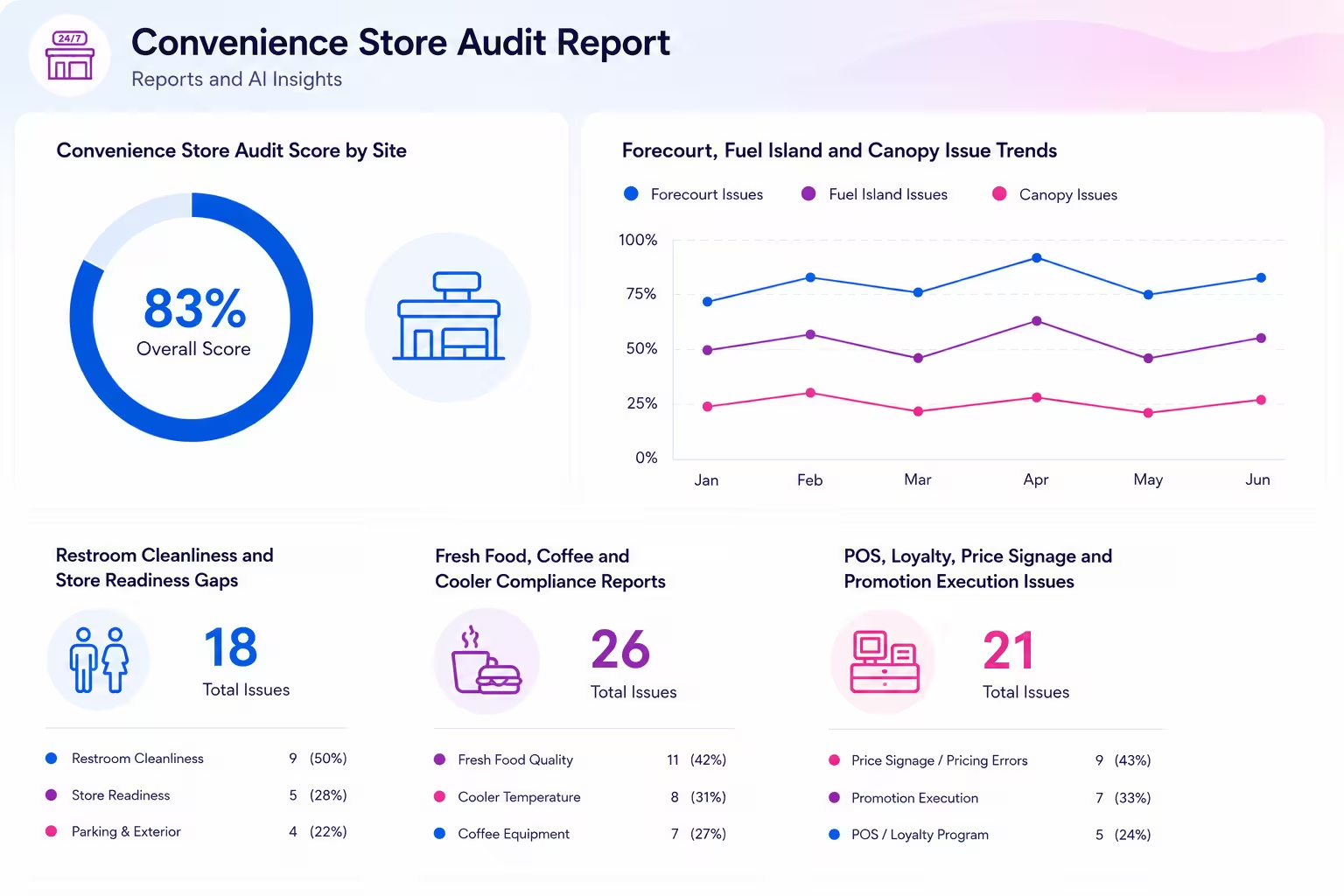
Compare operational performance across locations while giving convenience-store teams a structured way to execute and review shelf, display, pricing, and promotional standards.
Use ready-to-adapt templates to define site checks before digitizing scheduling, evidence, scoring, issue routing, and corrective actions inside Taqtics.
Hear from teams using Taqtics to improve consistency, accountability, visibility, and execution across large location networks.
Head of Information Technology, PT MAP Boga Adiperkasa
Felix shares how Starbucks Indonesia and MAP Group transformed café operations across 820 locations using Taqtics.
Head of HR and Learning, PizzaExpress
Vidya shares how PizzaExpress modernized daily operations, strengthened accountability, and made reporting faster across restaurants.
Chief Digital Officer, Solitario Diamonds
Ruvin shares how the team moved from paper, Excel, calls, WhatsApp, and scattered tools to one structured operating system.
Gas station management software is a broad category of technology used to manage the operational, transaction, inventory, workforce, maintenance, compliance, and reporting needs of fuel stations and convenience-store networks.
Different systems handle different parts of the operation. Fuel-management and forecourt systems may manage dispensing, wet stock, pump activity, or fuel transactions. POS and back-office systems handle sales, payments, inventory, and financial data. Operations-management software focuses on whether site teams complete the required SOPs, inspections, audits, maintenance checks, issue follow-up, and store standards correctly.
For multi-site operators, the objective is not necessarily to replace every existing system. It is to connect the operating processes around those systems so managers can verify what happened at each site, identify gaps earlier, and track corrective action to closure.
Typically support fuel dispensing, tank or wet-stock monitoring, fuel transactions, pump controls, and other fuel-specific processes.
Typically manages checkout, payments, store sales, product inventory, pricing, promotions, and financial or back-office data.
Helps standardize recurring tasks, inspections, audits, issue resolution, visual standards, corrective actions, and performance visibility across sites.
The legacy idea of one system managing every station function can be misleading. Most operators use a combination of specialized systems, with each platform responsible for a different part of the business.
For site execution, the most useful capabilities are the ones that help teams complete recurring work correctly, prove it happened, and resolve exceptions before they become repeat problems.
Schedule opening, closing, forecourt, restroom, foodservice, convenience-store, safety, and facility routines by site, role, shift, or frequency.
Capture answers, readings, photos, timestamps, location information, scoring, and critical failures during field inspections.
Route maintenance, safety, equipment, facility, IT, and operating issues to the correct owner with deadlines and closure evidence.
Distribute visual references, collect site images, review promotions or planograms, and act on display deviations across the network.
Standardize safety, housekeeping, emergency-readiness, foodservice, and operating checks with stronger proof where required.
Compare completion, audit scores, recurring gaps, open issues, overdue actions, and site-level trends across regions.
The main operational value comes from replacing local follow-up and inconsistent processes with a repeatable system that makes site execution easier to verify and improve.
Give every location the same approved tasks, audit criteria, timing, and evidence requirements while allowing controlled site-specific variations.
See which routines were completed, where inspections failed, and which sites have open or overdue work without waiting for manual reports.
Move site problems from calls or messages into assigned workflows with priority, due times, escalation, progress, and proof of closure.
Keep site, time, evidence, score, finding, owner, action, and closure history connected so managers can understand what actually happened.
Turn checklist, audit, issue, and action data into structured reports and dashboards instead of compiling spreadsheets after each review cycle.
Use the same operating framework as the business expands to more stations, regions, formats, foodservice offers, and convenience-store concepts.
Start by deciding which part of the gas station technology stack you are trying to improve. A fuel-management requirement is different from a POS requirement, and both are different from a multi-site execution problem.
Clarify whether you need fuel controls, POS, inventory, accounting, workforce management, site execution, compliance, maintenance, or a combination.
Make sure the system can support more stations, regions, formats, users, operating areas, and workflows without adding heavy administration.
Station teams should be able to complete recurring work, attach proof, raise issues, and understand assigned actions easily from mobile devices.
Look for adaptable checklists, inspections, scoring, schedules, assignment rules, permissions, actions, escalation, and reporting.
Identify where operational data needs to work alongside existing fuel, POS, ERP, inventory, finance, BI, or workforce systems.
Consider implementation help, workflow setup, pilot support, training, ongoing maintenance, security, and the vendor's ability to support expansion.
A controlled rollout is usually more useful than digitizing every legacy process at once. Start with a small number of high-value workflows, prove adoption, and then expand.
Define stations, regions, forecourts, c-stores, foodservice, facilities, service bays, teams, and responsible roles.
Select recurring SOPs, inspections, issue categories, maintenance checks, or compliance routines with clear operational value.
Build templates, schedules, evidence rules, scoring, routing, dashboards, and pilot them with a representative group of stations.
Train teams, monitor adoption and data quality, refine the workflows, then expand across the wider station network.
Gas station management software is a broad category that can include fuel-management, POS, inventory, finance, workforce, maintenance, compliance, and site-operations systems. Different products manage different parts of the station technology stack.
A fuel management system is usually focused on fuel-specific functions such as dispensing, pump controls, fuel usage, tank or wet-stock monitoring, and fuel transaction data. Gas station management software is a broader term that can also include POS, retail inventory, workforce, compliance, maintenance, and operational execution.
Fuel pumps typically work with specialized forecourt or fuel-management technology that controls dispensing and records fuel transactions. That software may connect with POS, payment, tank-monitoring, back-office, and operations platforms depending on the station's technology setup.
Taqtics can support forecourt and fuel-island checks, convenience-store operations, foodservice and cold-chain routines, lube or service-bay checks, restrooms, facilities, safety inspections, mystery visits, supplier reviews, issue resolution, corrective actions, and multi-site reporting.
No. Taqtics is focused on the operations execution layer: SOPs, inspections, audits, issues, corrective actions, visual standards, and operational reporting. It can complement existing fuel, POS, inventory, ERP, and finance systems.
Yes. Recurring checklists can be scheduled and assigned based on location, role, department, shift, designation, or configured responsibility rules.
Yes. Taqtics supports workflows using geo-fencing, timestamps, time-bound submissions, live photos, readings, comments, and structured fields when stronger verification is required.
Yes. Failed or critical inspection items can create actions with owners, priorities, due dates, escalation rules, status tracking, closure evidence, and re-verification.
Yes. Convenience-store teams can receive approved visual guidance, submit execution images, and use AI-assisted image review to flag likely display or planogram deviations for manual validation.
Start by defining the problem you need to solve, then evaluate multi-location scalability, field usability, configuration flexibility, evidence and audit controls, issue management, reporting, integration needs, security, implementation support, and the vendor's ability to support expansion.
Yes. Reports and dashboards can compare completion, inspection scores, recurring gaps, issue categories, overdue actions, corrective-action closure, and other configured operational measures across locations and regions.
Start with one recurring SOP, audit program, issue category, or operating area. Taqtics can connect site execution, evidence, corrective actions, and reporting across the network.