
Dock and Yard Inspection Software for Safer Vehicle and Yard Movement
Standardize inspections across gates, traffic lanes, trailer parks, staging zones, dock approaches, and external warehouse areas. Verify vehicle movement controls, yard surfaces, pedestrian segregation, visibility, security, and emergency readiness while assigning corrective actions for every dock and yard risk.
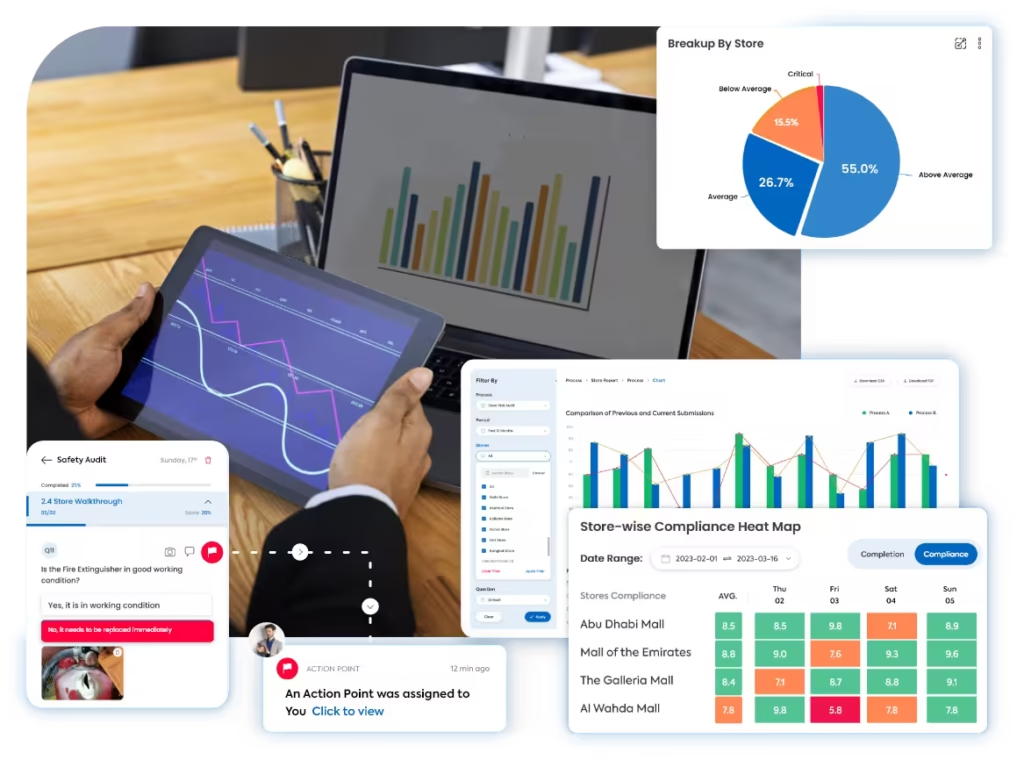
A clearer way to inspect every dock and yard zone
Taqtics connects yard inspection templates, zone-level observations, photographic evidence, risk scoring, reports, ownership, and corrective actions across every warehouse exterior, gate, lane, parking area, staging zone, and dock approach.
Where manual dock and yard inspections break down
Select a common gap to see how disconnected yard checks increase traffic, collision, infrastructure, and security risk.
The same yard condition is judged differently across shifts
Without clear traffic, parking, surface, lighting, security, and dock-approach standards, teams apply different risk and release decisions.
Managers cannot verify the actual movement hazard
Manual records often separate potholes, blocked routes, poor visibility, unsafe trailer parking, spills, and damaged barriers from live photographs and inspection time.
Findings are not tied to the correct gate, lane, or dock
When the exact yard zone, traffic route, parking bay, staging area, dock approach, vehicle, and shift are missing, repeat risks are difficult to identify.
Yard hazards remain open across multiple shifts
When actions sit outside the inspection workflow, ownership, temporary controls, repair deadlines, escalation, closure evidence, and reinspection are easily missed.
What a Dock and Yard Inspection Should Cover
Review gate controls, vehicle routes, yard surfaces, trailer parking, staging areas, dock approaches, pedestrian safety, lighting, housekeeping, security, emergency readiness, and corrective-action follow-up.
Control Every Vehicle Entering and Moving Through the Yard
Verify gate procedures, traffic direction, speed control, signage, barriers, communication, and safe vehicle separation.
Keep Yard Surfaces, Trailer Parks, and Staging Areas Safe
Inspect ground condition, drainage, markings, parking discipline, trailer support, and safe staging of vehicles and goods.
Inspect the Approach to Every Dock and Loading Bay
Review vehicle alignment, dock equipment, approach clearance, restraints, doors, bumpers, edge protection, and visible damage.
Separate Pedestrians From Vehicles and Improve Visibility
Verify walkways, crossings, PPE, lighting, blind-spot controls, housekeeping, and safe behaviour across the yard.
Protect the Yard and Keep Emergency Routes Ready
Inspect perimeter security, surveillance, restricted areas, emergency access, fire points, incident controls, and action closure.
How Taqtics Digitizes Dock and Yard Inspections
Set the yard standard once, guide teams through every external zone, calculate risk consistently, and convert failed checks into accountable actions.
Make Every Dock and Yard Finding Easier to Verify
Verify the warehouse, yard zone, gate, lane, dock, inspection time, condition, evidence, score, assigned owner, and closure status behind every finding.
Are vehicle routes, speed signs, and line markings clearly visible?
Evidence is required for a failed responseAre yard surfaces free from potholes, standing water, spills, and debris?
Are pedestrian walkways and crossings unobstructed and clearly separated?
Validated observations
Confirm exactly where, when, and under which operating conditions each yard observation was recorded.
+
Validated observations
Confirm exactly where, when, and under which operating conditions each yard observation was recorded.
- Warehouse, yard, gate, lane, dock, parking, and staging-zone context
- Geo-verified and timestamped inspection with responsible-user details
- Live photographs of traffic routes, surfaces, parking, lighting, barriers, and hazards
- Vehicle, trailer, asset, incident, weather, and shift references where required
Standardized scoring
Apply the same traffic, surface, dock, pedestrian, security, and emergency standards across sites and shifts.
+
Standardized scoring
Apply the same traffic, surface, dock, pedestrian, security, and emergency standards across sites and shifts.
- Zone-specific instructions and condition standards
- Compliant, Non-compliant, and N/A answer rules
- Critical, major, and minor hazard classifications
- Weighted scoring with automatic yard-safety calculation
Corrective actions
Assign every yard hazard and track temporary controls, repair, and reinspection through closure.
+
Corrective actions
Assign every yard hazard and track temporary controls, repair, and reinspection through closure.
- Owners, priorities, deadlines, temporary controls, and overdue escalations
- Routing to warehouse, transport, facilities, maintenance, EHS, security, or contractor teams
- Barrier placement, route closure, resurfacing, relining, lighting repair, cleanup, or equipment replacement
- Closure evidence, reviewer approval, reinspection, and reopening when required
Connect yard inspections with corrective action tracking software so movement and infrastructure risks are not left unresolved.
Dock and Yard Reports That Show Where Movement Risk Is Increasing
Turn inspection data into visibility across yard safety, traffic routes, surfaces, parking, dock approaches, pedestrian controls, security, corrective actions, and recurring external-site risks.
View all report insights +
- Overall dock and yard safety score
- Site, yard, gate, lane, and dock-level performance
- Traffic-route and speed-control findings
- Gate, barrier, sign, and mirror defects
- Potholes, cracks, and uneven-surface findings
- Standing water, drainage, ice, and spill issues
- Trailer parking and support failures
- Blocked or incorrectly used staging areas
- Dock-approach and bay-equipment defects
- Pedestrian segregation and crossing gaps
- Lighting and visibility findings
- Housekeeping and loose-material hazards
- Security, perimeter, and CCTV gaps
- Emergency-route and fire-point readiness
- Open, overdue, and completed corrective actions
- Average yard-hazard closure time
- Repeat findings by zone, shift, and weather condition
- AI-detected movement and infrastructure risk patterns
Start With a Ready-to-Use Dock and Yard Inspection Checklist
Define yard zones, traffic controls, surface standards, parking rules, dock-approach checks, pedestrian controls, evidence requirements, scoring, and action triggers inside Taqtics.
Dock and Yard Inspection Software Questions
What is dock and yard inspection software?+
Dock and yard inspection software helps logistics teams inspect gates, traffic routes, yard surfaces, parking and staging areas, dock approaches, pedestrian controls, security, emergency readiness, and corrective actions through one digital workflow.
What should a dock and yard inspection cover?+
An inspection can cover gate access, traffic direction, speed controls, road markings, surfaces, drainage, trailer parking, dock approaches, bay equipment, pedestrian routes, lighting, housekeeping, security, and emergency access.
Can inspections be assigned by site, yard, gate, lane, dock, and shift?+
Yes. Audits can be assigned by warehouse, yard, gate, traffic lane, dock, parking zone, staging area, shift, responsible role, inspection type, frequency, and deadline.
Can inspectors capture photographs and exact yard locations?+
Yes. Questions can require live photographs, comments, zone details, gate or dock numbers, vehicle or trailer references, weather condition, temporary controls, and supporting documents.
Can potholes, spills, and damaged markings create corrective actions?+
Yes. Failed checks can create actions for route closure, barrier placement, cleanup, resurfacing, drainage repair, line repainting, lighting repair, equipment repair, or contractor follow-up.
Can critical yard hazards trigger an immediate escalation?+
Yes. Critical findings can trigger immediate alerts, temporary route closure, area restriction, vehicle holds, priority actions, escalations, and mandatory reinspection before normal use resumes.
Can pedestrian and vehicle segregation be audited?+
Yes. Teams can inspect marked walkways, crossings, guardrails, exclusion zones, waiting areas, high-visibility PPE, safe doors, signage, mirrors, and compliance with designated routes.
Can dock and yard findings be classified by severity?+
Yes. Findings can be classified as critical, major, or minor with different scores, priorities, temporary controls, deadlines, escalation paths, and closure requirements.
Can yard performance be compared across sites and shifts?+
Yes. Reports can compare warehouses, yards, gates, lanes, docks, parking areas, shifts, inspection categories, repeat findings, action closure, and historical safety trends.
Can Taqtics identify recurring dock and yard risks?+
Yes. Historical inspection data can surface repeated potholes, drainage issues, poor lighting, blocked routes, parking failures, pedestrian gaps, damaged barriers, dock defects, and security issues by zone, shift, or weather condition.
Make Every Dock and Yard Inspection Reliable and Actionable
Digitize yard inspections, verify traffic and infrastructure conditions, protect pedestrians, assign corrective actions, and improve external-site safety across every warehouse.