
Construction & Field Operations Audit Software
Construction Audit Software for Field Teams
Run site safety inspections, PPE checks, contractor audits, equipment inspections, progress reviews, and incident follow-ups with validated evidence and faster corrective action.
Construction Audit Challenge
Construction Inspections Need Consistent Standards, Reliable Proof, and Faster Issue Closure
Paper forms, spreadsheets, and disconnected follow-ups make it difficult to verify findings, compare active sites, and resolve safety issues on time.
Taqtics brings inspections, evidence, scoring, and corrective actions into one structured workflow.
Site findings are difficult to verify
Manual inspections may not include reliable photographs, timestamps, project details, site zones, or location evidence.
Inspection standards vary across sites
Supervisors, safety officers, engineers, and contractors may interpret the same requirement differently.
Corrective actions move slowly
Safety and operational issues can remain open when ownership, deadlines, and escalation rules are unclear.
Recurring site risks stay hidden
Teams need historical comparisons to identify repeated PPE, contractor, equipment, and safety failures.
Construction and Field Audit Types
Run Safety, PPE, Contractor, Equipment, Progress, and Incident Audits From One Platform
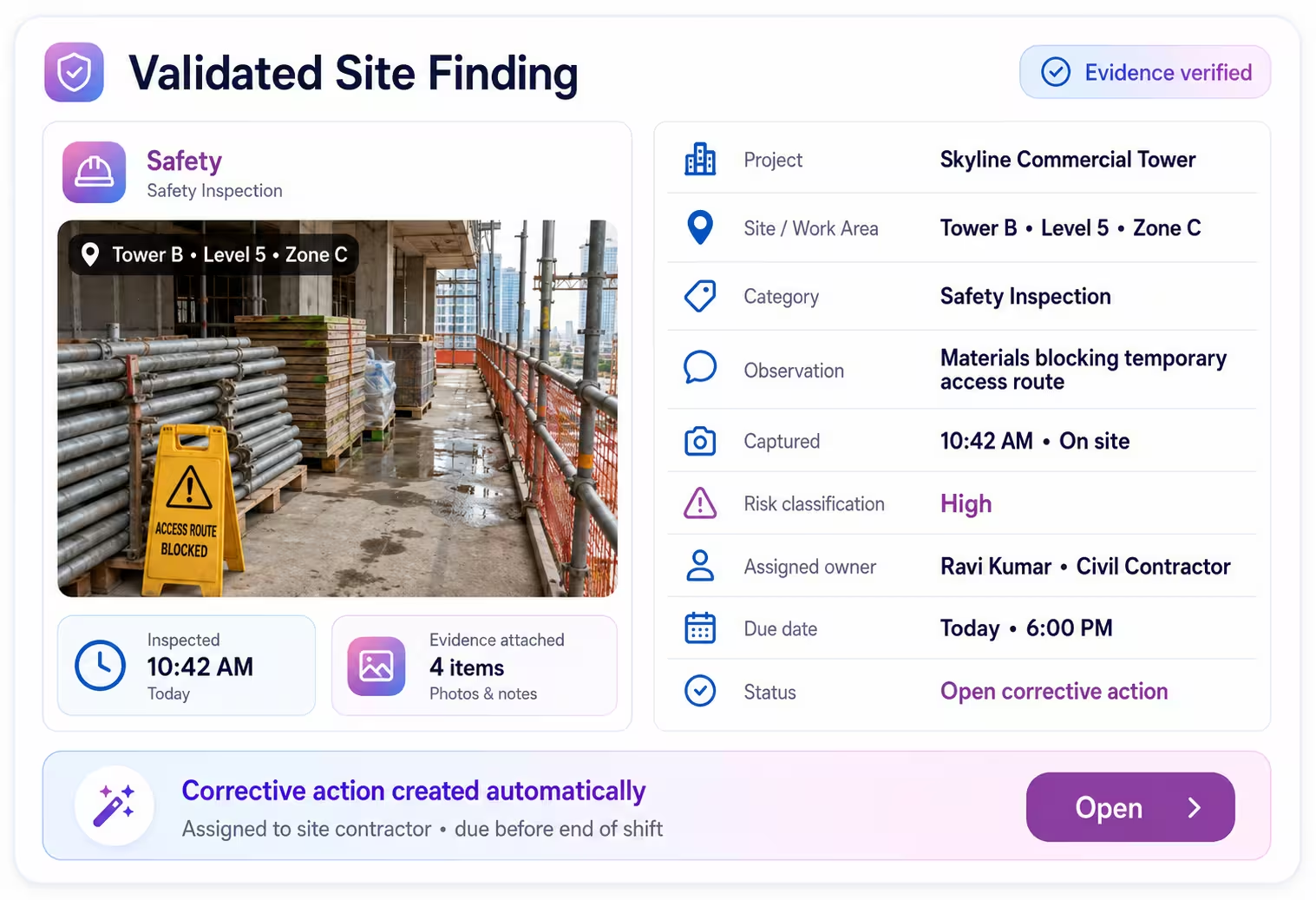
Validated Findings
Make Every Construction Site Finding Reliable and Traceable
Capture safety, contractor, equipment, and progress findings with timestamps, photographs, structured comments, project details, site zones, and mandatory proof.
Project and safety teams can see where an issue was recorded, what evidence was attached, how serious it is, and who is responsible for closing it.
Standardized Scoring
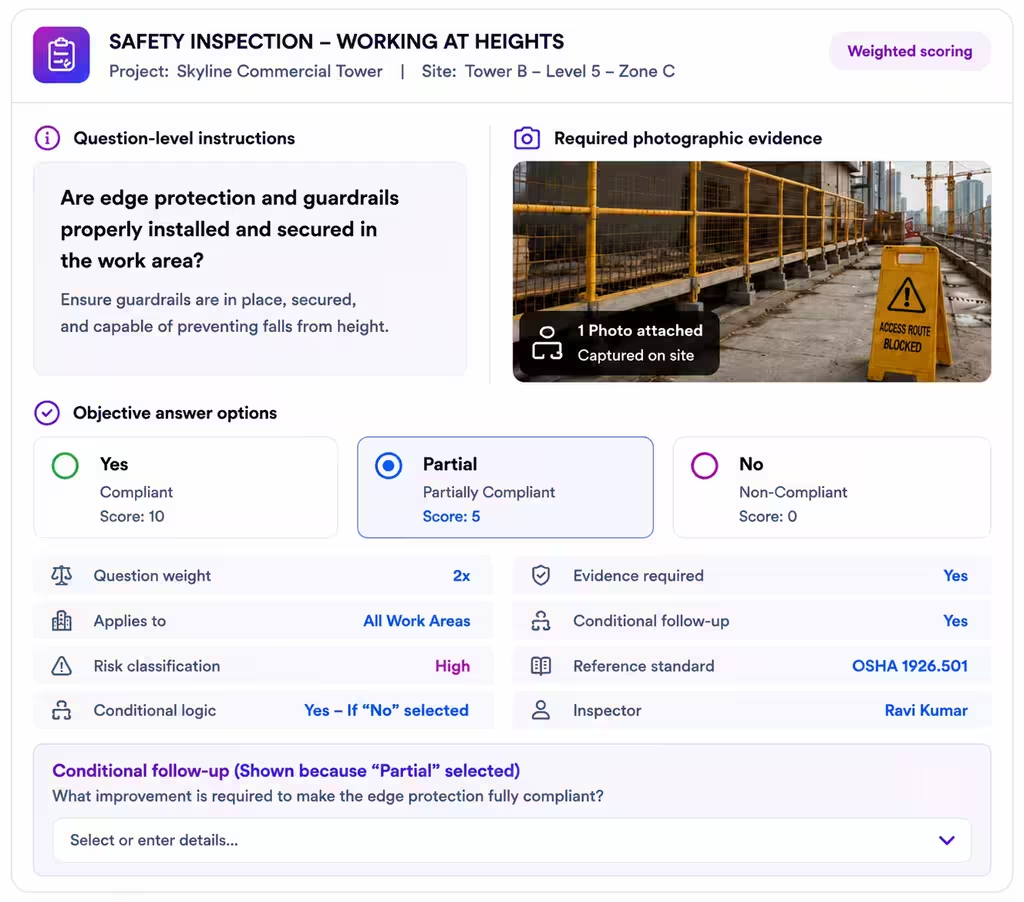
Standardize Scoring Across Projects, Sites, Contractors, and Inspectors
Give every inspection question clear instructions, objective answers, scoring rules, required evidence, and conditional logic so site-performance scores remain comparable.
Construction Audit Workflow
How Construction and Field Audit Management Works in Taqtics
From inspection setup to corrective-action visibility in eight connected steps.
Build Templates
Add questions, scoring, and proof.
Assign Audits
Set projects, sites, zones, roles, and frequency.
Inspect on Mobile
Record observations and evidence.
Calculate Scores
Apply scoring rules automatically.
Create Actions
Convert findings into assigned work.
Close With Proof
Submit evidence after resolution.
Review and Escalate
Verify closure or reopen the issue.
Track Performance
Monitor scores, actions, and trends.
Platform Features
Audit Features Built for Construction and Field Operations
Standardize field inspections, automate follow-ups, and give project teams a clear view of execution.
Multilingual Audits
Run consistent inspections across workers, contractors, projects, and regions in their preferred language.
Multi-Level Review
Route submissions through site supervisors, safety officers, project managers, and head-office reviewers.
Corrective Actions
Create action points automatically when safety, equipment, contractor, or quality gaps are recorded.
Deadlines and Escalations
Assign owners, priorities, due dates, and escalation rules based on risk severity.
Advanced Scoring
Configure weighted, partial, negative, zero, and conditional scoring.
Visual Audit Reports
Generate reports with scores, evidence, findings, actions, and project summaries.
Historical Pattern Detection
Identify recurring safety failures, contractor gaps, equipment risks, and delayed corrective actions.
Reports and AI Insights
Construction Audit Reports That Show What Needs Attention
See project performance, safety risks, contractor compliance, corrective actions, and priority findings in one clear view.
Checklist Library
Explore Construction and Field Inspection Templates
Start with ready-to-customize templates for site safety, PPE, contractors, equipment, progress inspections, and incident follow-ups.
Client Testimonials
See How Multi-Location Teams Improve Operational Execution With Taqtics
Real stories from teams using Taqtics to improve visibility, accountability, and execution across distributed operations.
Felix Amando Hadisaputra
Head of Information Technology, PT MAP Boga Adiperkasa (Starbucks, Subway)
Felix, Head of IT at MAP Boga, shares how Starbucks Indonesia and MAP Group transformed cafe operations across 820 locations using Taqtics.
Vidya Mudaliar
Head of HR and Learning, PizzaExpress
Vidya Mudaliyar, Head of HR & Learning & Development at PizzaExpress, shares how the organization modernized daily operations, strengthened accountability, and made reporting significantly faster across its restaurants.
Ruvin Dholakiya
Chief Digital Officer, Solitario Diamonds
Ruvin Dholakiya, Chief Digital Officer at Kisna, shares how Kisna uses Taqtics to move from paper, Excel, calls, WhatsApp messages, and scattered internal tools to one structured operating system for retail execution.
Operational Proof
Built for Structured Inspections Across Complex Construction Operations
Standardize field inspections and keep risks, actions, and project performance visible across active sites.
Standardize Field Inspections
Create consistent inspection structures for projects, sites, zones, contractors, equipment, and roles.
Validate Every Finding
Use photographs, timestamps, structured comments, site context, and supporting evidence.
Close Issues Faster
Assign internal teams or contractors, define deadlines, trigger escalations, and require closure evidence.
Ready to Improve Construction Safety?
Make Construction Inspections Easier to Run, Review, and Close
Digitize site safety inspections, PPE checks, contractor audits, equipment inspections, progress reviews, and incident follow-ups with validated findings and corrective actions.