
Retail Stock & Inventory Audit Software for Multi-Location Teams
Run structured stock audits, verify shelf availability, stockroom discipline, goods movement, inventory accuracy, and corrective actions across every retail location.
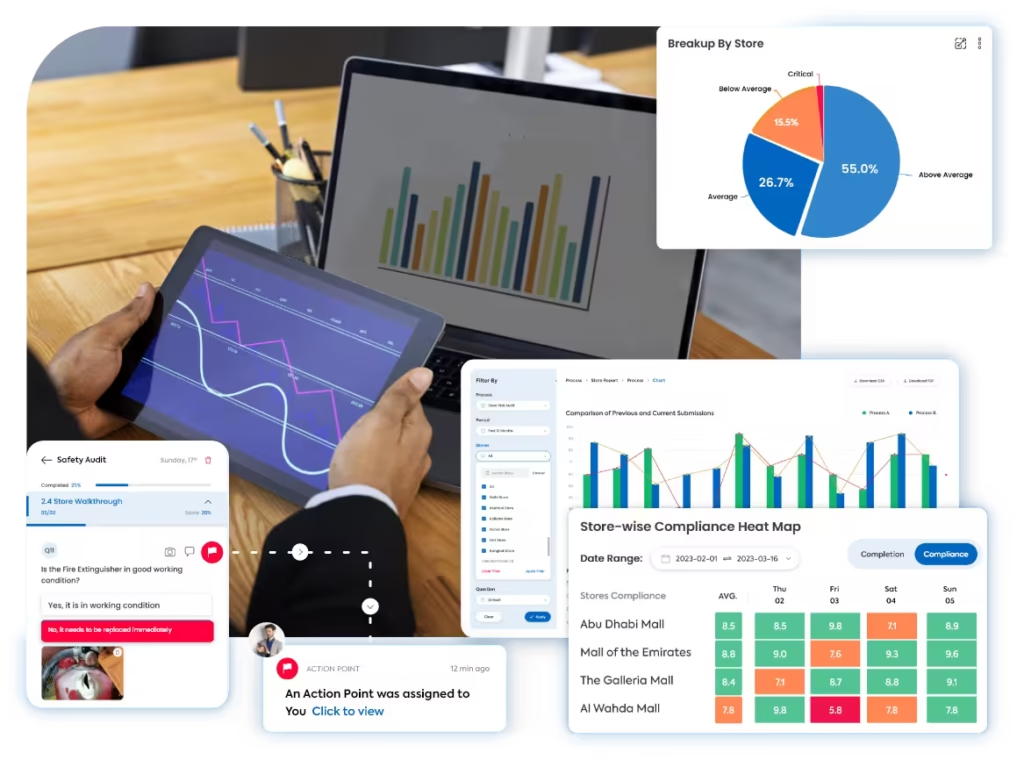
A clearer way to manage stock audit execution
Taqtics brings shelf checks, stockroom reviews, goods movement controls, inventory observations, scoring, evidence, reports, and corrective actions into one connected workflow across every store.
Where manual retail stock audits break down
Select a common stock audit gap to see why disconnected checks reduce trust, delay visibility, and leave inventory issues unresolved.
Missing SKUs and empty facings are identified too late
Manual checks make it difficult to surface low availability, empty shelves, and replenishment gaps before they affect store execution.
Stockrooms follow different storage and movement practices
Without clear standards, stores may handle receiving, labeling, transfers, damaged stock, and replenishment in different ways.
HQ cannot confidently verify stock audit findings
Spreadsheet notes and chat images are difficult to connect with location, time, comments, scores, and the exact audit question.
Repeat stock gaps are difficult to identify and close
Manual consolidation prevents HQ from spotting recurring inventory variances, weak stockroom discipline, and delayed corrective actions across stores.
What a Retail Stock Audit Should Cover
Move through five stock-control areas to review shelf availability, stockroom standards, physical inventory, goods movement, and exception handling across every store.
Shelf availability and replenishment execution
Confirm that priority SKUs are available, visible, and replenished according to the approved routine.
Stockroom organization and storage discipline
Review whether stock is stored safely, clearly, and in a way that supports accurate movement and replenishment.
Inventory accuracy and cycle-count controls
Validate physical stock observations, count routines, variance handling, and review discipline.
Goods receiving, transfers, and inventory movement
Check whether incoming stock and internal movement follow approved controls and documentation.
Damaged stock, exceptions, and corrective action
Review how stores isolate, document, resolve, and prevent repeat stock-control exceptions.
How Taqtics Digitizes Retail Stock Audits
Set the standard once, guide execution in-store, verify every stock observation, calculate scores, and convert failed checks into accountable corrective action.
Make Every Stock Audit Observation Easier to Trust
Verify the location, time, evidence, score, and follow-up behind every stock finding. The supporting controls remain visible for quick review.
Are all priority SKUs available on the shelf?
Field is requiredIs damaged stock isolated and documented correctly?
Are stock transfer records complete and approved?
Validated observations
Confirm where, when, and with what proof each stock audit response was submitted.
- Geo-fenced and time-bound submissions
- Live shelf and stockroom photo evidence
- Timestamped location-level audit trail
Standardized scoring
Apply the same instructions, answer types, proof rules, and scoring logic across stores.
- Question-level instructions and objective answers
- Partial, zero, negative, and conditional scoring
- Automated stock audit score calculation
Corrective actions
Assign failed stock findings and track every action through to closure.
- Owners, priorities, and deadlines
- Escalations for overdue actions
- Closure proof and status tracking
Connect audits with corrective action tracking software so stock gaps and inventory issues are not left unresolved.
Retail Stock Audit Reports That Show Inventory Gaps
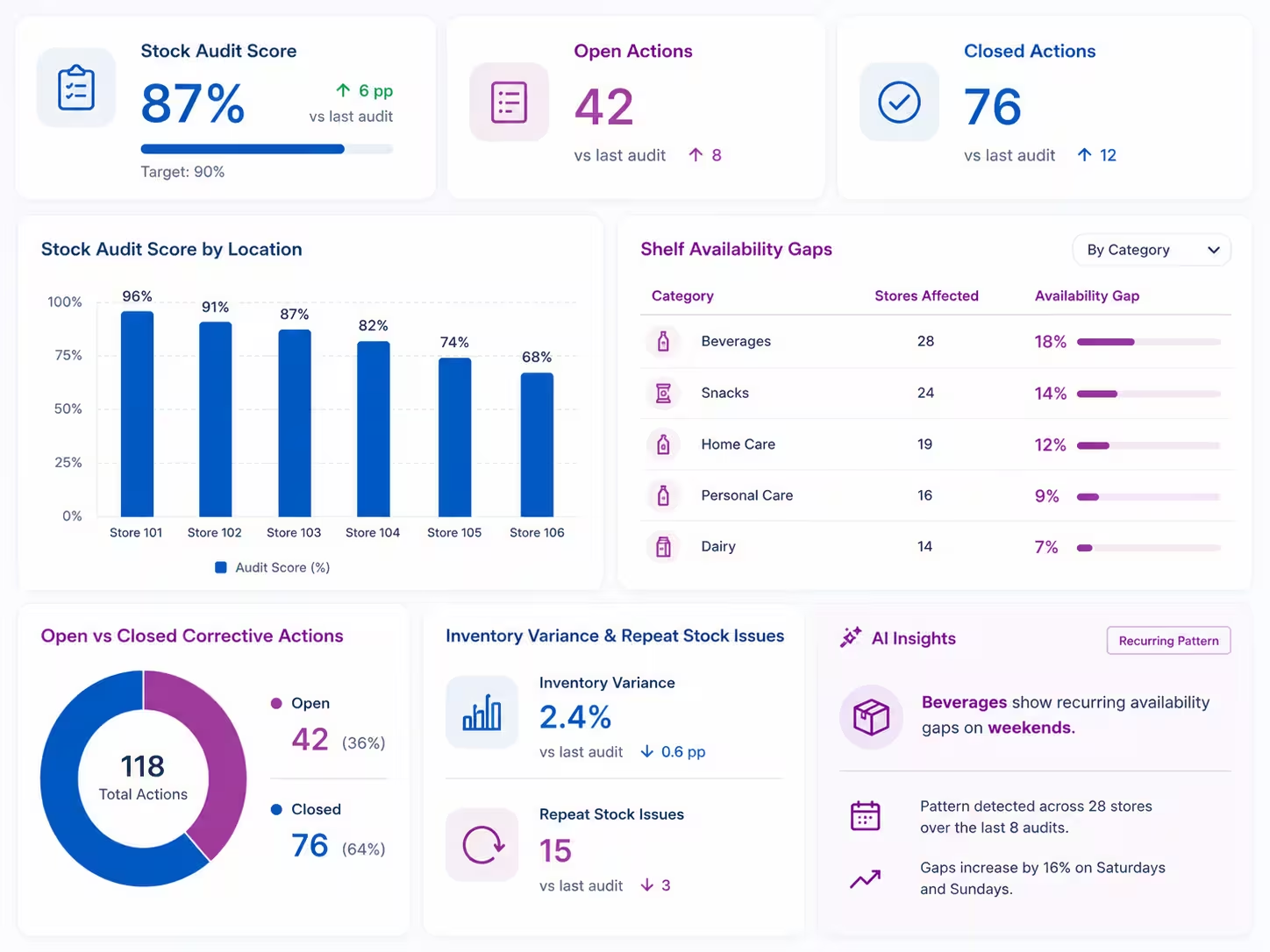
Turn stock audit data into clear visibility across stores, shelf availability, inventory variances, stockroom discipline, corrective actions, and repeat exceptions.
View all report insights
- Stock audit score by location
- Shelf availability gaps by store or category
- Stockroom readiness and organization trends
- Inventory variance and repeat stock issues
- Goods receiving and transfer process gaps
- Open vs closed corrective actions
- AI-based recurring pattern detection from historical audit data
Start With a Retail Stock Audit Checklist
Define shelf availability checks, stockroom standards, inventory movement questions, proof requirements, scoring logic, and corrective action triggers inside Taqtics.
See How Retail Teams Improve Store and Inventory Visibility
Explore how multi-location retail teams use Taqtics to digitize audits, SOP checks, inventory reviews, corrective actions, and store visibility.


Global Supermarket Chains
How supermarket teams digitized supervisor checklists, store audits, L1/L2 reviews, corrective actions, inventory checks, and leadership dashboards.


Global Sportswear Retail Brands
How sportswear stores standardized audits, SOP routines, visual merchandising, issue resolution, and asset tracking.

Solitario Lab Grown Diamonds
How Solitario improved audit coverage, standardized SOP checks, tracked issues, and scaled compliance across 50+ stores.
Retail Stock Audit Software Questions
What is retail stock audit software?
Retail stock audit software helps teams inspect shelf availability, stockroom standards, inventory accuracy, receiving, transfers, and replenishment processes using structured digital audits.
How does Taqtics verify stock audit observations?
Taqtics supports geo-fencing, time-bound submissions, live photo capture, comments, timestamps, and location-level audit trails to make stock audit findings easier to verify.
Can stock audits be completed on mobile?
Yes. Auditors can complete retail stock audits on mobile, capture shelf or stockroom proof, add comments, and submit structured responses from the store.
Can non-compliances create corrective actions automatically?
Yes. Failed stock audit checks can automatically create corrective actions with owners, deadlines, priorities, escalations, and closure proof.
Can Taqtics generate retail stock audit reports?
Yes. Reports can include stock audit scores, shelf availability gaps, stockroom issues, inventory variances, photo evidence, corrective actions, and recurring issue patterns.
Can Taqtics be used for stockroom and inventory audits?
Yes. Taqtics can be configured for stockroom audits, inventory accuracy audits, cycle-count checks, goods receiving checks, stock transfers, and damaged stock reviews.
Make Every Retail Stock Audit Reliable and Actionable
Digitize stock audits, validate shelf and stockroom observations, generate reports instantly, and close corrective actions faster across every store.