
Safety Inspection Software for Workplace Hazards and Faster Risk Closure
Run workplace safety, PPE, fire, facility, equipment, hazard, and incident follow-up inspections with verified evidence, consistent risk scoring, corrective actions, and real-time visibility across every location.
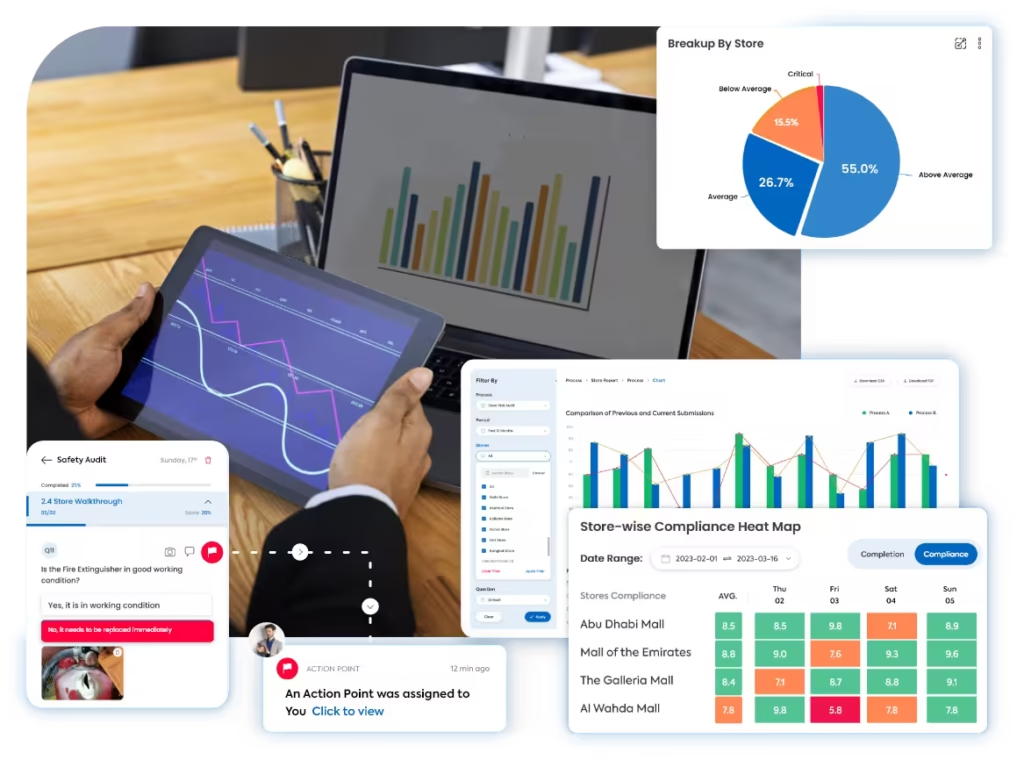
A clearer way to inspect, prioritize, and close safety risks
Taqtics connects safety templates, field observations, photo evidence, risk scoring, reports, responsible teams, and corrective actions in one workflow across sites, departments, work areas, shifts, equipment, and facilities.
Where manual safety inspections break down
Select a common gap to see why paper forms, spreadsheets, photos, and disconnected follow-ups make safety risks harder to verify and close.
Safety hazards are reported but not closed fast enough
Blocked exits, unsafe floors, damaged equipment, exposed wiring, missing PPE, leaks, and other serious findings need clear owners, deadlines, escalation, and closure proof.
The same safety condition is judged differently across sites
Without clear questions, severity definitions, critical checks, and evidence rules, inspectors can classify identical risks differently.
Photos, repair proof, and incident notes stay disconnected
Managers need the exact site, zone, timestamp, photo, hazard category, severity, asset, comment, and action history behind every finding.
HQ cannot see repeat hazards and overdue actions early enough
High-risk sites, recurring hazard categories, repeat incidents, overdue actions, and weak closure performance stay hidden without one consolidated view.
What a Safety Inspection Program Should Cover
Move through five practical safety areas covering workplace hazards, emergency readiness, PPE, equipment and facility risks, incident follow-up, and verified corrective-action closure.
Identify everyday workplace hazards before they become incidents
Inspect walking paths, housekeeping, storage, access, surfaces, behaviour, and immediate risk conditions across operational areas.
Verify fire protection, emergency exits, and response readiness
Confirm that people can evacuate safely and that critical emergency equipment is accessible, serviceable, and ready for use.
Verify that teams have and correctly use required protective equipment
Inspect PPE availability, selection, condition, task suitability, employee use, and staff awareness across roles and work areas.
Inspect equipment, electrical, chemical, and facility safety conditions
Review machines, utilities, chemicals, storage, building condition, and maintenance needs that can create operational safety risks.
Investigate incidents and verify that corrective actions actually remove risk
Connect incident review, near misses, root cause, responsible teams, deadlines, repair evidence, and reinspection through closure.
How Taqtics Digitizes Safety Inspections
Set safety requirements once, schedule inspections by location and risk, capture evidence in the field, classify findings consistently, and track every failed check through verified closure.
Make Every Safety Finding Easier to Trust
Verify the site, work area, inspection time, hazard, severity, evidence, responsible team, action deadline, and closure behind every safety observation.
Are all emergency exits clear, unlocked, marked, and ready for use?
Live exit photo required on failureAre extinguishers accessible, serviceable, and within the required inspection date?
Are evacuation routes, emergency lighting, and assembly-point information clearly available?
Validated observations
Confirm where, when, and for which site, zone, hazard, asset, and severity every safety response was submitted.
Validated observations
Confirm where, when, and for which site, zone, hazard, asset, and severity every safety response was submitted.
- Geo-fenced and time-bound site submissions
- Live photos, comments, hazard details, equipment references, and documents
- Timestamped site-level safety inspection trail
Standardized scoring
Apply common inspection instructions, severity rules, evidence requirements, critical checks, and score logic across locations.
Standardized scoring
Apply common inspection instructions, severity rules, evidence requirements, critical checks, and score logic across locations.
- Yes, No, and N/A response formats with critical-item rules
- Critical, high, medium, and low risk classification
- Automated site, category, zone, and inspection scores
Corrective actions
Turn failed hazard, fire, PPE, facility, equipment, electrical, chemical, or incident checks into accountable actions.
Corrective actions
Turn failed hazard, fire, PPE, facility, equipment, electrical, chemical, or incident checks into accountable actions.
- Owners, priorities, risk-based deadlines, and immediate escalation
- Repair, replacement, containment, retraining, and reinspection requirements
- Closure evidence, reviewer approval, and reopening when risk remains
Connect inspections with corrective action tracking software so safety findings are not left unresolved.
Run Different Inspections for Different Safety Risks
Safety is not one checklist. Run focused programs for workplace hazards, emergency readiness, PPE, equipment, facilities, incidents, and corrective-action closure without turning this page into a standards or certification audit.
Daily Workplace Safety Walks
Housekeeping, spills, walkways, access, storage, lifting risks, unsafe behaviour, immediate hazards, and quick corrective actions.
Fire and Emergency Readiness Inspections
Exits, emergency lights, fire equipment, route signage, first aid, response equipment, assembly points, and staff awareness.
PPE and Staff Safety Inspections
Task-appropriate PPE, availability, condition, correct use, safety footwear, eye and hearing protection, staff awareness, and unsafe practices.
Equipment, Electrical, Chemical and Facility Inspections
Guards, emergency stops, damaged equipment, electrical risks, SDS access, chemical storage, spill controls, utilities, surfaces, and maintenance defects.
Incident and Near-Miss Follow-Up Inspections
Incident details, near misses, evidence, immediate response, root cause, repeat hazards, investigation status, and training needs.
Corrective Action Verification
Owners, priorities, deadlines, escalations, repair or replacement proof, verifier review, reinspection, reopening, and recurring-risk tracking.
Safety Inspection Reports That Show Where Risk Is Increasing
Turn inspection data into visibility across sites, hazard categories, work areas, critical findings, repeat risks, incidents, responsible teams, and corrective-action performance.
View all report insights
- Safety score by site, region, zone, and category
- Workplace, fire, PPE, equipment, electrical, chemical, and facility gaps
- Critical, high, medium, and low risk findings
- Repeat hazards and recurring failed checks
- Incident and near-miss trends
- Open, overdue, and closed corrective actions
- Average action closure time by responsible team
- AI-based recurring pattern detection from historical inspection data
Start With a Ready-to-Use Safety Inspection Checklist
Use structured templates for workplace hazards, fire safety, exits, PPE, equipment, facility risks, incident follow-up, evidence requirements, scoring, and corrective-action triggers.
See How Multi-Location Teams Improve Audit Execution
Explore how operational teams use Taqtics to standardize audits, capture proof, route issues, close corrective actions, and improve visibility across locations.
Americana Restaurants
How Americana digitized quality, food-safety, supplier, and workplace-safety audits while improving corrective-action visibility across its Middle East operations.


Global Supermarket Chains
How supermarket teams digitized supervisor checklists, audits, approval workflows, corrective actions, inventory controls, and leadership reporting.


Global Sportswear Retail Brands
How Nike and Under Armour stores operated by GMG standardized audits, SOP routines, issue resolution, and asset tracking across their retail network.
Safety Inspection Software Questions
What is safety inspection software?
Safety inspection software helps teams schedule and complete mobile inspections, capture hazards with evidence, classify risk, generate reports, and track corrective actions across workplaces, facilities, equipment, and field locations.
What should a safety inspection checklist include?
A safety inspection checklist can include workplace hazards, housekeeping, slips and falls, emergency exits, fire equipment, PPE, electrical and equipment safety, chemicals, first aid, storage, incidents, and corrective-action closure.
Can Taqtics be used for daily safety inspections?
Yes. Teams can configure daily safety walks, weekly inspections, fire and emergency checks, PPE observations, facility reviews, equipment checks, and incident follow-ups by site, zone, team, shift, or frequency.
Can inspectors capture photo proof and risk severity?
Yes. Inspectors can capture live photos, comments, hazard categories, severity, site and zone details, timestamps, location proof, equipment references, documents, and resolution evidence.
Can failed safety checks create corrective actions?
Yes. Failed or critical checks can create actions with owners, priorities, due dates, escalation rules, repair or containment requirements, status tracking, and closure proof.
Can Taqtics identify recurring safety risks across locations?
Yes. Historical inspection and corrective-action data can help teams identify repeat hazard categories, recurring failed checks, weak locations, overdue actions, and patterns that need operational attention.
Make Every Safety Inspection Reliable and Actionable
Digitize safety inspections, verify hazards with evidence, standardize risk scoring, generate reports instantly, and close corrective actions faster across every location.