
Medical Equipment Inspection Software for Safer, Reliable Clinical Equipment
Standardize medical equipment inspections across hospitals, clinics, laboratories, diagnostic centres, pharmacies, and care facilities. Verify equipment condition, calibration, preventive maintenance, safety controls, documentation, and corrective actions through one connected workflow.
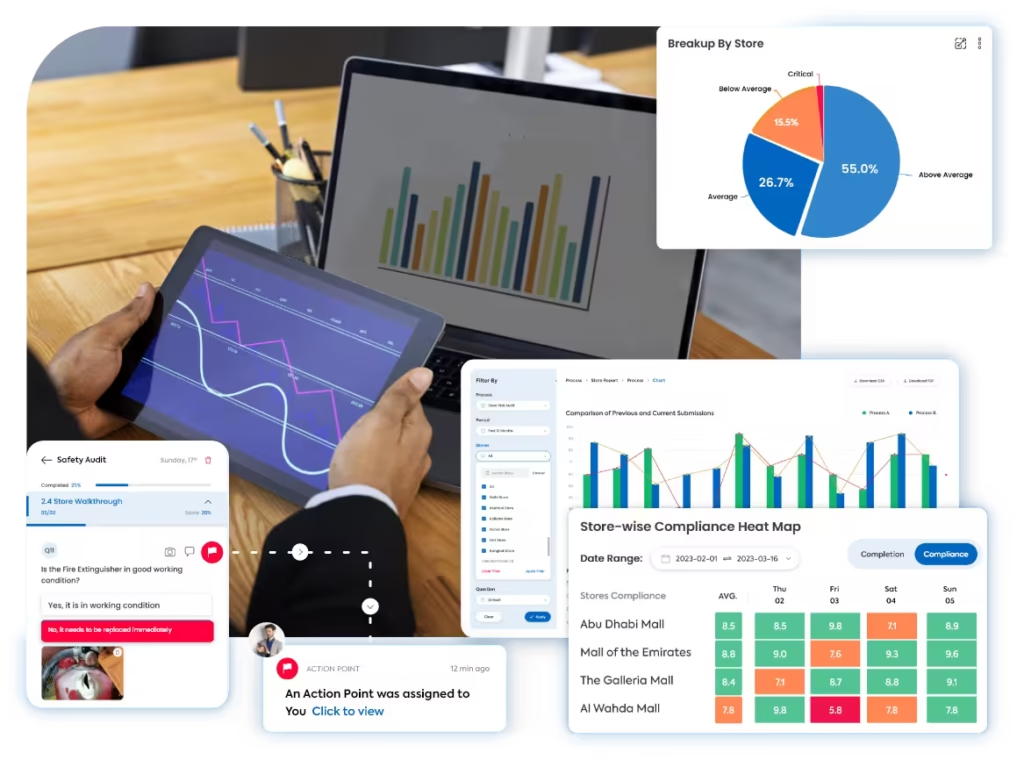
A Clearer Way to Inspect Every Medical Device and Clinical Asset
Taqtics connects equipment inspection templates, asset-level observations, evidence capture, scoring, maintenance actions, corrective actions, and reports across every healthcare facility and department.
Where Manual Medical Equipment Inspections Break Down
Select a common gap to see why paper forms, spreadsheets, messages, and disconnected service records weaken equipment visibility.
Without clear inspection instructions and severity rules, equipment condition, alarms, accessories, electrical safety, and service readiness may be scored differently by each inspector.
Manual reports often separate the finding from the asset ID, department, serial number, inspection time, photograph, reading, service label, and responsible inspector.
Disconnected logs make it harder to connect an equipment defect with preventive maintenance, calibration status, service history, vendor work, parts replacement, and return-to-service approval.
When follow-up sits outside the inspection workflow, isolation, repair, replacement, escalation, service evidence, reviewer approval, and safe return to use can be missed.
What a Medical Equipment Inspection Should Cover
Move through five inspection areas to verify equipment identity, physical condition, functional safety, calibration, preventive maintenance, accessories, documentation, and defect follow-up.
Verify Equipment Identity and Physical Condition
Confirm the correct asset is being inspected and document visible damage, cleanliness, labels, housing, cables, connectors, and mounting condition.
Confirm Functional and Safety Controls Before Use
Test basic operation, alarms, controls, emergency functions, electrical safety indicators, and device response according to inspection requirements.
Keep Calibration and Preventive Maintenance Current
Verify calibration validity, preventive maintenance status, service labels, due dates, past defects, and equipment readiness after maintenance.
Verify Accessories, Consumables, and Clinical Readiness
Confirm required accessories, probes, leads, batteries, attachments, manuals, consumables, and storage conditions are complete and suitable for use.
Turn Equipment Findings Into Accountable Maintenance Actions
Connect every failed inspection item with equipment isolation, service ownership, repair evidence, reviewer approval, and return-to-service status.
How Taqtics Digitizes Medical Equipment Inspections
Set the inspection standard once, guide teams through asset-level checks, calculate results automatically, and convert failed equipment checks into accountable maintenance actions.
Make Every Medical Equipment Finding Easier to Verify
Verify the facility, department, asset, inspection time, equipment condition, supporting evidence, severity, maintenance action, and closure status behind every finding.
Does the equipment power on and complete its basic functional self-check without alarms?
Evidence required for failed checksIs the calibration label valid and within the approved due date?
Are cables, plugs, connectors, accessories, and the equipment housing free from visible damage?
Validated observations
Confirm which device was inspected and preserve the evidence behind every equipment finding.
+
Validated observations
Confirm which device was inspected and preserve the evidence behind every equipment finding.
- Facility, department, room, asset ID, model, and serial-number context
- Timestamped inspection with auditor details and equipment location
- Photographs, comments, readings, labels, and visible-condition evidence
- Calibration, maintenance, service, accessory, and supporting-document references
Standardized scoring
Apply consistent equipment-condition standards, safety rules, and scoring logic across facilities and inspectors.
+
Standardized scoring
Apply consistent equipment-condition standards, safety rules, and scoring logic across facilities and inspectors.
- Equipment-specific inspection instructions and acceptable-condition standards
- Compliant, Non-compliant, and N/A answer rules
- Critical, major, and minor defect classifications
- Weighted scoring with automatic equipment-compliance calculation
Corrective actions
Assign equipment defects and track every repair through evidence-backed closure.
+
Corrective actions
Assign equipment defects and track every repair through evidence-backed closure.
- Owners, priorities, deadlines, and overdue escalations
- Routing to biomedical engineering, maintenance, clinical, facilities, procurement, or vendor teams
- Isolation, repair, replacement, calibration, servicing, or restricted-use requirements
- Closure evidence, functional retest, reviewer approval, and return-to-service status
Connect equipment inspections with corrective action tracking software so failed equipment checks are not left unresolved.
Medical Equipment Reports That Show Where Asset Risk Is Increasing
Turn inspection data into visibility across equipment compliance, defect categories, calibration status, preventive maintenance, service actions, return-to-service decisions, and recurring asset risks.
View all report insights +
- Overall medical equipment compliance score
- Equipment score by facility and department
- Asset-category performance
- Physical-condition findings
- Functional test failures
- Alarm and safety-control findings
- Calibration status and overdue calibration
- Preventive-maintenance compliance
- Open equipment defects
- Equipment isolated from service
- Accessories and consumable readiness
- Electrical and cable-condition findings
- Critical, major, and minor defects
- Open versus closed repair actions
- Overdue service actions by owner
- Vendor-assigned maintenance status
- Average repair-closure time
- Return-to-service approvals
- Repeat defects by asset or equipment type
- AI-detected recurring equipment risk patterns
Start With a Ready-to-Use Medical Equipment Inspection Checklist
Define equipment identity, physical condition, functional checks, calibration, preventive maintenance, safety controls, accessories, evidence rules, scoring, and corrective-action triggers inside Taqtics.
Medical Equipment Inspection Software Questions
What is medical equipment inspection software?+
Medical equipment inspection software helps healthcare teams inspect clinical devices and equipment, capture evidence, verify calibration and maintenance, score condition, assign repair actions, and track equipment through safe return to service.
What should a medical equipment inspection cover?+
An inspection can cover asset identity, physical condition, functional checks, alarms, electrical and safety controls, calibration, preventive maintenance, accessories, consumables, service labels, documentation, defects, and corrective actions.
Can inspections be assigned by facility, department, and equipment type?+
Yes. Inspections can be assigned by healthcare facility, department, room, equipment category, asset ID, role, inspection type, maintenance frequency, and deadline.
Can inspectors capture photographs, readings, and asset details?+
Yes. Questions can require live photographs, structured comments, asset IDs, serial numbers, meter readings, calibration labels, service records, and supporting documents.
Can calibration and preventive-maintenance compliance be scored separately?+
Yes. Teams can apply separate section weights, critical checks, severity rules, and automatic score calculations for calibration, preventive maintenance, functionality, safety, and equipment readiness.
Can critical equipment defects trigger immediate actions?+
Yes. Critical failures can trigger alerts, equipment isolation, corrective actions, priority deadlines, escalation, repair instructions, and mandatory closure evidence.
Can service and calibration documents be attached?+
Yes. Inspectors and reviewers can attach calibration certificates, preventive-maintenance records, service reports, vendor documents, photographs, readings, parts-replacement records, and other supporting evidence.
Can findings be routed to biomedical engineering and maintenance teams?+
Yes. Findings can be routed to biomedical engineering, clinical engineering, maintenance, facilities, department managers, procurement teams, or approved service vendors.
Can equipment-compliance scores be compared across facilities?+
Yes. Reports can compare facilities, departments, equipment categories, individual assets, calibration status, preventive-maintenance compliance, defect categories, service closure, and historical performance.
Can Taqtics identify recurring medical equipment risks?+
Yes. Historical inspection data can surface repeated functional failures, cable damage, battery problems, overdue calibration, preventive-maintenance gaps, recurring service actions, and repeat defects by asset or equipment type.
Make Every Medical Equipment Inspection Reliable and Actionable
Digitize equipment inspections, verify clinical asset condition, track calibration and maintenance, assign accountable repairs, and improve equipment readiness across every healthcare facility.