
Store Audit Software for Multi-Location Retail Teams
Run structured store audits, capture verified observations, score compliance automatically, and assign corrective actions across every retail location.
What is Store Audit Software?
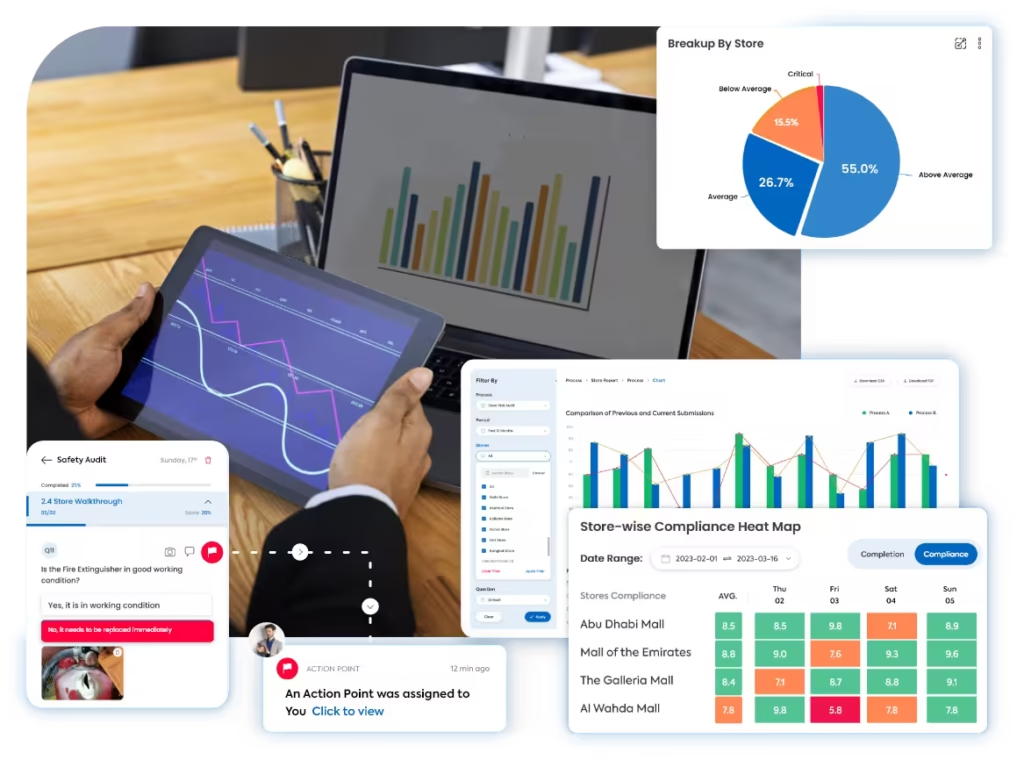
Store audit software helps retail teams inspect store standards, capture audit findings, calculate scores, and track corrective actions across multiple locations.
Instead of using paper checklists, spreadsheets, or basic forms, Taqtics gives retail operations teams a structured way to run store audits with location proof, photo evidence, objective answers, automated scoring, and instant reports.
Why manual store audits create gaps
Manual store audits make it difficult for HQ to compare locations, validate findings, and make sure every non-compliance is followed up properly.
What a Store Audit Should Cover
Review the customer-facing, operational, compliance, safety, and back-of-house areas that define everyday store execution.
How Taqtics Digitizes Store Audits
Create consistent audit standards, guide store teams through execution, calculate scores automatically, and convert findings into corrective actions.
Make Every Store Audit Observation Easier to Trust
Store audit findings become more useful when HQ can verify where the observation was made, when it was submitted, what evidence was captured, and how it was scored.
10:24 AM · Store 102
Location verified · Photo proof added
Validated observations
- Geo-fenced audit submissions
- Time-bound audit windows
- Live photo capture
- Comments and evidence fields
- Timestamped responses
- Location-level audit trail
Standardized scoring across stores and auditors
- Question-level instructions
- Objective answer types
- Partial, zero, and negative scoring
- Conditional logic
- Automated score calculation
Turn non-compliances into corrective actions
When a store audit finding fails, Taqtics can automatically create corrective actions with owners, priorities, due dates, escalation rules, status tracking, and closure proof.
This connects audits directly with corrective action tracking software , so findings are not left unresolved after the audit is submitted.
- Owners and accountability
- Priority-based deadlines
- Escalations for overdue actions
- Closure proof and status tracking
Store Audit Reports That Show What Needs Attention
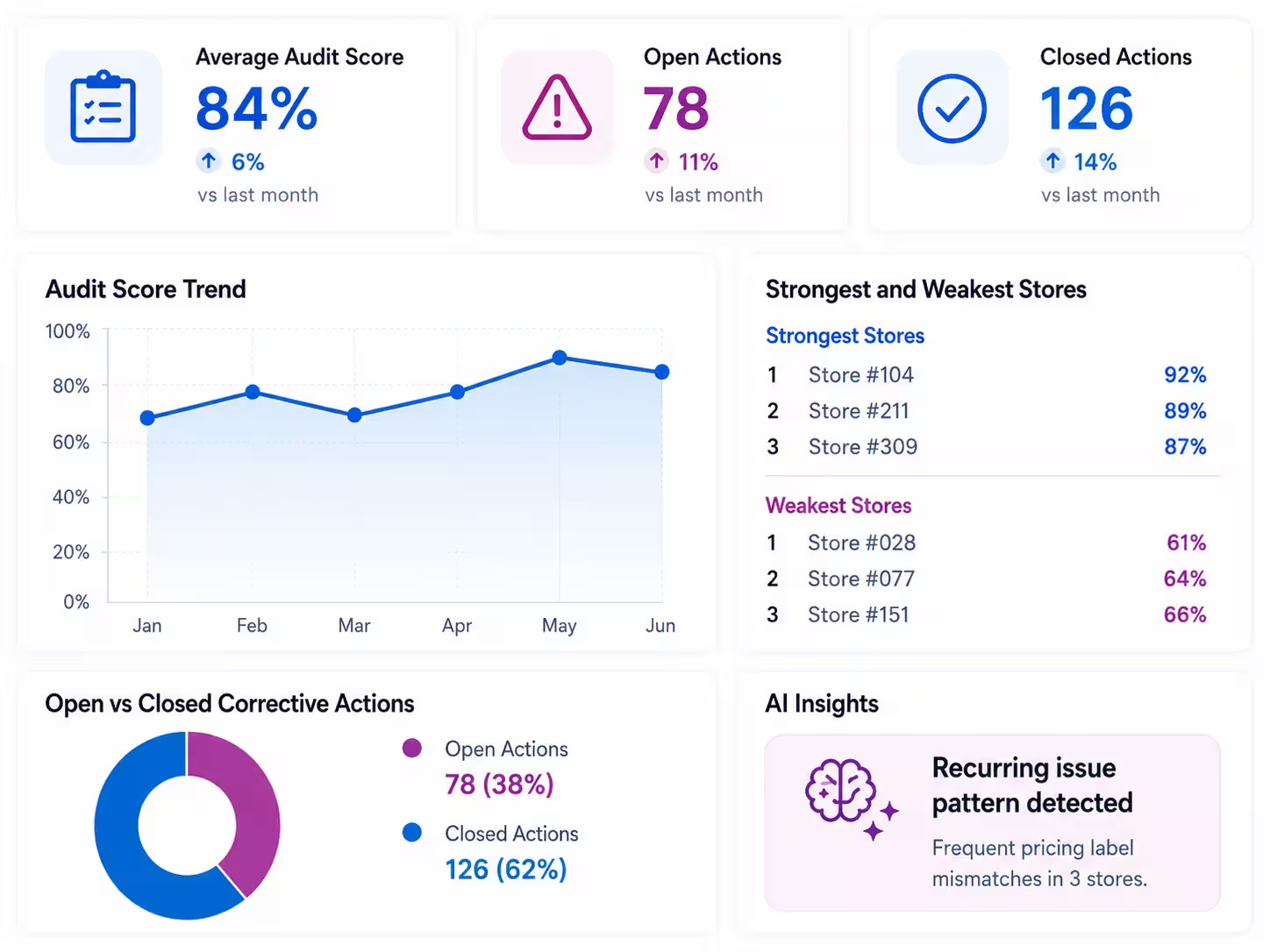
Taqtics turns store audit data into visual reports and dashboards that help operations teams identify weak stores, recurring issues, delayed corrective actions, and improvement areas.
- Store audit score by location
- Strongest and weakest stores
- Most common non-compliant areas
- Repeat store-level issues
- Open vs closed corrective actions
- Region-wise store audit performance
- AI-based recurring pattern detection from historical audit data
Start With a Ready-to-Use Store Audit Checklist
Use a structured store audit checklist to define inspection areas, questions, answer types, scoring rules, and evidence requirements that can be digitized inside Taqtics.
See How Retail Teams Improve Store Audit Execution
Explore how multi-location retail teams use Taqtics to standardize audits, track issues, improve compliance, and strengthen store visibility.

Solitario Lab Grown Diamonds
How Solitario improved audit coverage, standardized SOP checks, tracked issues, and scaled compliance across 50+ stores.


Global Sportswear Retail Brands
How sportswear stores standardized audits, SOP routines, visual merchandising, issue resolution, and asset tracking.


Global Supermarket Chains
How supermarket teams digitized store audits, reviews, corrective actions, inventory checks, and leadership dashboards.
Store Audit Software Questions
What is store audit software?
Store audit software helps retail teams run structured inspections across stores, capture observations, calculate scores, generate reports, and track corrective actions.
How does Taqtics verify store audit observations?
Taqtics supports geo-fencing, time-bound submissions, live photo capture, comments, timestamps, and location-level audit trails to make audit findings easier to verify.
Can store audits be completed on mobile?
Yes. Auditors can complete store audits on mobile, follow question-level instructions, capture proof, add comments, and submit audit responses from the store.
Can non-compliance create corrective actions automatically?
Yes. Taqtics can create corrective actions when non-compliance is observed. Each action can have an owner, deadline, priority, escalation rule, and closure proof.
Can I customize store audit scoring?
Yes. You can configure answer types, section weights, partial scores, negative scores, zero scores, conditional questions, and automated score calculations.
Can Taqtics generate store audit reports automatically?
Yes. Store audit reports can include scores, responses, comments, photo evidence, non-compliances, corrective actions, and location-level performance insights.
Make Every Store Audit Reliable and Actionable
Digitize store audits, validate observations, generate reports instantly, and close corrective actions faster across every retail location.